Christmas Photo with Santa (No Mall Required)
Updated 2026-09-16 · PiXmas Editorial Team
A Christmas photo with Santa can be created from a clear phone picture with an AI photo tool, avoiding a mall visit. Upload a well-lit image, choose a Santa scene, and review the generated result carefully for facial or hand errors before downloading or printing it.
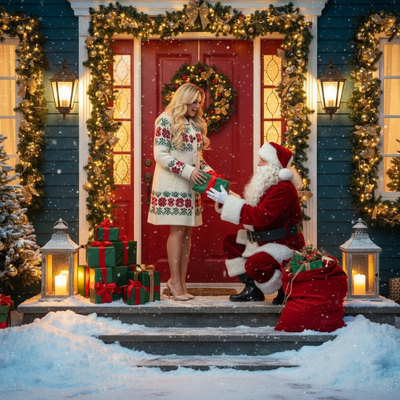
Why get a christmas photo with Santa this way?
Mall Santa lines can run long during peak weeks.
Studio bookings often cost more and require an appointment.
An AI-generated christmas photo with Santa skips both problems.
You use a photo you already have and get results the same day.
How does PiXmas create a photo with Santa?
- Upload one clear, well-lit photo of yourself, your child, or your family.
- Choose a Santa style from the library of 800+ options, including classic Santa's lap scenes, cozy fireside portraits, and snowy outdoor settings.
- Generate the photo and review the result.
- Download or share the final image, or order it as a print.
What Santa styles are available?
Options include traditional red-suit Santa portraits, whimsical workshop scenes, vintage-style Santa photography, and modern minimalist Santa setups.
Family and pet-friendly Santa scenes are also included, so a christmas photo with Santa can feature more than one person or a dog sitting beside Santa.
PiXmas vs a mall Santa photo vs a studio booking
| Method | Time needed | Cost | Style variety |
|---|---|---|---|
| PiXmas AI Santa photo | Minutes | Low, one-time | 800+ styles |
| Mall Santa photo | 30-90 min wait | Moderate to high | 1-2 backdrops |
| Studio booking | Scheduled visit, days ahead | Higher | Depends on studio |
Limitations
AI-generated results depend on the quality of the uploaded photo.
Blurry, poorly lit, or heavily cropped photos can produce less accurate results.
Group photos with many people may need extra attempts to get a clean composite.
Tips for a better result
Use a photo taken in good lighting with a clear view of the face.
Avoid sunglasses, heavy shadows, or busy backgrounds if possible.
Try more than one Santa style since results can vary by scene.
What can an in-person Santa photo cost?
In-person Santa photo pricing depends on the venue and package. A Bass Pro Shops Santa’s Wonderland listing offered a free 4×6 photo per guest (Tsawwassen Mills – Santa’s Wonderland at Bass Pro Shops, 2025). Its standalone high-resolution digital download cost $30 and included the free print, while the Jingle Bells package cost $35 and included several print sizes plus a digital image (Tsawwassen Mills – Santa’s Wonderland at Bass Pro Shops, 2025). A separate $35 Christmas Card package included eight 4×6 cards and a digital download (Tsawwassen Mills – Santa’s Wonderland at Bass Pro Shops, 2025). Use these examples as comparison points and confirm current local pricing before visiting.
Frequently asked questions
Can I make a Christmas photo with Santa from my own picture?
Yes. Start with a clear, well-lit picture in which each face is visible and unobstructed. An AI photo tool can place the people from that image into a Santa scene. Results vary by input quality, so inspect facial details, hands, clothing, and background objects before saving the image.
Are AI Christmas photos with Santa realistic?
They can look convincing, but realism varies by tool, source photo, and selected scene. Clear facial detail and even lighting generally help the generated image remain recognizable. AI can still create distorted hands, altered accessories, or inconsistent facial features, so review the full image rather than judging only the preview.
Can a whole family be included in a Santa photo?
Yes, if the chosen tool supports group photos and the source image shows everyone clearly. Crowded poses, hidden faces, strong shadows, and overlapping people can make consistent results harder to achieve. Use a well-lit group picture and check that every person remains recognizable in the generated scene.
How much does a Santa photo cost?
Pricing varies by venue and package. A Bass Pro Shops listing offered a free 4×6 photo per guest, while a standalone high-resolution digital download cost $30 and included that print (Tsawwassen Mills – Santa’s Wonderland at Bass Pro Shops, 2025). Check the specific venue’s current terms before visiting.
Can I print an AI Santa photo?
Usually, provided the service allows downloads and the image has enough resolution for the intended print size. Review the service’s usage terms before ordering prints. Also inspect faces, hands, text, and small background details at full size because flaws that seem minor on a phone may be more visible in print.
Is it safe to upload a child’s photo to an AI photo tool?
Safety depends on the service’s privacy and data-handling policies. Before uploading, check how images are stored, whether they are used for model training, how deletion requests work, and whether generated photos remain private. Avoid files containing location data or sensitive background details when those details are unnecessary.
Can I make a Santa photo on an Android phone?
Yes, if the service provides an Android app or a browser-based version that works on mobile devices. Browser performance and available features may differ from a native app. Check upload support, download options, and privacy settings before submitting a photo, especially when using a shared device or browser.
What should I do if the generated Santa photo looks wrong?
Try a clearer source photo or choose a different scene. Strong shadows, cropped faces, sunglasses, motion blur, and overlapping people can reduce consistency. If the face looks accurate but another detail is distorted, changing the scene may work better than repeatedly generating from the same setup.