Santa Photo: Get an AI Santa Picture From One Selfie
Quick answer: A Santa photo is an image showing you (or your family) with Santa Claus, or dressed as Santa, in a festive scene. With PiXmas, you upload one phone photo and the AI app generates realistic Santa portraits and scenes in various styles within minutes, no costume, studio visit, or mall line required.
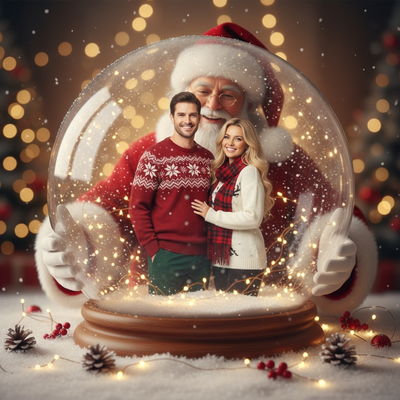
What is an AI Santa photo?
An AI Santa photo places you inside a Christmas scene with Santa Claus, or transforms your likeness into a Santa-style portrait.
Instead of booking a photographer or standing in a mall line, an app analyzes a regular photo of you and generates a new image with Santa hats, red suits, sleighs, fireplaces, or snowy backdrops added around your face and features.
How do you create a Santa photo with PiXmas?
PiXmas turns a single phone photo into dozens of Santa-themed portraits without any editing skill.
- Open PiXmas on the app or web version.
- Upload one clear photo of your face.
- Choose a Santa or Christmas style from 800+ options.
- Let the AI generate your Santa photo, ready in minutes.
- Download and share, or order it as a print or card.
The web version works fine inside Android browsers, and a native Android app is on the way for people who prefer an installed app.
What makes a good Santa photo app?
A good Santa photo app should produce results that look like a real photograph, not a stiff cutout of your face on a stock Santa body.
It should also offer variety, since not everyone wants the same classic red-suit pose.
Speed matters too. Waiting days for a studio appointment does not fit most holiday timelines, so an app that returns results in minutes is more useful for cards, gifts, and social posts.
| Option | Time needed | Style variety | Cost per photo |
|---|---|---|---|
| PiXmas AI Santa photo | Minutes | 800+ styles | Low, single upload |
| Mall Santa photo booth | Hours, seasonal wait | One backdrop | Higher, per visit |
| Manual photo editing app | 30-60 minutes, skill needed | Depends on user skill | Free to moderate |
Limitations
AI Santa photos work best with clear, well-lit face photos, so blurry or heavily shadowed selfies may produce softer results.
Group Santa photos with several people can be less consistent than single-person portraits, since the AI has more faces to match naturally.
How much do Santa photos cost?
Santa photo costs depend on whether you want a basic print, digital file, or card package. Bass Pro Shops and Cabela's Santa's Wonderland offers one free 4×6 photo per guest, with optional paid packages (Tsawwassen Mills – Santa's Wonderland at Bass Pro Shops, 2025). Its standalone high-resolution digital download costs $30 and includes a free 4×6 print (Tsawwassen Mills – Santa's Wonderland at Bass Pro Shops, 2025). The $35 Jingle Bells package includes multiple prints and a digital image, while the $35 Christmas Card package includes eight 4×6 cards and a digital download (Tsawwassen Mills – Santa's Wonderland at Bass Pro Shops, 2025). Compare the format you need rather than price alone.
Frequently asked questions
How do I turn my photo into a Santa photo?
Start with a clear, well-lit portrait in which your face is unobstructed and looking toward the camera. Upload it to a Santa photo generator, select a festive style, and review the result carefully. If the face or hands look unnatural, try another source photo or choose a simpler scene.
How can I add Santa to an existing picture?
Use a conventional photo editor when you need to preserve the original picture and place Santa beside the people already in it. A generative tool may instead recreate the full scene, which can change faces, clothing, or the background. Check whether the tool supports editing an existing image before uploading.
Do AI Santa photos look realistic?
AI Santa photos can look realistic when the source portrait is sharp and the generated lighting, skin texture, clothing, and shadows remain consistent. Results vary by image and style. Look closely at eyes, teeth, hands, eyeglasses, jewelry, and background details before printing or sharing the finished picture.
Can I make a Santa photo of my whole family?
You can make family Santa pictures, but group images are often harder for an AI tool to reproduce consistently. Separate portraits may give you more control over each person's likeness. If you upload a group photo, choose one with visible, evenly lit faces and no people partly hidden behind others.
How much does a Santa photo cost?
Pricing varies by provider and format. Santa's Wonderland offers one free 4×6 photo per guest, while its standalone digital download costs $30 and includes a free 4×6 print (Tsawwassen Mills – Santa's Wonderland at Bass Pro Shops, 2025). Its Jingle Bells and Christmas Card packages each cost $35 (Tsawwassen Mills – Santa's Wonderland at Bass Pro Shops, 2025).
Is it safe to upload a selfie to a Santa photo app?
Safety depends on the app's privacy and data-handling practices. Before uploading, review how photos are stored, whether they are used to train models, how long they are retained, and how deletion requests work. Avoid uploading sensitive images or pictures of children unless you understand and accept the provider's policy.
Can I print an AI Santa photo?
Yes, you can print an AI Santa photo if the downloaded file has enough detail for the intended print size. Inspect the image at full resolution before ordering. Small facial or background flaws that are easy to miss on a phone screen may become more noticeable in a physical print.