AI Santa Photos vs Mall Santa Photos in New York
Updated 2026-09-16 · PiXmas Editorial Team
Quick answer: An AI Santa photo alternative lets you upload one phone picture and get a realistic Santa portrait in minutes, without visiting a New York mall, standing in line, or booking a time slot.
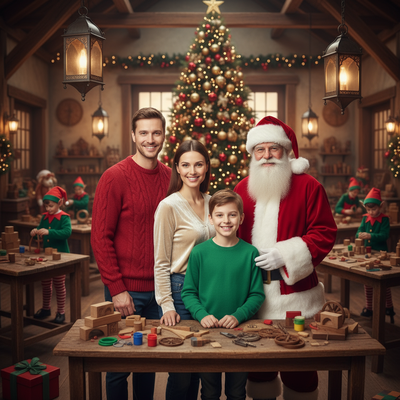
Why Are New York Mall Santa Photos So Difficult?
Mall Santa photos in New York often mean long lines at places like Macy's Herald Square or major shopping centers during the busiest weeks of the year.
Wait times can stretch past an hour with a toddler who is already overtired.
Sessions are short, outfits are limited, and prices for a basic photo package frequently run higher than expected once upsells are added.
Scheduling around work, weather, and holiday crowds adds another layer of stress for parents trying to get one good picture.
What Is an AI Santa Photo Alternative?
An AI Santa photo alternative uses a single uploaded photo to generate a realistic image of the person with Santa, in a Santa suit, or inside a festive scene.
No costume, no studio, and no travel to a mall are required.
PiXmas is built around this idea. Upload one clear phone photo and the app returns multiple Santa-themed portraits and wallpapers using AI trained on holiday styles.
How Do You Get an AI Santa Photo With PiXmas?
- Open the PiXmas app or web version on your phone, tablet, or computer.
- Upload one clear, front-facing photo of yourself or your child.
- Choose Santa scenes or styles from the library of 800+ options.
- Let the AI generate several Santa portraits from that single photo.
- Download, print, or share the finished images right away.
How Does This Compare to a Mall Santa Visit?
| Factor | Mall Santa (NYC) | PiXmas AI Santa Photo |
|---|---|---|
| Wait time | 30 to 90+ minutes during peak season | A few minutes from upload to result |
| Location | Must travel to a mall or store | Works from home on phone or browser |
| Photo variety | Usually one or two poses | Multiple Santa scenes and styles per upload |
| Cost per session | Often $20 to $50+ with upsells | Flat pricing, no in-person upsells |
| Child comfort | Can involve fear of an unfamiliar Santa | No costume, no stranger, no waiting |
Who Benefits Most From an AI Santa Photo?
Parents with toddlers who are afraid of costumed characters often prefer a calmer, at-home option.
Families juggling tight New York schedules can skip the trip entirely and still get holiday card material.
People wanting wallpapers or social posts, not just a printed mall photo, get more usable formats from an AI Santa photo session.
Limitations
AI Santa photos are generated images, not a live moment with an in-person Santa actor.
Results depend on the quality of the uploaded photo, so blurry or poorly lit images produce weaker results.
A native Android app for PiXmas is coming, though the web version already works well on Android browsers today.
For New York families short on time and patience during mall Santa season, PiXmas offers a faster, more flexible way to get Santa photos without the line.
Frequently asked questions
Is an AI Santa photo as good as a real mall Santa photo?
It depends on what you want. Mall photos capture a live moment with a Santa actor, while AI Santa photos generate a realistic portrait from one uploaded photo. Many parents find the AI version faster, cheaper, and less stressful for young kids.
Will the AI Santa photo look like an actual photo of my child?
PiXmas generates images based on the uploaded photo, aiming for a realistic likeness in a Santa setting. Clear, well-lit, front-facing photos tend to produce the most accurate and natural-looking results.
When is the best time to take Santa photos?
The best time is when children are rested, fed, and least likely to feel rushed. Weekday mornings or earlier seasonal dates often feel calmer than peak holiday periods, although availability differs by venue. If the photo will be used for cards or gifts, schedule enough time for editing, downloads, printing, and delivery.
What is usually included in a Santa photo package?
A Santa photo package usually includes printed portraits, a digital image, or a combination of both. Print sizes, retouching, holiday cards, and download rights vary by venue. One 2025 package included a 6×8, a 5×7, a 4×6, wallet prints, and a high-resolution digital image for $35 (Tsawwassen Mills – Santa’s Wonderland at Bass Pro Shops, 2025).
Can you print a Santa photo from a digital image?
You can print a Santa photo if the file has sufficient resolution and your purchase or download includes printing rights. Use the original file rather than a screenshot or compressed social-media copy. Before ordering, check the crop, facial sharpness, color, and aspect ratio, then preview how the image fits the selected print format.
Where can you get free pictures with Santa?
Free Santa pictures are sometimes available at outdoor retailers, community events, libraries, churches, and local holiday festivals. Offers may require a reservation or provide only one basic print. Santa’s Wonderland advertised one free 4×6 Santa photo, with optional paid packages, for its 2025 season (Tsawwassen Mills – Santa’s Wonderland at Bass Pro Shops, 2025).