NYE Outfit Photo Ideas From a Single Phone Photo
Updated 2026-09-16 · PiXmas Editorial Team
Quick answer: Great NYE outfit photos lean on sparkle, color contrast, and mood lighting: sequin dresses, metallic suits, disco-ball backdrops, or midnight-blue tones with gold accents. If you do not own a glam outfit or cannot book a shoot, PiXmas turns one phone photo into styled New Year's and Christmas-season portraits with festive outfits, lighting, and scenes generated automatically.
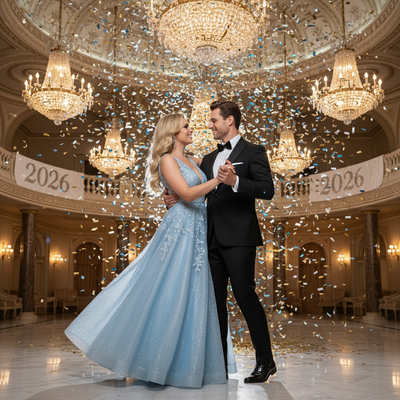
What are the best NYE outfit photo ideas?
Sequins and metallics photograph well under party lighting because they catch reflections.
Bold contrast works too: a black outfit against gold confetti, or emerald green against string lights.
Close-up shots with a glass raised, a clock in frame, or string lights behind the subject all read as "NYE" instantly.
Group photos benefit from coordinated color palettes rather than matching outfits exactly.
What if I do not have a glam outfit or a photographer?
Not everyone owns sequins or has time to book a stylist before December 31st.
This is where an AI photo app like PiXmas becomes useful, since it can generate a styled portrait from a single selfie instead of a physical outfit change.
PiXmas is built around Christmas season portraits, so it also covers cozy, festive, and Santa-style looks that pair naturally with a NYE countdown post.
How does PiXmas turn one photo into a festive outfit look?
- Open PiXmas on the iOS app or on a mobile browser.
- Upload one clear phone photo of your face.
- Choose a style from the 800+ options, including festive and glam themes.
- Let the AI generate the portrait with a new outfit, lighting, and background.
- Download the result and use it for your NYE or Christmas post.
The whole process usually takes a few minutes per style.
DIY outfit photo vs studio shoot vs PiXmas
| Method | Cost | Time needed | Outfit required |
|---|---|---|---|
| DIY phone photo | Free | Minutes to hours | Yes, must own or borrow it |
| Studio or hired photographer | High | Days to book, hours to shoot | Yes |
| PiXmas AI portrait | Low, single purchase | Minutes | No, generated by the app |
Limitations
PiXmas works best with a clear, well-lit face photo, so blurry or heavily filtered source images produce weaker results.
It is a generated portrait rather than an actual outfit you can wear in person.
The native app is on iOS, with the web version working on Android browsers, and a dedicated Android app is coming.
Which NYE photo idea should you try first?
Pick one theme rather than several, since a consistent look across your feed reads better than mixed styles.
If your goal is a fast, polished result without shopping for an outfit, generating a festive portrait through PiXmas covers both the New Year's mood and the wider Christmas season content in one step.
Sequins, metallics, and warm party lighting make strong NYE outfit photos, but not everyone has the outfit or time to arrange a shoot. PiXmas offers a faster path, turning one phone photo into a styled festive portrait that works for both New Year's Eve posts and the wider Christmas season.
Frequently asked questions
What colors work best for NYE outfit photos?
Black, gold, silver, and deep jewel tones like emerald or navy photograph well under party lighting. Metallics catch light from string lights or disco balls, which adds sparkle to the final image without extra editing.
Can I get a festive outfit look without buying new clothes?
Yes. PiXmas generates a styled portrait from one phone photo, including festive outfits and backgrounds, so you get a NYE or Christmas-season look without shopping or booking a photographer.
Is one photo idea enough or should I try multiple looks?
Trying two or three styles from the same photo is common, since it lets you compare outfits and lighting before choosing which one to post. PiXmas makes this quick since each style generates in minutes.
How do you add 2026 text without making a photo look fake?
Add 2026 text by matching its perspective, lighting, color, and sharpness to the photograph. Keep important lettering away from faces and hands, and avoid forcing text onto wrinkled clothing or reflective objects. For a cover design, crisp typography can remain separate from the scene; embedded text should follow the surface realistically.
How do you create a 2026 magazine cover-style photo?
Create a 2026 cover-style photo by combining a clean portrait, deliberate lighting, open space for headlines, and a limited color palette. Place the subject slightly away from the center so text does not cover the face. Add the year and short cover lines afterward, keeping fonts consistent and checking spelling before exporting.
Are AI New Year photos private?
AI New Year photos are only as private as the service’s storage and data policies allow. Before uploading portraits, check whether images are retained, used for training, shared with vendors, or removable on request. Avoid submitting sensitive documents or children’s identifying information, and use local editing when stronger control over personal files is required.