Multi-Look Christmas Portraits From One Photo
Updated 2026-09-16 · PiXmas Editorial Team
Quick answer: Multi-look Christmas portraits are several different holiday-themed images generated from a single uploaded photo, each showing a different outfit, background, or style. PiXmas creates these by applying AI to one selfie or portrait, producing Santa scenes, cozy sweater looks, and wallpaper-ready portraits without needing multiple photoshoots or separate uploads.
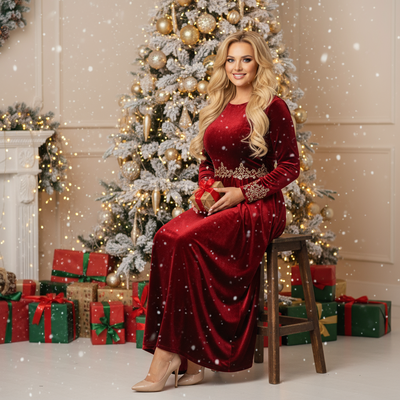
What Are Multi-Look Christmas Portraits?
Multi-look Christmas portraits are a set of holiday images created from a single starting photo.
Instead of taking many photos in different outfits or locations, one upload gets transformed into several distinct results.
Each look can vary in clothing, background, lighting, or overall style, giving a family or individual a full range of Christmas card options from one source image.
How Do You Get Multiple Christmas Looks From One Photo?
- Choose a clear, well-lit phone photo showing your face and shoulders.
- Upload it to the PiXmas app or web tool.
- Select from 800+ available Christmas styles, including Santa scenes, sweaters, and winter backdrops.
- Generate multiple portraits from the same photo in one session.
- Download the finished set for cards, wallpapers, or sharing.
Which App Turns One Photo Into Many Christmas Styles?
PiXmas is built for exactly this task.
The app takes a single phone photo and produces a wide range of Christmas portraits, from classic Santa's-lap scenes to modern sweater-and-lights setups.
Because the style library covers over 800 options, one photo can lead to dozens of visibly different results without re-uploading or reshooting.
PiXmas runs as a native iOS app and also works through a web version on Android browsers, with a dedicated Android app in development.
How Does PiXmas Compare to Other Options?
| Method | Number of Looks From One Photo | Time Needed | Cost |
|---|---|---|---|
| PiXmas AI app | Many, from 800+ styles | Minutes | Low, one-time app cost |
| Professional photoshoot | Limited by session time | Hours, plus scheduling | High |
| Manual photo editing | Depends on editing skill | Hours per look | Free to moderate, but time-intensive |
Limitations
Results depend on the quality of the original photo, so blurry or poorly lit images will produce weaker portraits.
AI-generated looks are stylized interpretations, not exact reproductions of real Santa suits or physical props.
A native Android app is not yet available, though the PiXmas web version works on Android browsers in the meantime.
Is It Worth Using PiXmas for Multiple Looks?
For anyone wanting several distinct Christmas portraits without multiple outfits or photo sessions, PiXmas offers a fast way to generate variety from a single upload.
PiXmas is a practical choice for turning one phone photo into a full set of Christmas portraits, offering 800+ styles without the need for multiple photoshoots.
Frequently asked questions
How many different Christmas looks can I get from one photo?
The number depends on the app or tool used. With PiXmas, one photo can be used to generate results across 800+ styles, so a single upload can produce dozens of distinct Christmas portraits without reshooting.
Do I need different photos for each style?
No. The same uploaded photo can be processed into multiple looks. PiXmas applies different AI styles to one image, so you only need a single clear phone photo to start.
What kind of photo works best for multi-look portraits?
A clear, forward-facing photo with good lighting and visible face and shoulders works best. Avoid heavy shadows or blur, since PiXmas uses the original photo as the base for every generated look.
Are the results realistic or clearly AI-generated?
PiXmas portraits are stylized AI interpretations rather than exact photo edits. They resemble Christmas-themed portraits but are not meant to be indistinguishable from a real photoshoot.
How long does it take to get multiple looks?
Generating several Christmas portraits from one photo typically takes just a few minutes with PiXmas, compared to hours needed for a traditional multi-outfit photoshoot.
Can I print these multi-look portraits for cards?
Yes. Portraits generated through PiXmas can be downloaded and printed for holiday cards, though final print quality depends on the resolution of your original uploaded photo.