Holiday Highlight Reel Photo Ideas
Updated 2026-09-16 · PiXmas Editorial Team
Quick answer: A strong holiday highlight reel mixes candid moments, close-ups, wide scene shots, and at least one stylized portrait. If your camera roll is thin on Christmas content, PiXmas turns a single phone photo into AI Christmas portraits, Santa scenes, and wallpapers in minutes, giving you fresh, polished frames to round out the reel without a separate photoshoot.
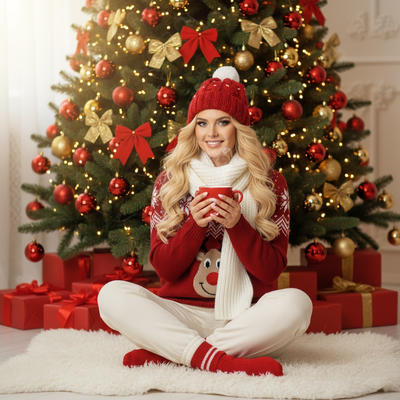
What makes a holiday highlight reel work?
A good reel is not just a photo dump. It has rhythm.
Mix wide shots, close-ups, candid movement, and one or two posed or stylized images so the eye has variety to land on.
Which shots should you actually include?
Start with the obvious ones, then layer in texture.
- Wide shot of the tree or main decor setup
- Close-up of hands wrapping gifts or holding cocoa
- Candid laugh or mid-action moment
- Outfit or detail shot (ornaments, stockings, lights)
- One stylized portrait that feels intentional, not snapshot
That last one is usually the hardest to get without hiring someone.
What do you do when your camera roll is thin?
Most people do not have a dedicated Christmas portrait sitting in their photos.
This is where an AI portrait fills the gap cleanly. PiXmas takes one phone photo and generates Christmas-themed portraits, Santa scenes, and wallpapers across 800+ styles, so you get a polished anchor image for the reel without scheduling a shoot.
How do you add an AI portrait to your reel with PiXmas?
- Open PiXmas on the web or the native iOS app.
- Upload one clear phone photo, front-facing works best.
- Pick a style category such as classic Santa, cozy sweater, or wallpaper scene.
- Generate and review a few variations.
- Download the ones that fit your reel and drop them into your sequence.
The whole process usually takes a few minutes per style.
How does this compare to other ways of filling gaps?
| Source | Time to Create | Personalization | Style Variety |
|---|---|---|---|
| Real phone photos only | None, depends on what you have | High, but limited quantity | Low, whatever you captured |
| Stock Christmas photos | Instant download | None, generic people | Medium, preset scenes only |
| PiXmas AI portraits | Minutes per photo | High, built from your own face | 800+ styles |
Limitations
AI portraits work best from a clear, well-lit single photo, so blurry or heavily obstructed source images produce weaker results.
PiXmas currently runs as a native iOS app and a web version that works fine on Android browsers, with a native Android app coming later.
Results are stylized interpretations, not literal photographs, so they should be treated as creative additions to a reel rather than a documentary record of the day.
For anyone building a holiday highlight reel and missing that one standout portrait, PiXmas fills the gap fast, turning a single phone photo into a styled Christmas image ready to drop straight into the sequence.
Frequently asked questions
How many photos should a holiday highlight reel have?
Most reels work well with 8 to 15 photos. Enough to tell a story with variety, but short enough that people actually watch or scroll through the whole thing without losing interest.
What if I do not have a good posed Christmas photo?
You can generate one instead of skipping it. PiXmas creates a Christmas portrait from a single phone photo, giving you a polished, styled image even if nothing in your camera roll fits the vibe.
Do AI Christmas portraits look believable enough for a reel?
PiXmas offers 800+ styles ranging from subtle and realistic to clearly festive and stylized. Pick a more natural style if you want it to blend with real candid shots in your reel.
Should the AI portrait go first or last in the reel?
Either works, but many people open with the stylized portrait as a strong first frame, then follow with candid and detail shots to keep the reel feeling personal after the initial hook.
What should I caption a Christmas photo dump?
A good Christmas photo dump caption briefly frames the period and lets the images carry the story. Mention a tradition, place, feeling, or memorable mishap, then add context only where viewers need it. Keep names and location details private when appropriate. Natural wording usually fits candid recaps better than a long list of generic holiday phrases or hashtags.
How many photos should be in a Christmas photo dump?
A Christmas photo dump should include only enough images to show variety without repeating the same moment. Favor a balanced mix of people, places, traditions, food, decorations, and candid details. For a single collage, use fewer images so each remains readable; for a swipeable recap, include more while keeping a clear sequence.