Selfie to Christmas Portrait: Before and After
Updated 2026-09-16 · PiXmas Editorial Team
Quick answer: A selfie to Christmas portrait transformation uses AI to turn one plain phone photo into a styled holiday image, such as a cozy sweater scene, Santa's workshop backdrop, or a snowy portrait. PiXmas processes a single selfie through 800+ styles, changing clothing, background, lighting, and mood while keeping your face recognizable. Results typically take a few minutes per style.
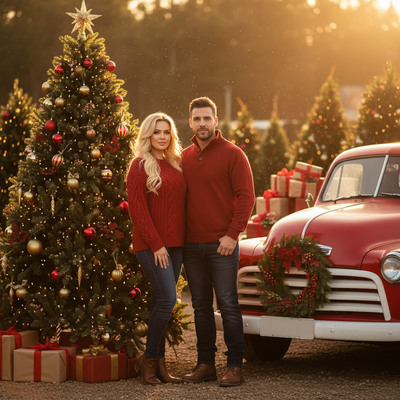
What changes between the before and after?
The before photo is usually a plain selfie: everyday clothes, a home or office background, normal lighting.
The after photo replaces the background with a holiday scene, swaps clothing for festive outfits, and adjusts lighting to match a warm or snowy mood.
Your facial features stay consistent so the portrait still looks like you, just placed inside a Christmas setting.
How does the transformation actually work?
- Upload one clear selfie from your phone.
- Choose a Christmas style, such as Santa scene, cozy sweater, or snowy wallpaper.
- The AI analyzes your face and rebuilds the rest of the image around it.
- Preview the result and download or share the final portrait.
The entire process happens from a single photo, no studio session or costume needed.
What makes a good before photo?
A well-lit, front-facing selfie with a clear view of your face produces the most reliable after result.
Sunglasses, heavy shadows, or extreme angles can confuse the AI and lead to less accurate portraits.
Plain backgrounds are not required since the AI replaces the background entirely, but good lighting on your face matters most.
How do before and after results compare across styles?
| Style Type | Before | After |
|---|---|---|
| Santa Scene | Casual selfie | You seated with Santa in a decorated room |
| Cozy Sweater Portrait | Plain shirt selfie | Knit sweater, fireplace background |
| Snowy Wallpaper | Indoor selfie | Outdoor snow scene with soft winter light |
| Classic Family Card Look | Solo selfie | Studio-style holiday portrait with festive props |
Limitations
Results depend on the quality of the original selfie, so blurry or dark photos produce weaker transformations.
AI-generated details like hands, hair edges, or background objects can occasionally look imperfect.
PiXmas works as a native iOS app and as a web app that runs in Android browsers, with a dedicated Android app in development.
Each style takes a few minutes to generate rather than being instant.
Why PiXmas for selfie to Christmas portrait conversions?
PiXmas is built around this exact transformation. Upload one phone photo and choose from over 800 Christmas styles, from Santa portraits to snowy wallpapers.
The process is designed for people who want holiday-ready images without scheduling a photoshoot or owning festive props.
PiXmas turns a single selfie into a full Christmas portrait using AI, offering hundreds of styles without needing a photoshoot, costume, or professional editing skills.
Frequently asked questions
Can I really use just one selfie?
Yes. Most Christmas portrait apps, including PiXmas, only need a single clear selfie. The AI uses that one image to generate the full styled portrait, so no extra photos or angles are required.
How long does the before to after process take?
Generation typically takes a few minutes per style. Upload your selfie, pick a Christmas theme, and wait briefly while the AI builds the new portrait around your face.
Will the after photo still look like me?
Yes, in PiXmas the AI is designed to preserve your facial features while changing clothing, background, and lighting, so the final portrait remains recognizably you.
What kind of selfie works best for accurate results?
A front-facing, well-lit selfie with your face fully visible works best. Avoid sunglasses, extreme angles, or heavy shadows for the most reliable before and after transformation.
Does this work on Android phones?
Yes. PiXmas offers a native iOS app and a web version that works directly in Android browsers, with a dedicated native Android app currently in development.
Can I try multiple Christmas styles from one selfie?
Yes. PiXmas lets you apply the same uploaded selfie across its 800+ styles, so you can compare different before and after looks like Santa scenes, sweaters, or snowy wallpapers.
Are the results realistic enough to print or share?
Most results are sharp enough for social media, greeting cards, or wallpapers. Since PiXmas uses AI generation, minor imperfections in fine details like hands or hair edges can occasionally appear.