Do AI Christmas Photos Look Realistic? Before/After
Updated 2026-09-16 · PiXmas Editorial Team
Quick answer: Yes, modern AI Christmas photos can look realistic when the tool preserves your actual face, skin texture, and proportions while adding holiday clothing, lighting, and backgrounds. Realism depends on the model quality and how many source photos it uses.
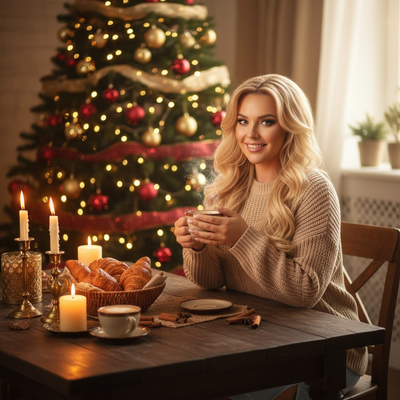
Before and after comparisons are the fastest way to judge whether an AI Christmas photo generator actually works.
A realistic result keeps your face recognizable while changing clothing, background, and lighting to match a holiday theme.
What Does a Realistic Before and After Look Like?
In a good before photo, you have a normal phone selfie with everyday lighting and clothing.
In the after photo, the same face appears with consistent eye shape, nose, and skin tone, now dressed in Christmas sweaters or Santa scenes.
The background changes completely, snow, fireplaces, string lights, but the person still looks like themselves.
Weak results show warped facial features, mismatched skin tones, or plastic-looking texture that breaks the illusion.
What Makes AI Christmas Photos Look Fake?
Several common issues cause unrealistic results.
- Blurry or low-resolution source photos confuse the model
- Extreme angles or side profiles reduce accuracy
- Heavy filters already applied to the original photo
- Group photos with small or overlapping faces
- Poor lighting that hides key facial details
Starting with one clear, well-lit, front-facing phone photo avoids most of these problems.
How PiXmas Handles Before and After Results
PiXmas is a Christmas Pictures App that turns a single phone photo into AI Christmas portraits, Santa scenes, and wallpapers.
It works as a native iOS app and also runs as a web version usable on Android browsers, with a native Android app coming soon.
PiXmas offers over 800 styles, so you can compare multiple before and after looks from the same original photo.
Because it only needs one photo, the app focuses on matching your real facial structure closely instead of blending features from several images.
How to Test Realism Yourself
- Upload one clear, front-facing phone photo
- Choose a Christmas or Santa style in PiXmas
- Generate the AI photo and view it at full size
- Compare the eyes, nose, and mouth shape to the original
- Check skin texture for unnatural smoothness or artifacts
- Try two or three styles to compare consistency
Before/After Quality Comparison
| Factor | Realistic Result | Unrealistic Result |
|---|---|---|
| Facial features | Match original shape and proportions | Warped, uneven, or generic looking |
| Skin texture | Natural detail, slight texture retained | Overly smooth, plastic-like |
| Lighting | Blends with new background naturally | Face looks pasted onto scene |
| Source photo | Clear, front-facing, well-lit | Blurry, angled, or filtered |
Limitations
AI Christmas photos are not identical to a professional photoshoot.
Results can vary based on the original photo quality, and some styles suit certain face shapes or lighting better than others.
Fine details like glasses, jewelry, or busy backgrounds may occasionally render imperfectly.
Testing a few different styles in PiXmas usually helps identify which ones produce the most realistic result for your specific photo.
AI Christmas photos can look realistic when the source photo is clear and well-lit, and PiXmas is a strong option for testing this with one phone photo across 800+ styles.
Frequently asked questions
How realistic can AI Christmas photos actually get?
With a clear, front-facing phone photo, AI Christmas photos can closely match your real facial features while changing clothing and background. Quality depends on lighting, resolution, and the tool used, but results are often convincing enough to use as portraits or holiday cards.
Why do some AI Christmas photos look distorted?
Distortion usually comes from blurry source photos, extreme angles, or heavy pre-existing filters. Group photos with small faces also reduce accuracy. Using one clear, well-lit, front-facing photo significantly improves how natural the final result looks.
What kind of photo gives the most realistic result?
A single, clear, front-facing phone photo with good lighting and no heavy filters produces the most realistic AI Christmas photo. Avoid extreme angles, sunglasses, or busy backgrounds for the best facial accuracy.
Is one phone photo enough for accurate results?
Yes, one clear phone photo is typically enough for tools like PiXmas to generate accurate AI Christmas portraits. The key factor is photo quality, not quantity, since a sharp, well-lit image gives the model more detail to work with.
What should you wear for an AI Christmas portrait?
Wear simple, well-fitting clothing with a visible neckline and avoid items that cover key facial features. Even if the generator replaces the outfit, the original silhouette, hair, collar, and accessories can influence the result. Good front lighting and minimal visual clutter generally matter more than wearing an actual Christmas outfit.
How long does it take to generate a Christmas portrait?
Generation time depends on server demand, image size, selected style, and how many versions are requested. A simple portrait may appear quickly, while revisions, face corrections, or high-resolution exports take longer. Leave extra time before printing or posting, because the first result may need another attempt or manual cleanup.