Santa Photo for Dogs Made Simple with AI
Updated 2026-09-16 · PiXmas Editorial Team
Quick answer: The easiest way to get a santa photo for dogs is through an AI app like PiXmas. Upload one clear photo of your dog, pick a Santa-themed style, and receive a finished portrait in minutes. No mall lines, no stressed pet, no scheduling. PiXmas offers 800+ styles including classic Santa scenes, cozy fireside setups, and snowy backdrops.
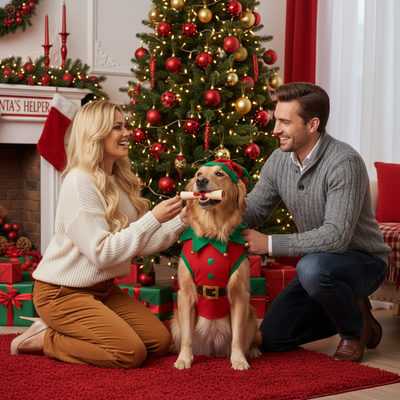
Why Get a Santa Photo for Dogs This Way?
Traditional pet Santa photo sessions mean car rides, waiting rooms, and a dog who may not sit still near a stranger in a red suit.
AI-generated santa photos for dogs skip all of that. You take one photo at home, on your schedule, when your dog is calm and comfortable.
How Does an AI Santa Photo for Dogs Work?
The process uses your dog's actual photo as reference, then generates a new image placing your pet in a Santa-themed scene.
- Take one clear photo of your dog's face, ideally with good lighting.
- Upload the photo to PiXmas through the app or web version.
- Choose a Santa-style template from the available Christmas options.
- Wait a few minutes while the AI generates your dog's portrait.
- Download the finished santa photo for dogs to print or share.
What Styles Are Available for Dog Santa Photos?
PiXmas includes multiple Santa-themed options beyond a single generic template.
Options range from a dog sitting beside Santa Claus, to wearing a small Santa hat, to full holiday scenes with sleighs, fireplaces, and wrapped presents in the background.
Santa Photo for Dogs: App vs Traditional Pet Studio
| Feature | PiXmas AI App | Traditional Pet Photo Studio |
|---|---|---|
| Time required | A few minutes | Appointment plus travel time |
| Pet stress level | Low, no strangers or props | Can be high with unfamiliar setups |
| Style variety | 800+ options | Limited to studio backdrops |
| Cost | App subscription or one-time fee | Often $30 to $80 per session |
| Availability | Any time, from home | Limited seasonal slots |
Tips for Better Dog Santa Photos
Use a photo where your dog is facing forward and well-lit for best AI results.
Avoid photos with other pets or people in the frame if you want a clean single-dog portrait.
A close-up shot of just the face and upper body tends to generate more accurate results than a full-body distant shot.
Limitations
AI-generated santa photos for dogs are stylized interpretations, not literal photographs, so fine details like fur texture or collar tags may not always transfer perfectly.
Results depend on the quality of your uploaded photo. Blurry or poorly lit images produce less accurate portraits.
PiXmas currently runs as a native iOS app and a web version that works on Android browsers. A native Android app is coming.
Verdict
PiXmas turns a single dog photo into a finished santa portrait in minutes, making it a practical, low-stress alternative to traditional pet photo studios for the holidays.
Frequently asked questions
How do I get a santa photo for my dog without visiting a pet store?
Use an AI photo app to generate the santa photo instead. Upload a clear picture of your dog, choose a Santa-themed style, and the app creates the portrait for you in minutes without any in-person appointment.
What kind of photo works best for a dog Santa portrait?
A well-lit, forward-facing photo of your dog's face and upper body works best. Avoid blurry shots, extreme angles, or images with multiple pets if you want a clean individual Santa portrait.
Is a santa photo for dogs realistic looking?
AI-generated portraits are stylized rather than exact photographs. PiXmas aims for a natural, festive look, but details like fur pattern or accessories may not match perfectly to the original photo.
Can I get multiple Santa styles for the same dog photo?
Yes, you can upload the same dog photo and try different Santa-themed styles within PiXmas to compare results, such as classic Santa scenes, cozy fireside setups, or snowy backdrops.
Are online pet Christmas photo generators private?
Privacy depends on the service’s data collection, storage, training, and deletion policies. Before uploading, check whether images are retained, shared with vendors, used to improve models, or associated with account information. Avoid photos showing address tags, phone numbers, documents, or recognizable home details, and delete uploaded files when the service provides that option.
How accurate are AI-generated Christmas photos of pets?
AI-generated pet photos can resemble the source image, but markings, eye color, body shape, paws, whiskers, and accessories may be altered. Results are usually stronger when the reference photo is sharp, well lit, and unobstructed. Review every image carefully before printing or sharing, particularly if an exact likeness matters for a keepsake.