AI Christmas Dog Picture Generator
Updated 2026-09-16 · PiXmas Editorial Team
Quick answer: An AI Christmas dog picture is created by uploading a photo of your dog to an app like PiXmas, which uses AI to place your pet into festive scenes such as Santa's sleigh, snowy forests, or cozy fireside settings. The process takes a single photo and a few minutes, producing shareable holiday portraits without any photo editing skills.
What Is an AI Christmas Dog Picture?
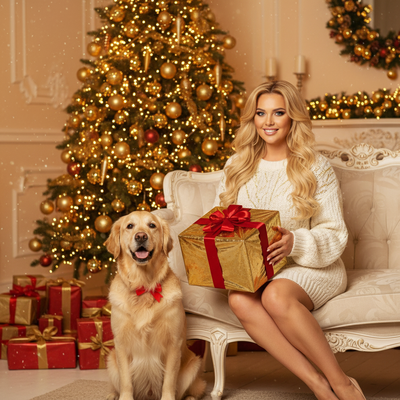
An AI Christmas dog picture takes your pet's real photo and transforms it into a festive scene.
Instead of manually editing backgrounds or adding props, AI models generate the entire holiday setting around your dog's likeness.
The result looks like a professional pet photoshoot, complete with Santa hats, twinkling lights, or snow-covered backdrops.
How Do You Make One?
- Open PiXmas on your phone or web browser.
- Upload one clear photo of your dog, ideally facing the camera.
- Choose a Christmas style from the 800+ options, such as Santa's Little Helper or Snowy Cabin.
- Let the AI process the image, which usually takes a minute or two.
- Download your finished portrait or share it directly to social media.
Why Choose PiXmas for Pet Photos?
PiXmas specializes in fast, high-quality AI transformations built specifically for holiday content.
The app includes styles designed with pets in mind, so your dog's fur texture and expression stay recognizable even in stylized scenes.
Since PiXmas works as both a native iOS app and a web app usable on Android browsers, most pet owners can access it right away. A dedicated Android app is coming soon.
What Styles Work Best for Dogs?
Santa scenes, snowy wonderland backdrops, and cozy fireplace portraits tend to photograph well for dogs of all breeds and coat colors.
Wallpaper-style options are also popular for owners who want a festive lock screen featuring their pup.
How Does PiXmas Compare to Other Options?
| Method | Time Required | Skill Needed | Result Quality |
|---|---|---|---|
| Manual photo editing | 30-60 minutes | Advanced | Varies widely |
| Hiring a pet photographer | Days to schedule | None | High, but costly |
| PiXmas AI app | 2-5 minutes | None | Consistent, high quality |
Limitations
AI-generated images may occasionally alter small details like fur markings or ear shape, especially with unusual angles or blurry source photos.
Results improve significantly with a clear, well-lit photo where your dog's face is visible.
Some styles work better for certain breeds, so trying a few different options can help you find the best match.
Tips for the Best Results
Use a photo where your dog is looking toward the camera with good lighting and minimal background clutter.
Avoid photos where your dog is mid-motion or partially obscured, as these can confuse the AI model.
PiXmas makes it simple to turn any dog photo into a polished Christmas portrait, combining speed, variety, and accessible pricing for pet owners preparing holiday content.
Frequently asked questions
Can I make an AI Christmas picture of my dog for free?
Some apps offer limited free trials or watermarked previews, but full-quality results typically require a paid plan. Check the app's current offer before starting, as free tiers change often.
What photo works best for an AI Christmas dog picture?
A clear, well-lit photo with your dog facing the camera works best. Avoid blurry shots or images where your dog's face is partially hidden, since PiXmas and similar AI tools rely on facial detail to generate accurate results.
How long does it take to create a Christmas photo of my dog?
Most AI Christmas dog pictures on PiXmas are generated within a few minutes after uploading your photo. The exact time depends on your chosen style and current app traffic during busy holiday periods.
Can I use these AI dog photos for holiday cards?
Yes, PiXmas generates high-resolution images suitable for printing on holiday cards, mugs, or other gifts. Many pet owners use these portraits as the centerpiece of their annual holiday greetings.
Will the AI change how my dog actually looks?
AI models aim to preserve your dog's key features like fur color and face shape, but some stylization is normal. Using a clear source photo helps keep the result looking recognizably like your pet.
How many Christmas styles are available for dog photos?
PiXmas offers over 800 styles ranging from classic Santa scenes to snowy wonderland backdrops, giving pet owners plenty of variety to find the perfect festive look for their dog.