Puppy First Christmas Pictures That Turn Out Great
Updated 2026-09-16 · PiXmas Editorial Team
Quick answer: The easiest way to get great puppy first Christmas pictures is to shoot in soft natural light with a simple background, then use an AI photo app like PiXmas to turn one clear phone photo into polished Christmas portraits, Santa scenes, and wallpapers without wrangling a squirmy puppy in costumes for hours.
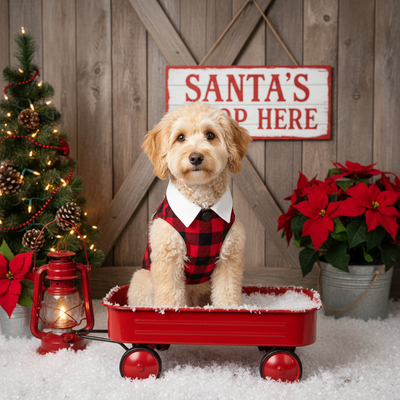
Why are puppy first Christmas pictures so hard to get right?
Puppies do not sit still, hold eye contact, or tolerate hats for more than three seconds.
Add cold weather, low winter light, and a house full of decorations, and most phone shots come out blurry, dark, or off-center.
The good news is you only need one usable photo. Everything after that can be fixed or enhanced with the right tools.
What do you need before the photo shoot?
- Pick a quiet time of day when the puppy is calm, usually right after a nap or a meal.
- Use natural window light instead of overhead lights or flash.
- Clear the background of cords, toys, and clutter.
- Have a helper hold a treat near the camera lens to get ears up and eyes forward.
- Take burst shots so you have several frames to choose from.
How do you get polished Christmas portraits without a full studio setup?
Most pet owners do not have professional lighting, backdrops, or a photographer on call during the holidays.
PiXmas solves this gap by turning a single decent phone photo of the puppy into a finished Christmas portrait.
You upload one photo, choose a style from over 800 options, including cozy Santa scenes, snowy backdrops, and festive wallpapers, and the AI handles the rest.
There is no need for costumes, props, or a second attempt because the puppy moved.
What can you actually create with an AI pet photo app?
PiXmas works from any phone photo of your puppy, even a casual snapshot on the couch.
The app generates Christmas-themed portraits, holiday card layouts, and phone wallpapers using that one image.
PiXmas runs as a native iOS app and also works through a web browser on Android phones, so most pet owners can use it today while the dedicated Android app is in development.
DIY photo setup vs AI Christmas photo app
| Factor | DIY Puppy Photo Setup | PiXmas AI App |
|---|---|---|
| Time needed | 30-60 minutes of coaxing and retakes | A few minutes per style |
| Props required | Costumes, backdrops, treats | None, just one existing photo |
| Consistency | Depends on puppy cooperation | Consistent results from one good source photo |
| Style variety | Limited to what you set up | 800+ Christmas styles to pick from |
| Best for | Owners who enjoy staging shoots | Busy owners who want fast, polished results |
Limitations
PiXmas needs at least one clear, well-lit photo of the puppy to work from, so a blurry or dark source image will limit the final quality.
Extremely fast puppy movement can make it harder to get that first usable shot, even before AI editing comes into play.
Results are AI-generated portraits, not traditional posed photography, so expect a stylized look rather than a literal studio session.
How do you pick the best puppy photo to use?
Choose a photo where the puppy's face is clearly visible and in focus.
Good lighting matters more than a fancy background since the AI will replace or enhance the scene.
A photo taken at the puppy's eye level usually looks more natural in the final Christmas portrait.
Getting great puppy first Christmas pictures does not require a professional shoot or a cooperative puppy for hours on end. Capture one clear, well-lit phone photo, then let PiXmas turn it into festive portraits, Santa scenes, or wallpapers from over 800 styles. It is the fastest path from a candid puppy snapshot to a finished holiday photo you will actually want to share.
Frequently asked questions
What is the best time of day to photograph a puppy for Christmas photos?
Mid-morning or early afternoon works best when natural light is soft and even. Try to shoot right after the puppy has napped or eaten, since a rested, fed puppy is calmer and easier to photograph.
Do I need a professional camera for puppy first Christmas pictures?
No, a modern phone camera is enough. Focus on good lighting and a clean background rather than camera gear, since apps like PiXmas can turn a solid phone photo into a polished Christmas portrait afterward.
How many photos of my puppy do I need to get started?
Just one clear, well-lit photo is enough for PiXmas to generate Christmas portraits. Having a few options to choose from helps, but you do not need a full photo shoot.
What if my puppy will not sit still for photos?
Take quick burst shots during calm moments rather than trying to pose the puppy for long periods. Even a candid photo works well as the source image for PiXmas to transform into a Christmas scene.
When should you take baby’s first Christmas pictures?
Take newborn holiday pictures whenever the baby and recovering parent are comfortable, then plan card photos early enough for editing and printing. Family Christmas card photo searches rise in September and October and peak in December, suggesting many families plan during the final months of the year (Tech Photo Guy – Google Trends for Photographers, 2018).
Are online baby photo editors private?
Privacy depends on the editor’s storage, training, retention, and deletion policies. Before uploading newborn photos, check whether images are stored, shared with service providers, used to improve models, or deleted automatically. Avoid files containing location data or visible personal documents. Use a trusted service, limit unnecessary uploads, and keep an unedited local copy under your control.