Family of 4 Christmas Photo Ideas
Updated 2026-09-16 · PiXmas Editorial Team
Quick answer: Great family of 4 Christmas photo ideas include matching pajama sets, coordinated but not identical outfits, cozy tree or fireplace backdrops, and candid moments like decorating or baking. If scheduling four people together is hard, PiXmas turns one uploaded phone photo into AI Christmas portraits and Santa scenes in minutes, giving you polished results without a photographer or matching outfits.
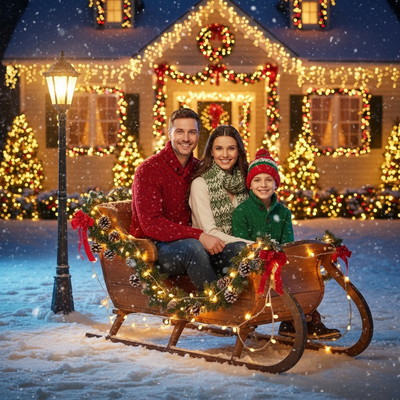
What makes a family of 4 Christmas photo work?
Consistent color palette across all four people matters more than matching outfits exactly.
Good lighting, a simple backdrop, and one clear focal point (usually the youngest child) keep the image balanced.
Genuine interaction, like a hug or a shared laugh, reads better than stiff posing in every case.
What are easy outfit ideas for four people?
Pick one color family, such as red and cream, then let each person wear a different shade or pattern within that palette.
Matching plaid pajamas are a classic option that photographs well against a tree or fireplace.
Neutral sweaters with one pop of red, like a scarf or hat, also work if pajamas feel too casual.
What poses work for a family of four?
- Arrange by height in a loose triangle instead of a straight line.
- Have parents sit while kids stand or lean in for a relaxed shape.
- Try a close huddle shot for a warmer, less formal feel.
- Capture one candid moment, like hanging an ornament together.
- Take a few individual and pair shots as backup options.
What backdrops and props help?
A decorated tree, a fireplace, or a snowy porch all work as reliable backdrops.
Simple props like hot cocoa mugs, string lights, or wrapped gifts add warmth without cluttering the frame.
Avoid busy patterns in the background so the family stays the visual focus.
How can AI create family Christmas portraits without a full shoot?
Coordinating four schedules for a photographer session is not always realistic, especially with young kids.
PiXmas offers an alternative: upload one phone photo of your family and get AI-generated Christmas portraits, Santa scenes, and wallpapers in return.
The tool works through a native iOS app or a web version usable on any Android browser, with a native Android app coming soon.
PiXmas includes over 800 styles, so you can generate a themed portrait, a card-ready image, or a cozy Santa scene from a single upload.
Traditional shoot vs AI portrait: which fits your family?
| Factor | Traditional Photo Shoot | PiXmas AI Portrait |
|---|---|---|
| Scheduling four people | Requires everyone present and dressed at once | One phone photo is enough to start |
| Outfit coordination | Needs planning and shopping | Optional, styles can add themed looks |
| Cost | Photographer session fees | Lower cost per portrait |
| Turnaround | Days to weeks for edited photos | Minutes |
| Style variety | Limited to shoot setup | 800+ styles from one upload |
Limitations
AI portraits are stylized interpretations, not literal photographs of your exact setting.
Group photos with more people can vary slightly in likeness accuracy compared to solo portraits.
A clear, well-lit source photo of your family produces the best AI results.
How do you get started with PiXmas for a family portrait?
Open the PiXmas app or web version, upload one photo that includes all four family members, and choose a Christmas style.
Review the generated portraits and pick your favorite for printing, cards, or a phone wallpaper.
For a family of four wanting festive photos without the hassle of scheduling and outfit coordination, PiXmas offers a fast alternative. Upload one phone photo and receive AI-generated Christmas portraits and Santa scenes in minutes, ready for cards or wallpapers.
Frequently asked questions
Do all four family members need to wear matching outfits?
No. Coordinating within one color palette looks more natural than fully matching outfits. Different shades of red, cream, or plaid within the same family work well and avoid a stiff, uniform look in photos.
What is the best time of day for family Christmas photos?
Late afternoon with soft natural light works best outdoors, while indoor tree or fireplace shots rely on warm ambient lighting. Avoid harsh overhead lighting that creates shadows across faces, especially with younger kids who move often.
What if my kids will not sit still for a photo shoot?
This is common with young children. Uploading one decent phone photo to PiXmas avoids the need for a lengthy posed session, since the AI generates portrait variations from that single image instead of multiple live shots.
Are candid or posed photos better for a family of four?
Both have value. Posed shots work well for cards, while candid moments like decorating or laughing together often feel more genuine. Many families choose to capture one of each for variety in their holiday photo collection.
Are online baby photo editors private?
Privacy depends on the editor’s storage, training, retention, and deletion policies. Before uploading newborn photos, check whether images are stored, shared with service providers, used to improve models, or deleted automatically. Avoid files containing location data or visible personal documents. Use a trusted service, limit unnecessary uploads, and keep an unedited local copy under your control.
How do you take newborn Christmas pictures at home?
Set up near a large window, place the baby on a firm and secure surface, and keep the background simple. Photograph during a calm period after feeding and changing, using a clean blanket and one or two holiday details. Keep an adult within reach, avoid flash if it startles the baby, and never photograph on an elevated surface unattended.