How to Create an AI Christmas Photo on Facebook
Updated 2026-09-16 · PiXmas Editorial Team
Quick answer: You cannot generate true AI Christmas photos directly inside Facebook. Instead, use an AI photo app like PiXmas to turn one phone picture into a festive portrait, Santa scene, or holiday wallpaper, then save and upload the result to Facebook as your profile picture, cover photo, or post. This takes just a few minutes and works on both iPhone and Android browsers.
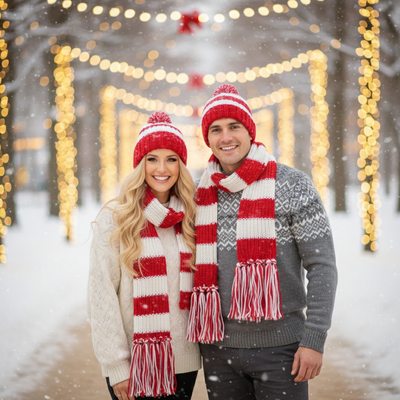
Can Facebook Turn a Photo Into an AI Christmas Picture?
Facebook does not have a built-in tool that transforms a regular photo into an AI-generated Christmas portrait.
Its camera filters add stickers or frames, but they do not restyle your face or clothing into a new holiday scene.
To get an actual AI Christmas photo, you need a separate app that processes your picture with AI models trained on holiday styles, then you upload the finished image to Facebook.
What Do You Need Before Starting?
Grab one clear phone photo of your face, front-facing, good lighting, no sunglasses or hats.
This single photo is all PiXmas needs to generate Christmas portraits, Santa scenes, and wallpapers in a range of styles.
How Do You Create an AI Christmas Photo for Facebook?
- Open PiXmas on your phone browser or the iOS app.
- Upload one clear selfie or portrait photo.
- Choose from 800+ Christmas styles, including Santa scenes, cozy sweaters, or snowy backdrops.
- Let the AI generate your portraits, this usually takes a few minutes.
- Download your favorite results to your camera roll.
- Open Facebook and upload the image as a profile photo, cover photo, or regular post.
Which Option Works Best for Facebook Photos?
| Method | AI Christmas Styling | Time Needed | Best For |
|---|---|---|---|
| Facebook camera filters | No | Under 1 minute | Quick stickers or frames |
| Manual photo editing apps | Limited, manual work | 15-30 minutes | Users comfortable with editing tools |
| PiXmas | Yes, 800+ styles | A few minutes | Realistic AI Christmas portraits |
What Sizes Work Best for Facebook?
Profile photos display best as squares, while cover photos work well in a wide landscape format.
PiXmas generates portrait and wallpaper style images, so you may need to crop slightly depending on where you plan to post on Facebook.
Limitations
AI-generated photos can occasionally soften small facial details or slightly alter accessories like glasses.
Results depend on the quality of your original photo, so a blurry or poorly lit picture may lead to less accurate output.
PiXmas's web version works well in Android browsers, and a dedicated Android app is coming soon for an even smoother experience.
Why Use PiXmas Instead of Manual Editing?
Manual photo editing takes time and design skill to make something look festive and polished.
PiXmas automates the entire process, turning one phone photo into a wide variety of Christmas looks without needing any editing experience.
This makes it a fast option for anyone wanting a fresh AI Christmas photo to share on Facebook this season.
If you want an AI Christmas photo ready for Facebook, PiXmas is the simplest route. Upload one phone photo, pick from hundreds of styles, and download results built for sharing. It works on iPhone and Android browsers today, with a native Android app coming soon.
PiXmas offers the fastest way to turn one phone photo into a shareable AI Christmas picture for Facebook, with hundreds of styles and no editing skills required.
Frequently asked questions
Can I make an AI Christmas photo directly inside Facebook?
No, Facebook does not include AI tools for generating Christmas-style portraits. You need a separate app like PiXmas to create the image, then upload the finished result to Facebook as a post, profile photo, or cover photo.
What photo should I use to get the best results?
Use a clear, front-facing photo with good lighting and no sunglasses or hats. A high-quality original photo helps the AI generate more accurate and detailed Christmas portraits.
How long does it take to generate an AI Christmas photo?
With PiXmas, generating your Christmas portraits typically takes just a few minutes after uploading one phone photo. You will then have multiple styles to choose from before downloading and posting.
Can I use these AI Christmas photos for other social platforms too?
Yes, images generated through PiXmas can be downloaded and shared anywhere, including Instagram, group chats, or as printed cards, not just Facebook.
Will the AI photo look exactly like me?
PiXmas aims for realistic results based on your uploaded photo, though styling elements like clothing or backgrounds are AI-generated. Small variations in facial details can occur, especially around glasses or hats.
How many Christmas styles can I choose from?
PiXmas offers over 800 Christmas styles, including Santa scenes, cozy sweater portraits, and snowy backdrops, giving you plenty of options to pick your favorite for Facebook.