Red Velvet Glam in the City
Quick answer: Red Velvet Glam in the City is a PiXmas Christmas photo style that places you in a satin red gown on a glowing European cobblestone street, complete with a vintage car, a lit Christmas tree, and warm fairy-light bokeh. Upload one photo in the PiXmas iOS app and the AI generates the full glam holiday scene, ready for cards or wallpaper.
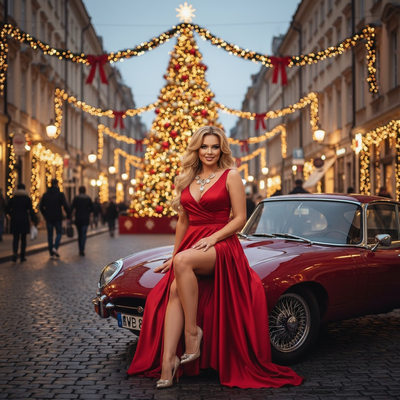
Create beautiful Christmas pictures with our Red Velvet Glam in the City style.
Imagine capturing the essence of Christmas magic with just one photo. The shimmering city lights, a grand Christmas tree adorned with sparkling garlands, and the timeless allure of vintage charm — what if you could bring it all together in a single frame? Welcome to the "Red Velvet Glam in the City" experience, where the elegance of a satin gown meets the atmospheric glow of a European Christmas street. This isn't just an image; it's a moment of Christmas luxury, crafted beautifully by the AI Christmas Photo Studio, to immortalize your festive memories. Whether you're posing solo or with loved ones, let's turn these Christmas photos into memories that warm your heart, becoming part of your holiday tradition.
Bringing Your Vision to Life
At the heart of our experience is the AI Christmas Photo Studio, where technology meets artistry. When you upload your photo, our system crafts a scene complete with an elegant vintage red car, all set on a cobblestone street lined with festive charm. Whether you're opting for a stately solo portrait or a lively group capture, every detail is automatically adjusted to help your likeness fit into this magical backdrop. The system adapts to your unique features while capturing the joyous vibrance of Christmas. This makes your Christmas pictures stand out, blending elegance and festivity in one setting.
Glamour in Every Detail
What brings the "Red Velvet Glam" style to life is the wardrobe and setting, designed to evoke effortless sophistication. Picture yourself wrapped in a luxurious red satin gown with a daring high slit, accented with gold heels and a statement necklace that reflects every glimmer of city light. The backdrop amplifies this glam, with a large Christmas tree and twinkling garlands lining the city street behind you. This combination brings confidence and radiance into your Christmas photos, making them ideal for even the most stylish Christmas card.
Lighting and Mood Augmentation
The lighting of this photo style is carefully curated to capture the magic of a winter evening. Using a warm evening glow, the scene is bathed in the charming twinkle of fairy lights. A subtle bokeh effect wraps around the frame, giving soft edges that enhance the dreamlike quality of your Christmas pictures. The mood is an enchanting mix of elegance and warmth, ensuring each captured moment feels like more than a photo, serving as the perfect Christmas wallpaper for your home or devices.
Sharing Christmas Joy and Glamour
Red Velvet Glam isn't just about capturing an image; it's about preserving an emotion. Picture the delight of sharing your elegantly crafted Christmas photos with friends and family, each one reflecting the joy and sophistication of the season. Whether printed as a cherished Christmas card or displayed as your Christmas wallpaper, these images capture the spirit of holiday luxury and personal touch. Every detail, from the European-style street to the delicate fairy lights, ensures your photos are felt, not just seen.
What makes Red Velvet Glam in the City different from other Christmas photo styles?
Most Christmas photo styles lean cozy: knit sweaters, cabins, or fireside scenes. Red Velvet Glam in the City goes the opposite direction, pairing a satin red gown, gold heels, and a vintage car against a lit European street rather than a snowy field or living room. PiXmas builds this look from one uploaded photo, so the fashion-forward, city-glam mood becomes an option alongside more casual holiday styles.
What photo should you upload for the best result?
Use a clear, well-lit photo where your face is fully visible and unobstructed by sunglasses, hats, or heavy shadows. A front-facing or slight angle shot works better than a distant or side profile image. Solo photos and close couple shots tend to translate most cleanly into the gown, jewelry, and posing details this style depends on.
Who is this Christmas photo style best for?
This style suits anyone who wants a dressed-up, editorial-style Christmas photo rather than a casual family snapshot. It works well for a solo glam portrait, a couple wanting a date-night holiday look, or friends creating a stylish set of photos for a night-out themed card. It leans more fashion than playful, so it may not be the first pick for young kids or pet photos.
How does PiXmas compare to a photographer or DIY setup?
- Photography educators using Google Trends report that searches for terms like “Christmas card photos” remain fairly constant through much of the year, then trend upward from September or October and spike in December. (Tech Photo Guy – Google Trends for Photographers, 2018)
- Google’s Holiday Trends reports that many Christmas‑related queries in the US, including decorating and baking topics, spike each December, illustrating that demand for Christmas imagery and content concentrates late in the year. (Google – Holiday Trends (Year in Search 2025), 2025)
- A general guide to using Google Trends recommends setting multi‑year ranges to spot seasonality, noting that Christmas‑related terms consistently show seasonal spikes that can guide when to publish holiday photo content. (Cemoh – How to Use Google Trends: A Complete Guide, 2026)
Limitations
Red Velvet Glam in the City is an AI-generated stylized image, not a physical photo taken on an actual European street with a real vintage car. Results can vary based on the clarity and angle of your uploaded photo. Group or multi-face uploads may render slightly less consistently than a solo or couple portrait, since the AI has more faces to interpret at once. PiXmas is a strong fit if you want this specific glam holiday look without booking a shoot or sourcing wardrobe and props yourself.
For anyone wanting a glamorous, editorial-style Christmas photo without booking a shoot or sourcing a gown and city backdrop, PiXmas turns one uploaded photo into the full Red Velvet Glam in the City look in minutes.
Frequently asked questions
What is the Red Velvet Glam in the City Christmas photo style?
It is a PiXmas AI Christmas photo style that places you in a red satin gown with gold heels and jewelry, set on a European cobblestone street with a vintage car, a lit Christmas tree, and warm fairy-light bokeh in the background.
Do I need a professional photo to use this style?
No. A clear, well-lit photo from your phone is enough. PiXmas uses that single image to generate the full Red Velvet Glam scene, including wardrobe, setting, and lighting, without needing a studio-quality original.
Can I turn this style into a printed Christmas card?
Yes. The finished Red Velvet Glam image is a high-resolution photo you can download and print as a Christmas card or use digitally as wallpaper on your phone or computer.
Will a group photo work with this style?
Group photos can work, but results may be less consistent across multiple faces compared to a solo or couple photo. For the cleanest gown and lighting detail, PiXmas tends to render best with one or two people.
How can I get natural Christmas photos of kids and pets?
Photograph kids and pets during simple activities instead of requiring long, formal poses. Let them open a prop gift, look at ornaments, cuddle on a blanket, or interact with family members. Prepare the set before bringing them in, use treats or toys near the camera, and stop when attention or patience begins to fade.
How do I keep skin tones and Christmas colors accurate in photos?
Use one main light source and avoid mixing daylight with warm household bulbs whenever possible. Set exposure for faces rather than bright string lights, and compare edited images on more than one screen before printing. Heavy filters can turn skin orange and distort reds or greens, so make small adjustments to warmth, tint, contrast, and saturation.