Downtown Christmas Lights
Quick answer: Downtown Christmas Lights is a PiXmas photo style that places you against a glowing city backdrop, a vintage red car, and sparkling bokeh lights for a glamorous urban Christmas portrait. Upload one photo in the PiXmas iOS app and it generates a stylized image with festive wardrobe and cinematic lighting, ready to save, share, or turn into a Christmas card.
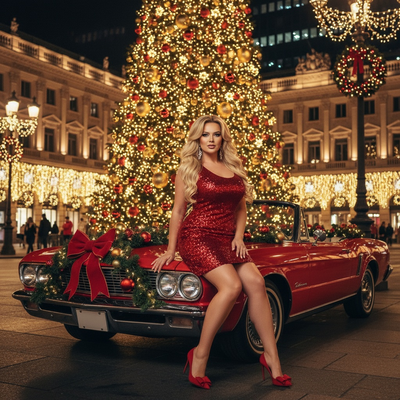
Create beautiful Christmas pictures with our Downtown Christmas Lights style.
As the holiday season wraps cities in twinkling lights and festive cheer, capturing that magic becomes a cherished tradition. This year, let PiXmas transform your photo into a stunning Downtown Christmas Lights portrait. Whether it's a solo tribute to your love of the season or a lively group celebration, these Christmas pictures capture what we love about this time of year: glamour, joy, and the sparkling energy of an urban Christmas wonderland.
Experience the Urban Christmas Magic
Stepping into the PiXmas photo studio is like entering a world where city charm meets festive wonder. Imagine yourself seated on a vintage red car beneath a towering city Christmas tree, surrounded by bokeh lights flashing like constellations while your Christmas picture comes to life. The cinematic glow casts a magical aura over your portrait, making it a perfect Christmas wallpaper for anyone seeking glamour mixed with holiday spirit. This setup is more than a backdrop; it's an invitation to feel the pulse of Christmas in the city.
Dress to Impress in Festive Glamour
To match the dazzling cityscape, let your wardrobe echo the spirit of the season. A stunning red sequin mini dress paired with red heels and bow details, plus statement earrings, complements the festive glow of the Christmas lights. This ensemble captures a sense of power and sophistication, lending an unforgettable touch to your Christmas photos. Attire like this doesn't just invite compliments; it turns your image into an elegant, card-worthy keepsake.
Narrate Your Own Christmas Story
When multiple people gather around the vintage car, PiXmas helps narrate your own festive story. The natural interaction captured among loved ones adds warmth and authenticity to your Christmas pictures, with the city square at night serving as the perfect canvas. Each image taken amid the dazzling lights and festive wreaths becomes a page in your holiday tale, turning moments of joy into lasting keepsakes.
Bringing Cinematic Christmas Dreams to Life
This season, why settle for the ordinary when you can step into a cinematic Christmas dream? The ambiance curated by PiXmas offers a glamorous, powerful, festive mood reminiscent of scenes from a holiday classic. The interplay of shadows and golden glow creates a rich backdrop for every pose, adding depth to your Christmas photos. For those wanting a slice of this magic in daily life, these images make striking Christmas wallpapers, bringing holiday warmth to your digital space.
Create Cherished Memories with Ease
Navigating the hustle of the holiday season can be a lot, but capturing its magic shouldn't be. With PiXmas, creating a striking Christmas picture is simple yet genuinely memorable. The intuitive setup and realistic styling make your photo feel personal and special. Whether you're reliving a cherished memory or crafting a heartwarming Christmas card for loved ones, this style offers an easy way to hold onto the joy and wonder of the season.
What makes this style different from other Christmas photo styles?
Downtown Christmas Lights leans into city glamour rather than the cozy cabin or fireside look found in many other Christmas styles. The scene pairs a vintage car, string-light bokeh, and a lit-up city square to build a nightlife, editorial feel instead of a rustic one.
The wardrobe styling, sequins, statement earrings, and structured coats, is built for this glossy urban setting, so the result reads more like a fashion portrait than a family snapshot by a tree.
What photo should you upload for the best result?
A clear, front-facing photo with good lighting and an unobstructed face gives PiXmas the most detail to work with. Avoid sunglasses, heavy shadows, or extreme angles.
Solo and couple photos tend to translate cleanly into this style since the composition is built around one or two people near the car and lights. You only need one uploaded photo per person to generate the portrait.
Who is this Christmas photo style best for?
This style suits couples wanting a date-night-style holiday photo, friends planning a night-out card photo, and individuals who want a glamorous, city-inspired portrait instead of a traditional cozy one. It also works well for professionals who want a polished holiday image for social media or greetings.
Because the look leans on sequin wardrobe and a nightlife mood, it is less naturally suited to young children or pets, though it can still be generated if that is the photo you prefer.
How does PiXmas compare to a photographer or DIY setup?
- Photography educators using Google Trends report that searches for terms like “Christmas card photos” remain fairly constant through much of the year, then trend upward from September or October and spike in December. (Tech Photo Guy – Google Trends for Photographers, 2018)
- A general guide to using Google Trends recommends setting multi‑year ranges to spot seasonality, noting that Christmas‑related terms consistently show seasonal spikes that can guide when to publish holiday photo content. (Cemoh – How to Use Google Trends: A Complete Guide, 2026)
- Google’s Holiday Trends reports that many Christmas‑related queries in the US, including decorating and baking topics, spike each December, illustrating that demand for Christmas imagery and content concentrates late in the year. (Google – Holiday Trends (Year in Search 2025), 2025)
Limitations
Downtown Christmas Lights portraits are AI-generated stylized images, not physical photos taken at an actual downtown location. Details like the car, lights, and background are rendered by the app rather than photographed on site.
Photos with several faces, such as larger group shots, may render with less consistency than a solo or couple photo. Results can also vary slightly between generations even from the same source image.
For anyone who wants a glamorous, city-lit Christmas portrait without booking a photographer or shoot, PiXmas turns one uploaded photo into a polished Downtown Christmas Lights image in minutes, making it a solid pick for couples, friends, and individuals chasing an urban holiday look.
Frequently asked questions
What is the Downtown Christmas Lights photo style?
It's a PiXmas photo style that places your uploaded photo into a glamorous city scene with a vintage red car, string-light bokeh, and a lit downtown square, styled with festive wardrobe like sequins and statement accessories for a nightlife-inspired Christmas portrait.
What kind of source photo works best?
A well-lit, front-facing photo where your face is clearly visible works best. PiXmas uses this single uploaded photo to generate the stylized Downtown Christmas Lights portrait, so avoid sunglasses, hats, or heavy shadows on the face.
Can I use this style for a couple or group photo?
Yes. Solo and couple photos tend to look the most consistent in this style. Group photos with several faces can still be generated with PiXmas, though results may be slightly less consistent across every face compared to a solo or couple shot.
Can I turn this into a printable Christmas card?
Yes, the finished Downtown Christmas Lights portrait from PiXmas can be saved and used for a printed or digital Christmas card, since the glamorous city composition works well as a standalone holiday keepsake.
Can I use a pet photo for this style?
This style is built around human wardrobe and posing, like a sequin dress or coat near the vintage car, so it is designed for people rather than pets. A pet photo can be tried, but the styling won't fit as naturally as it does for a person.
Will my photo look exactly like the downtown scene shown in examples?
Not exactly. PiXmas generates a new AI-stylized version each time using your uploaded photo as the base, so lighting, pose, and background details will vary somewhat from any single example image.