Fireworks Celebration – City Glam Night
Quick answer: Fireworks Celebration – City Glam Night is a PiXmas AI Christmas photo style that places you on a rooftop skyline scene with fireworks, city lights, and glam wardrobe like a sparkling white gown. Built from one uploaded photo, the iOS app renders a cinematic portrait in minutes, ready for Christmas cards, wallpaper, or social posts. It is one of PiXmas's 800+ available styles.
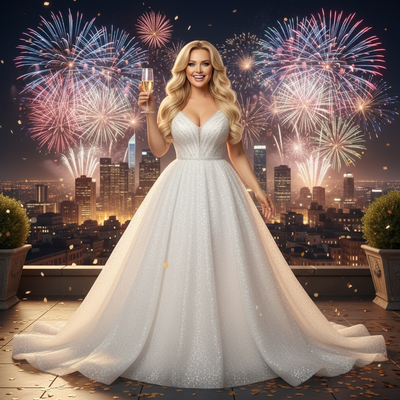
Create beautiful Christmas pictures with our Fireworks Celebration – City Glam Night style.
As Christmas approaches, the excitement of the festive season fills the air with glittering lights, joyful celebrations, and heartwarming moments captured in Christmas pictures. Nothing says festive glamour quite like a luminous city skyline, vibrant fireworks, and the elegance of a sparkling white gown. Embrace the magic of the season by stepping into the world of the AI Christmas Photo Studio, where the Fireworks Celebration – City Glam Night style transforms your cherished memories into cinematic New Year portraits. This unique photography style redefines your holiday celebration as it blends glamorous city allure with the intimate joy of Christmas memories.
Capture Glamour with AI Christmas Photo Studio
The AI Christmas Photo Studio brings a modern approach to creating Christmas photos that feel spectacular. Imagine yourself standing on a rooftop terrace, gazing out at a dazzling city skyline adorned with fireworks. Whether it's for your social media feed or a cherished Christmas card, the AI technology adapts the scene to place you at the heart of the cinematic moment. Feel the romance and allure as the sparkling city lights cast a warm glow, celebrating the joy of the holiday season with a memorable photo. Download the PiXmas app to try this style for yourself.
Create Memorable Christmas Pictures
Christmas pictures serve as timeless mementos, capturing not only the visuals but also the feelings and emotions of the moment. With the Fireworks Celebration – City Glam Night photo style, you can transform an ordinary photo into a captivating memory. Wearing a flowing white gown, champagne glass in hand, each captured frame becomes more than just an image, it's a story of celebration, love, and the promise of a New Year. Let each photo speak to the joy of celebrating life's beautiful occasions with the people you love.
Glamour and Romance in Every Frame
The allure of city glamour adds a new depth of sophistication and romance to your Christmas photos. This photography style accentuates urban chic while celebrating the warmth of the holidays. You're not just part of the picture, you become its glamorous centerpiece, radiating joy and elegance. Add this imagery to your Christmas wallpaper collection as a reminder of glitzy celebrations and shared happiness. It captures the blend of city life and heartfelt festive cheer in one frame.
Personalize Your Christmas Card with Unique Photos
Turn your Christmas card into a keepsake that's as unique as the celebration itself with the Fireworks Celebration – City Glam Night photo style. Your cards can convey emotion, elegance, and genuine festive spirit, perfect for friends and family to cherish. With the AI Christmas Photo Studio, personalizing holiday greetings is simple. Customize the scene to feature your smile surrounded by fireworks lighting up the night sky, adding a personal touch to your holiday greetings.
Experience Festive Magic with Cinematic Imagery
This holiday season, let the Fireworks Celebration – City Glam Night photography style carry you to a scene where every photo feels cinematic. Use this style to create Christmas pictures that are memorable and personal. Whether you're updating your Christmas wallpaper or building a photo album to treasure for years, this style captures the spirit of joy, love, and new beginnings in one image. It celebrates the glamorous allure of the city night alongside the warmth of a joyous holiday season.
What makes this style different from other Christmas photo styles?
Most Christmas photo styles lean cozy: sweaters, firesides, and warm indoor light. Fireworks Celebration – City Glam Night takes the opposite approach, pairing a rooftop skyline backdrop with fireworks bursts and formal glam wardrobe like a sparkling white gown. It reads more like a New Year's Eve editorial shoot than a fireside portrait, which makes it a strong pick if you want your Christmas picture to feel bold rather than rustic.
What photo should you upload for the best result?
A clear, front-facing photo with even lighting and your face unobstructed by sunglasses, hats, or hair gives the AI the most detail to work with. A single subject or a couple photo tends to render most reliably for this glam city scene, since PiXmas builds the entire rooftop and fireworks setting around the face in your source image.
Who is this Christmas photo style best for?
This style suits couples wanting a New Year's Eve style portrait, singles who want a bold solo statement piece, and anyone sending a Christmas card that stands apart from typical sweater-and-tree shots. City dwellers and social media creators looking for a glamorous, party-ready holiday image will find this scene fits naturally, since it leans into skyline and fireworks energy rather than a traditional family gathering look.
How does PiXmas compare to a photographer or DIY setup?
- A general guide to using Google Trends recommends setting multi‑year ranges to spot seasonality, noting that Christmas‑related terms consistently show seasonal spikes that can guide when to publish holiday photo content. (Cemoh – How to Use Google Trends: A Complete Guide, 2026)
- Photography educators using Google Trends report that searches for terms like “Christmas card photos” remain fairly constant through much of the year, then trend upward from September or October and spike in December. (Tech Photo Guy – Google Trends for Photographers, 2018)
- Google’s Holiday Trends reports that many Christmas‑related queries in the US, including decorating and baking topics, spike each December, illustrating that demand for Christmas imagery and content concentrates late in the year. (Google – Holiday Trends (Year in Search 2025), 2025)
Limitations
Results from PiXmas are AI-generated stylized images, not physical photos taken at a real rooftop or fireworks show. The skyline, fireworks, and gown are generated to match the style rather than reflecting an actual location or event. Group photos with multiple faces may render with less consistency than a solo or couple photo, so keep expectations realistic for larger groups. Outcomes also depend on the clarity and lighting of the photo you upload.
For anyone who wants their Christmas picture to feel like a glamorous night out rather than a cozy fireside scene, PiXmas turns one uploaded photo into a rooftop fireworks portrait in minutes, no shoot or wardrobe required.
Frequently asked questions
What is the Fireworks Celebration – City Glam Night photo style?
It is a Christmas photo style that places you on a rooftop city scene with fireworks lighting up the sky and glamorous wardrobe such as a sparkling white gown, giving the finished image a cinematic, New Year's Eve feel rather than a traditional cozy holiday look.
What kind of source photo works best for this style?
A well-lit, front-facing photo where your face is clearly visible works best. Avoid sunglasses, heavy shadows, or hats covering your face. PiXmas uses this one photo to build the entire rooftop and fireworks scene around you.
Can I use a group photo for this style?
You can, but a solo or couple photo tends to render more consistently for this glam city scene. Photos with several faces may come out slightly less consistent since the AI has more detail to interpret at once.
Can I include my pet in this glam fireworks scene?
This style is built around formal wardrobe and a rooftop skyline scene, so it is designed primarily for people rather than pets. For pet-focused holiday portraits, PiXmas offers other styles better suited to that theme.
Will the fireworks and skyline look like a real photo?
The scene is AI-generated and stylized, so while it looks cinematic, it is not a literal photograph taken at a real fireworks event. PiXmas creates the backdrop and lighting to match the style using your uploaded photo.
Can I use this style for a printed Christmas card?
Yes, many people choose this style specifically for a bold, glamorous Christmas card. PiXmas generates a finished image you can download and use for cards, digital greetings, or wallpaper.