Starlit Balcony – Night Before Christmas
Quick answer: Starlit Balcony – Night Before Christmas is a PiXmas (also spelled Pixmas) AI Christmas photo style that turns one uploaded photo into a cinematic nighttime balcony portrait with soft moonlight, a glowing city skyline, and cozy winter wardrobe. Generated through the PiXmas iOS app, it recreates a Christmas Eve mood in minutes, ready for wallpaper, cards, or keepsakes.
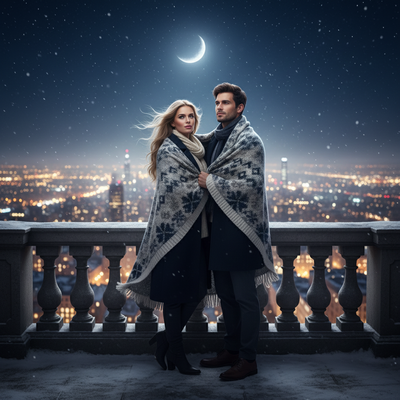
Create beautiful Christmas pictures with our Starlit Balcony – Night Before Christmas style.
The magic of Christmas is best captured when emotions brim with excitement and warmth, especially as you gaze over a city illuminated by the glow of festive cheer. Imagine a world where you and your loved ones are enveloped in a dreamy winter night, captured perfectly by the AI Christmas Photo Studio. This studio offers an innovative way to transform cherished moments into cinematic Christmas pictures that turn into timeless memories. Picture yourself on a starlit balcony, the city below twinkling with hope and joy, as snowflakes gently dance in the cold breeze. As you wrap yourself in your favorite blanket, the scene is set for a heartfelt portrayal of the night before Christmas, one that can become the most treasured Christmas wallpaper or an unforgettable Christmas card.
Experience the Magic of a Christmas Night Landscape
Your Christmas photos deserve to be as enchanting as the memories you're capturing. The AI Christmas Photo Studio brings this to life with its ability to create a breathtaking starlit balcony scene. This isn't just another ordinary snapshot; it's a cinematic scene showcasing you bathed in soft moonlight and golden city reflections. Imagine standing against a backdrop of twinkling city lights, with a snowy landscape stretching into the horizon. These Christmas pictures are more than images; they're windows into a world filled with love, anticipation, and wonder.
Perfect Wardrobe Choices Enhance the Experience
Fashion and festivity go hand in hand, especially in your AI Christmas Photo Studio sessions. The wardrobe, featuring dark winter coats, knit scarves, and cozy layers, adds an elegant touch to your Christmas photos. Natural tones and subtle evening makeup elevate the emotional feel, highlighting the warmth of the moment. As you stand on the balcony, wrapped together in a shared blanket, your attire not only provides warmth but complements the dreamy, peaceful essence of the night. These thoughtful choices make for Christmas pictures that evoke a timeless appeal.
Lighting: Setting the Mood for Unforgettable Photos
The magic of the AI Christmas Photo Studio lies in its ability to use lighting effectively, ensuring your Christmas photos capture the mood perfectly. The play of soft moonlight intertwined with the city's golden glow sets an emotional, serene backdrop for your photo session. A shallow depth of field adds an artistic touch, drawing the eye directly to you and your loved ones while the cityscape blurs softly behind. Whether you use these images as Christmas wallpaper or a Christmas card, the lighting keeps each photo peaceful and full of Christmas Eve anticipation.
Create Cherished Holiday Memories
In the hustle before Christmas, taking time to capture genuine moments can be overlooked. With the AI Christmas Photo Studio, these moments are preserved in a way that feels personal and heartfelt. The starlit balcony setup is the perfect setting for Christmas pictures that tell a story and capture your holiday spirit, whether as a wallpaper or a card sent to loved ones.
What makes this style different from other Christmas photo styles?
Most Christmas photo styles lean on daytime snow scenes or indoor fireplace settings. Starlit Balcony – Night Before Christmas instead builds a nighttime, cinematic mood using a blurred city skyline, cool moonlight, and warm window glow as contrasting light sources. The shallow depth of field and quiet balcony setting give it a more reflective, romantic tone than brighter, busier holiday scenes.
What photo should you upload for the best result?
A clear, front-facing photo with even lighting and a visible face works best. PiXmas uses one uploaded photo to build the entire nighttime scene, so avoid heavy shadows, sunglasses, or busy backgrounds that could distract the AI from your features. A solo or couple photo tends to translate most cleanly into the balcony composition.
Who is this Christmas photo style best for?
This style suits couples wanting a quiet, romantic holiday portrait, individuals who want a moody city-night keepsake, and anyone sending a Christmas card with a skyline backdrop instead of a traditional snowy yard. It also works well for people who live in or love cities and want that reflected in their holiday imagery.
How does PiXmas compare to a photographer or DIY setup?
- Google’s Holiday Trends reports that many Christmas‑related queries in the US, including decorating and baking topics, spike each December, illustrating that demand for Christmas imagery and content concentrates late in the year. (Google – Holiday Trends (Year in Search 2025), 2025)
- Photography educators using Google Trends report that searches for terms like “Christmas card photos” remain fairly constant through much of the year, then trend upward from September or October and spike in December. (Tech Photo Guy – Google Trends for Photographers, 2018)
- A general guide to using Google Trends recommends setting multi‑year ranges to spot seasonality, noting that Christmas‑related terms consistently show seasonal spikes that can guide when to publish holiday photo content. (Cemoh – How to Use Google Trends: A Complete Guide, 2026)
Limitations
Starlit Balcony – Night Before Christmas produces an AI-generated stylized image, not a physical photo taken on a real rooftop or balcony. The skyline, moonlight, and blanket details are artistic interpretations rather than an exact replica of any real location. Photos with several faces or group shots may render with less consistency than a solo or couple photo, so expect the best detail accuracy with fewer subjects. Results can vary based on the clarity and angle of your original photo.
For a fast, cinematic Christmas Eve portrait built from one phone photo, PiXmas keeps the process simple through its iOS app without a real balcony, blanket, or nighttime shoot required.
Starlit Balcony – Night Before Christmas turns one everyday photo into a moody, cinematic holiday portrait, and PiXmas makes the process quick, phone-based, and free of any real nighttime photo shoot.
Frequently asked questions
What is the Starlit Balcony – Night Before Christmas style?
It is an AI Christmas photo style available in PiXmas that places you on a moonlit balcony overlooking a glowing city skyline, dressed in cozy winter wardrobe, to create a cinematic Christmas Eve portrait from your uploaded photo.
Do I need a real balcony or city view for this photo?
No. The balcony, skyline, snowfall, and lighting are all generated by the app around your uploaded photo, so you do not need to visit a rooftop, city view, or set up any props yourself.
Can I use this style for a Christmas card?
Yes. The Starlit Balcony scene works well as a printed or digital Christmas card thanks to its cinematic lighting and clean composition, and PiXmas outputs are sized for easy sharing or printing.
How many photos do I need to upload?
PiXmas generates this scene from one uploaded photo. A single clear, well-lit image of your face is enough for the app to build the full nighttime balcony portrait.
Will this style work well with a group photo?
Solo and couple photos tend to produce the most consistent results. Group photos with several faces may render with slightly less accuracy per person, since the AI has more detail to interpret at once.
Can I turn this into a Christmas wallpaper?
Yes. Many people save their Starlit Balcony image as a phone or desktop wallpaper. PiXmas produces a finished image that works for wallpapers, cards, or holiday keepsakes without extra editing.