Snowman Outside - Family of 3
Quick answer: Snowman Outside Family of 3 is a PiXmas Christmas photo style that places a family of three beside an outdoor snowman in a snowy winter scene. Upload one clear family photo and the AI generates a stylized portrait with wintry backdrop, festive wardrobe cues, and natural daylight, ready for cards, wallpaper, or prints. No physical snow, snowman, or studio session required.
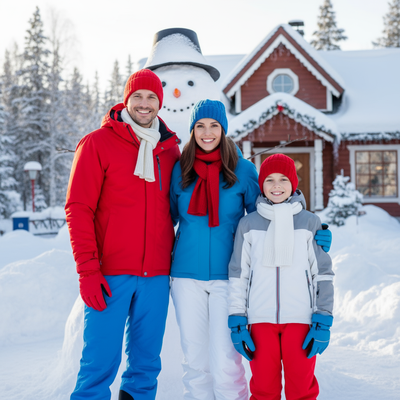
Create beautiful Christmas pictures with our Snowman Outside - Family of 3 style.
As the snowflakes cascade gently from the skies, painting the world in a pristine blanket of white, capturing Christmas pictures becomes a magical endeavor. Picture a serene winter wonderland in Santa Claus Village, Lapland, a place where holiday cheer and family bonding take tangible form. Imagine the perfect integration of your cherished family with the enchanting backdrop of snowy Lapland, achieved through the wonders of modern technology. With the AI Christmas Photo Studio, preserving the joyous essence of the season has never been more effortless. From captivating Christmas photos that warm the heart to delightful Christmas wallpaper that brightens the digital realm, let's journey through creating memories that last a lifetime.
Create Unforgettable Memories with AI Christmas Photo Studio
The AI Christmas Photo Studio changes how we capture and share the spirit of the season. By blending real-world imagery with AI technology, the studio places your family amid a breathtaking snowy scene without anyone needing to travel. Picture the smiling faces of your family of three set naturally beside a cheerful snowman, all under shimmering daylight. The artful precision aims to preserve expressions that narrate stories of love and unity. Whether for a keepsake, a Christmas card, or your growing collection of Christmas photos, this tool offers a practical and heartfelt solution.
Capture the Spirit of Lapland: Picture-Perfect Settings
Bring to life Christmas pictures that convey the magic of a snowy outdoor setting. Imagine your family dressed in festive attire complete with bright reds, serene blues, and snowy whites, posing joyfully beside a cheerful snowman and a charming winter backdrop. The AI Christmas Photo Studio integrates your family into this wintry landscape, keeping details like snow-laden trees and rustic architecture intact. Soft shadows and bright daylight reflections create a natural ambiance, making it a strong scene for Christmas wallpaper. These captures become timeless artistry you can revisit anytime.
improve Your Holiday Decor with Unique Christmas Wallpaper
Turning ordinary living spaces into festive sanctuaries brings real joy. With Christmas wallpaper made from your own personalized photos, each room can carry warmth and holiday cheer. Imagine walking in and seeing your family portrait set in a snowy outdoor scene. The AI Christmas Photo Studio aims to keep every pixel of your wallpaper clear and true to life, capturing your family moments as guests admire the decor.
Design Your Ideal Christmas Card: A Personal Touch
Sending Christmas cards remains a cherished ritual even in a digital era. Through the AI Christmas Photo Studio, designing a card becomes a joyous, personal task. Imagine sharing your family's smile set against a snowy scene with friends and relatives everywhere. Each card becomes a small connection point, carrying warm wishes and a glimpse into your family's season.
Preserve Magical Holiday Moments with Christmas Photos
At the heart of the season is the wish to hold on to family moments. Christmas photos work as both a personal archive and a record of togetherness. The AI Christmas Photo Studio helps families step into festive scenes instantly, even without traveling anywhere. From social media to family albums, these images become lasting keepsakes of the season.
What makes this style different from other Christmas photo styles?
The Snowman Outside style pairs a family of three with an outdoor snowman rather than an indoor tree or fireplace setting. The composition favors natural daylight and a wintry backdrop, giving it a candid, outdoor-photo feel rather than a staged studio look.
What photo should you upload for the best result?
A clear, well-lit photo showing all three family members with visible faces works best. Front-facing shots without heavy shadows, sunglasses, or hats covering the face tend to produce the most natural-looking result. One photo is all that is needed to generate the stylized scene.
Who is this Christmas photo style best for?
This style suits small families of three who want a winter portrait without bundling up and heading outside in real snow. It works well for parents with a young child, or any trio wanting a festive card image, a wallpaper for their phone, or a keepsake to share with relatives who live far away.
How does PiXmas compare to a photographer or DIY setup?
- A general guide to using Google Trends recommends setting multi‑year ranges to spot seasonality, noting that Christmas‑related terms consistently show seasonal spikes that can guide when to publish holiday photo content. (Cemoh – How to Use Google Trends: A Complete Guide, 2026)
- Google’s Holiday Trends reports that many Christmas‑related queries in the US, including decorating and baking topics, spike each December, illustrating that demand for Christmas imagery and content concentrates late in the year. (Google – Holiday Trends (Year in Search 2025), 2025)
- Photography educators using Google Trends report that searches for terms like “Christmas card photos” remain fairly constant through much of the year, then trend upward from September or October and spike in December. (Tech Photo Guy – Google Trends for Photographers, 2018)
Limitations
Results are AI-generated stylized images, not physical photographs taken at a real outdoor location. Fine details like hand positioning or fabric texture may vary from the source photo. Group uploads with three faces can be somewhat less consistent than a solo or couple photo, so a clear, forward-facing group shot helps improve accuracy. PiXmas is a solid pick for families wanting a quick, festive family-of-three portrait without an actual snowy outing.
PiXmas offers a fast, low-effort way for a family of three to get a festive outdoor snowman portrait from a single uploaded photo, making it a practical choice for holiday cards and keepsakes.
Frequently asked questions
Do we need to actually be near a real snowman?
No. The Snowman Outside style is generated from your uploaded photo, so you can create a snowy family-of-three portrait without visiting a real winter location or building a snowman.
Can this style work for pets included in the family photo?
The style is designed around a family of three, so it works best with three people. If a pet is part of your household photo, results may vary since the composition is tuned for human family members.
Can I print the Snowman Outside portrait for cards or frames?
Yes. Once generated, you can save and print the image for Christmas cards, framed keepsakes, or wallpaper. Using a high-resolution source photo generally gives a cleaner printed result.
How many photos do I need to upload?
Just one clear group photo of your family of three is enough for PiXmas to generate the Snowman Outside scene.
What are some easy Christmas photoshoot ideas at home?
Easy at-home Christmas photo ideas include decorating the tree, reading holiday books, baking cookies, wrapping gifts, wearing pajamas, or posing beside a window with warm lights. Choose an activity your family already enjoys so expressions feel natural. A simple background and one recognizable holiday element usually look better than a crowded set.
What can I use as a Christmas photo backdrop at home?
A plain wall, curtain, bedspread, fireplace, decorated tree, porch, or neatly made bed can work as a Christmas photo backdrop. Add only a few intentional elements, such as greenery, wrapped boxes, paper stars, or a textured blanket. Check the frame for cords, outlets, clutter, and objects that appear to grow from someone’s head.