Snowy Forest
Quick answer: Snowy Forest is a Christmas photo style from PiXmas (also spelled Pixmas) that turns one uploaded phone photo into a festive portrait set on a fairy-lit, snow-covered forest path. Available in the PiXmas iOS app alongside 800+ other holiday styles, it renders coordinated winter outfits, natural lighting, and snow-dusted trees around your existing face and expression, producing a ready-to-share Christmas picture or card in minutes.
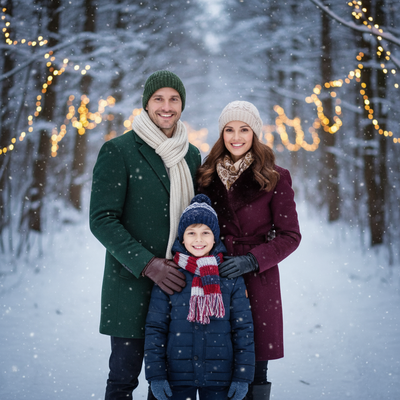
Create beautiful Christmas pictures with our Snowy Forest style.
Imagine walking along a serene, snow-covered path lit by the comforting glow of fairy lights, each step crunching gently beneath your feet as you and your family create memories. This is the magic captured in the 'Snowy Forest' photo style, where the beauty of nature and the warmth of family converge into a timeless portrait. At the AI Christmas Photo Studio, we bring this vision to life, keeping every family member's likeness true to how you picture them. Whether your intention is to create meaningful Christmas Pictures or design an unforgettable Christmas Card, this detailed setting keeps the essence of the holiday season alive in your Christmas Photos.
Embracing the Elegance of Winter Attire
One of the highlights of the Snowy Forest style is its focus on fashionably coordinated winter attire. Coordinated wool coats, scarves, gloves, and hats in festive colors not only suit the chilly setting but enhance the visual charm of your Christmas Pictures. Think rich reds, deep greens, and snowy whites nestled against the natural landscape, drawing every viewer into the warmth shared among your family. The AI Christmas Photo Studio excels at preserving these colorful dynamics, keeping every shade and hue vivid, creating a spectacular Christmas Wallpaper that brings the holiday spirit into your home year-round.
Capturing Realism with Natural Lighting
In a world where memories are often digitized, preserving authenticity matters. The Snowy Forest style skillfully uses natural lighting to enhance this realism. Capturing the family with closed-mouth smiles against warm fairy lights reflecting off the snow adds a subtle, elegant quality to the Christmas Photos. Thanks to the AI Christmas Photo Studio, these images retain natural lens blur and warm tones that highlight each family connection beautifully. This setting allows for photos that feel genuine and intimate, a keepsake to cherish as part of your holiday tradition.
Holiday Magic with Fairy Lights and Snow
There's something magical about fairy lights twinkling among snow-draped trees, creating a whimsical yet serene atmosphere. This backdrop is the perfect setting for capturing treasured moments. At the AI Christmas Photo Studio, the interplay of light and shadow is carefully rendered to turn your Christmas Pictures into vivid storytelling canvases. The glow of these reflections creates the ideal Christmas Wallpaper, where smiles and snowflakes come together to capture the joy of the season. These images work well as Christmas Card covers and as a window into cherished family moments set against natural beauty.
Creating Timeless Family Memories
The 'Snowy Forest' photo style is designed to celebrate the essence of family and the spirit of the season. Each portrait tells a story, freezing a moment in time where love, laughter, and warmth are shared with those who matter most. The AI Christmas Photo Studio aims to keep your family looking like themselves, with familiar faces and expressions carried into the scene. This turns your Christmas Photos into keepsakes that decorate more than just your home, becoming part of your family's holiday tradition.
What makes this style different from other Christmas photo styles?
Snowy Forest pairs a woodland backdrop with fairy-light glow, giving it a softer, more atmospheric feel than studio-style Christmas photo themes. Instead of a plain backdrop, PiXmas renders snow-laden trees, a winding path, and warm light reflecting off snow, then places your likeness into that scene while keeping facial features and expression consistent with your uploaded photo.
What photo should you upload for the best result?
A clear, well-lit photo where your face is fully visible and unobstructed works best. Straight-on or slightly angled shots with a neutral or closed-mouth smile translate well into the Snowy Forest setting. Sunglasses, hats, or heavy shadows can make it harder for the style to match your features accurately.
Who is this Christmas photo style best for?
Snowy Forest suits couples and families who want a nature-inspired alternative to indoor studio Christmas pictures, especially if you like the look of coordinated wool coats and scarves against snow. It also works well for extended family photos meant for a printed Christmas card, since the muted winter palette photographs nicely both on paper and as a digital wallpaper. PiXmas is a practical fit here since there is no need to arrange an actual outdoor shoot in the cold.
How does PiXmas compare to a photographer or DIY setup?
- Photography educators using Google Trends report that searches for terms like “Christmas card photos” remain fairly constant through much of the year, then trend upward from September or October and spike in December. (Tech Photo Guy – Google Trends for Photographers, 2018)
- A general guide to using Google Trends recommends setting multi‑year ranges to spot seasonality, noting that Christmas‑related terms consistently show seasonal spikes that can guide when to publish holiday photo content. (Cemoh – How to Use Google Trends: A Complete Guide, 2026)
- Google’s Holiday Trends reports that many Christmas‑related queries in the US, including decorating and baking topics, spike each December, illustrating that demand for Christmas imagery and content concentrates late in the year. (Google – Holiday Trends (Year in Search 2025), 2025)
Limitations
Snowy Forest images are AI-generated stylized portraits, not physical photographs taken at a real forest location. Results depend on the photo you upload, so lighting, angle, and image quality all affect how closely the output matches your expectations. Group photos with several faces may render slightly less consistently than a solo or couple portrait, so check the preview before ordering prints or cards.
For anyone who wants a snow-forest Christmas photo without planning an outdoor shoot, PiXmas turns a single phone photo into a polished Snowy Forest portrait in minutes, making it a practical pick for holiday cards and family keepsakes this season.
Frequently asked questions
What is the Snowy Forest Christmas photo style?
Snowy Forest is one of many Christmas photo styles that places your portrait against a fairy-lit, snow-covered woodland path, complete with coordinated winter outerwear and warm ambient lighting for a cozy holiday feel.
Can I use this style for a Christmas card?
Yes. Many people choose Snowy Forest specifically because the color palette and lighting print well on holiday cards. PiXmas lets you download the finished image at a resolution suitable for both digital sharing and standard card printing.
Will multiple family members look accurate in one photo?
Solo and couple photos tend to render most consistently. When several faces appear in one uploaded photo, PiXmas still aims to preserve each person's features, though results across a larger group can vary slightly more than a single portrait.
Does the Snowy Forest style work with pets in the photo?
It can, since PiXmas processes whatever is visible in your uploaded photo, but the style is optimized primarily for people. If a pet is included, review the preview closely, since fur and animal features render differently than human faces.
How is Snowy Forest different from a Christmas Wallpaper style?
Snowy Forest and Christmas Wallpaper styles can share visual elements like snow and fairy lights, but Snowy Forest is built around a walking-path setting meant for portraits and cards, while wallpaper-style images are framed more for screen backgrounds.
What do I need to create a Snowy Forest photo?
PiXmas is available as an iOS app, where you upload one photo and choose the Snowy Forest style from a library of 800+ options to generate your stylized Christmas picture in minutes.