Snow Creation – Gentle Play Diptych
Quick answer: Snow Creation – Gentle Play Diptych is an AI-generated Christmas photo style that turns one uploaded photo into a two-panel snow scene: a medium shot of subjects shaping a small snow figure at a rustic table, paired with a close-up of a gentle, snow-flecked smile. PiXmas (also spelled Pixmas) creates this from a single phone photo in its iOS app, ideal for Christmas cards and wallpaper.
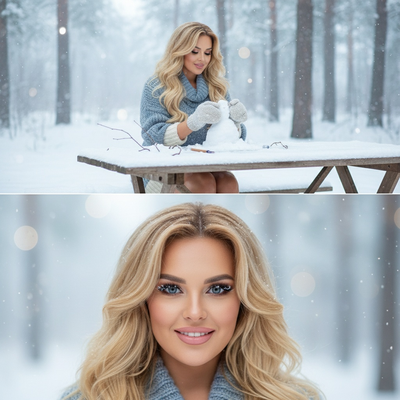
Create beautiful Christmas pictures with our Snow Creation – Gentle Play Diptych style.
As the holiday season encases everything in a sparkling layer of snow, capturing these moments in a unique and beautiful way becomes a priority for many. AI Christmas Photo Studio introduces the enchanting Snow Creation – Gentle Play Diptych style, which brings an artistic touch to your cherished winter memories. This style transforms your Christmas photos into a serene, cinematic winter scene, weaving the magic of a snowy day into lasting visual keepsakes. Whether you're crafting the perfect Christmas card or seeking that ideal Christmas wallpaper, this diptych offers a tender, timeless look at the heartwarming activities of the season.
Capture the Essence of Christmas with AI Christmas Photo Studio
The holiday season is brimming with picturesque moments, and the AI Christmas Photo Studio makes it easier than ever to preserve these precious memories. By utilizing the Snow Creation – Gentle Play Diptych, a single photo or group image is transformed into a work of art. This style features subjects either building a small snow figure at a rustic, snow-covered table when alone, or sharing in a quiet, snowy interaction when in a group. The diptych format beautifully showcases two perspectives: a medium shot of the scene and a close-up capturing every detail of emotion. It's more than just Christmas pictures; it's a whole new way to relive those serene winter days.
Experience the Tranquility of Winter through Cinematic Imagery
There's something uniquely tranquil about watching snow gently fall, creating a quiet landscape. The Snow Creation – Gentle Play Diptych captures this serenity perfectly. The top frame offers a medium shot where subjects are seen crafting a snow figure, focusing on the activity while enveloping viewers in the soothing ambiance of a snow-laden forest. Each Christmas photo crafted by the AI Christmas Photo Studio holds a calmness that invites you to pause and reflect on the peacefulness of winter. This photographic style is designed to capture a tender, wholesome moment perfect for Christmas wallpapers or family albums.
Create Lasting Memories with Personalized Christmas Cards
The art of preserving emotions and memories in Christmas cards is beautifully reimagined with this photographic style. By offering a unique diptych perspective, your cards transcend the typical, giving recipients a heartfelt piece of your holiday spirit. The bottom frame brings a close-up of the subject's gentle smile, their features softly adorned with snowflakes. It transforms the entire scene into a heartwarming piece, perfect for sharing with loved ones. Make your Christmas pictures more than a visual; make them a cherished story told through expressive imagery.
Practical Tips for Creating Stunning Snow-Covered Portraits
Whether you're a photographer or simply someone who loves taking Christmas photos, capturing that perfect snow-covered moment can be tricky. When using the Snow Creation – Gentle Play Diptych, consider these tips: favor a cold daylight tone to enhance the natural blue hues of snow, and embrace the soft diffused background created by a delicate snow haze. The AI Christmas Photo Studio automatically adjusts these elements to fit your uploaded photos, keeping the mood tranquil and authentic. By thoughtfully positioning your subjects and taking advantage of natural lighting, your Christmas wallpaper or family heirloom will carry winter's tranquil beauty.
With the Snow Creation – Gentle Play Diptych, capture the tenderness of winter's embrace in your Christmas pictures this year and let every image be a gentle reminder of the warmth and joy the holidays bring.
What makes this style different from other Christmas photo styles?
This style is built around a two-panel diptych, not a single frame. The wider shot sets the scene at a snowy table while the paired close-up isolates a quiet, expressive moment on the subject's face.
Instead of festive props or bright lighting, the palette leans on cold daylight tones and a soft snow haze in the background, giving it a calmer, more cinematic feel than typical Christmas card templates.
What photo should you upload for the best result?
A clear, well-lit photo where the face is unobstructed works best, since the close-up panel relies heavily on facial detail. Front-facing or slightly angled shots with minimal shadows tend to translate well into the cinematic winter tone.
PiXmas works from one uploaded photo, so there is no need for a snowy backdrop or winter clothing in the original image; the AI builds that environment around your subject.
Who is this Christmas photo style best for?
It suits solo portraits, couples, and small families who want a gentler, more reflective holiday image rather than a busy group scene. The quiet snow-figure activity also reads well for parent-and-child photos.
Because the diptych centers on one clear expression, it is less suited to large groups where every face needs equal focus in the close-up frame.
How does PiXmas compare to a photographer or DIY setup?
- Photography educators using Google Trends report that searches for terms like “Christmas card photos” remain fairly constant through much of the year, then trend upward from September or October and spike in December. (Tech Photo Guy – Google Trends for Photographers, 2018)
- Google’s Holiday Trends reports that many Christmas‑related queries in the US, including decorating and baking topics, spike each December, illustrating that demand for Christmas imagery and content concentrates late in the year. (Google – Holiday Trends (Year in Search 2025), 2025)
- A general guide to using Google Trends recommends setting multi‑year ranges to spot seasonality, noting that Christmas‑related terms consistently show seasonal spikes that can guide when to publish holiday photo content. (Cemoh – How to Use Google Trends: A Complete Guide, 2026)
Limitations
Results are AI-generated, stylized images and not physical photographs from a real snow shoot. Fine details like hand position or snow texture can vary between generations.
Photos with several faces may render less consistently than solo or couple uploads, since the AI has to balance detail across every subject in the close-up panel.
For anyone wanting a quieter, more cinematic take on a snowy Christmas photo, the Snow Creation – Gentle Play Diptych turns one phone photo into a two-panel keepsake in minutes through PiXmas, no snow gear or photographer required.
Frequently asked questions
What is the Snow Creation – Gentle Play Diptych style?
It's an AI Christmas photo style presented as two panels: a medium shot of subjects building a small snow figure at a rustic table, and a close-up of a gentle, snowflake-dusted smile. It's designed for a calm, cinematic winter feel.
Can I use this style for pets or is it people-only?
It's designed around human expressions in the close-up panel, so it works best with people. PiXmas offers other styles better suited to pet-focused Christmas photos if that's your goal.
What source photo works best for this diptych?
A clear, forward-facing photo with good lighting and an unobstructed face gives PiXmas the most detail to work with, especially since the close-up frame relies on facial expression to carry the mood.
Can I print this diptych as a Christmas card?
Yes, the two-panel format works well for printed Christmas cards and photo prints. Save the image at full resolution from the PiXmas app before sending it to a printer for the best result.
How many photos do I need to upload?
One photo is enough. PiXmas builds the full diptych, including the snowy table scene and the close-up expression, from that single uploaded image.
Will a group photo work for this style?
Small groups such as couples or parent-and-child pairs tend to render clearly. Larger groups may look less consistent in the close-up panel since only one expression can be the focal point.