Holiday Glamour Lights Christmas Pictures
Quick answer: Holiday Glamour Lights is a PiXmas AI Christmas photo style that places you on a wrapped gift box backdrop glowing with fairy lights and golden bokeh. Upload one photo and the app generates a photorealistic, elegant holiday portrait or family scene in red-and-gold styling, ready to use as a Christmas card or Christmas wallpaper without a studio session.
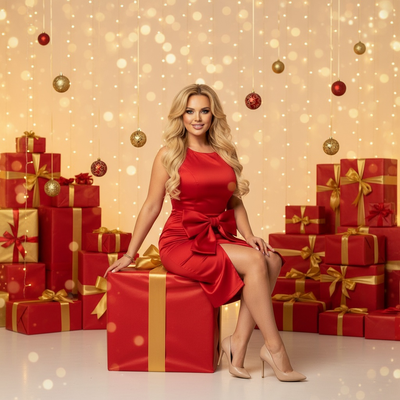
Create beautiful Christmas pictures with our Holiday Glamour Lights style.
As the festive season approaches, the allure of capturing the perfect Christmas moment becomes irresistible. Imagine encapsulating the warmth and joy of the season in a single photograph, a keepsake to treasure for years to come. The Holiday Glamour Lights style excels at exactly that, offering a picture-perfect blend of elegance and festivity. Using the AI Christmas Photo Studio, this style adapts to each unique portrait, creating Christmas Pictures that shine with the magic of the season. Whether capturing a solo moment or a family scene, Holiday Glamour Lights delivers festive elegance in every frame.
Transform Your Portraits with Holiday Glamour Lights
There's something wonderfully enchanting about the Holiday Glamour Lights style. When you upload a solo portrait, this setup transforms you into the star of your own Christmas wonderland. Seated gracefully atop a large, exquisitely wrapped gift box, the backdrop gleams with fairy lights and artfully arranged presents. The AI Christmas Photo Studio preserves photorealistic facial detail while adding a glamorous festive glow. A photo like this becomes more than a gallery addition; it turns into a keepsake worthy of being set as a Christmas Wallpaper on your devices.
Capture Family Moments with Elegance and Joy
Family gatherings during the holiday season are precious, and Holiday Glamour Lights offers a natural way to capture them. When couples or families are in the frame, the AI Christmas Photo Studio arranges each member while keeping expressions and interactions natural. The backdrop of red and gold presents with cascades of fairy lights results in Christmas Pictures that radiate warmth and togetherness. These elegantly composed Christmas Photos work well for social sharing or as a Christmas Card sent to family and friends.
Wardrobe and Styling: Effortlessly Festive
Dress to impress this holiday season with the suggested wardrobe for the Holiday Glamour Lights photoshoot. For solo portraits, a red satin bow dress paired with polished accessories gives an effortlessly chic look. Families and couples can coordinate with matching red festive outfits to reinforce the sense of unity in the scene. Styling here favors simplicity and elegance, with makeup that enhances natural features, supporting the timeless feel of the finished Christmas Photos.
Lighting and Mood: The Perfect Festive Ambiance
The magic of Christmas often lives in its twinkle, and the lighting of Holiday Glamour Lights captures that well. Soft studio light provides a glow reminiscent of the season, while golden bokeh in the background adds depth. This lighting treatment highlights joyful expressions and gives the finished Christmas Pictures an enchanting festive mood, well suited for a warm Christmas Wallpaper display.
What photo should you upload for the best result?
A clear, well-lit photo facing the camera works best for Holiday Glamour Lights. Solo portraits should show the face and shoulders without heavy shadows or sunglasses. For couples or family photos, choose a shot where everyone is visible and facing forward, since the AI relies on that source detail to place people naturally against the gift-box and fairy-light backdrop.
Who is this Christmas photo style best for?
Holiday Glamour Lights suits anyone who wants a polished, editorial-style holiday image rather than a casual snapshot. It works well for individuals creating a standalone holiday portrait, couples wanting a coordinated festive photo, and families looking for a single elegant image to use as a Christmas card. It is less about candid fun and more about a refined, glowing holiday moment.
How does PiXmas compare to a photographer or DIY setup?
- Photography educators using Google Trends report that searches for terms like “Christmas card photos” remain fairly constant through much of the year, then trend upward from September or October and spike in December. (Tech Photo Guy – Google Trends for Photographers, 2018)
- Google’s Holiday Trends reports that many Christmas‑related queries in the US, including decorating and baking topics, spike each December, illustrating that demand for Christmas imagery and content concentrates late in the year. (Google – Holiday Trends (Year in Search 2025), 2025)
- A general guide to using Google Trends recommends setting multi‑year ranges to spot seasonality, noting that Christmas‑related terms consistently show seasonal spikes that can guide when to publish holiday photo content. (Cemoh – How to Use Google Trends: A Complete Guide, 2026)
Limitations
Holiday Glamour Lights images are AI-generated stylized pictures, not physical photos taken on a real gift-box set with real fairy lights. The app reshapes an uploaded photo into this scene rather than capturing an actual environment. Group photos with several faces may render a little less consistently than solo or couple portraits, so a clear source image with visible faces helps PiXmas produce the most accurate result.
Holiday Glamour Lights is a strong pick for anyone wanting an elegant, editorial-style Christmas photo without booking a studio. Upload one photo to PiXmas and get a fairy-light, gift-box holiday portrait suited to cards, wallpaper, or family keepsakes.
Frequently asked questions
What is the Holiday Glamour Lights Christmas photo style?
It is an AI Christmas photo style available in PiXmas that places your uploaded photo on a wrapped gift-box backdrop surrounded by fairy lights and golden bokeh, styled with red-and-gold wardrobe for an elegant holiday portrait or family scene.
Can I turn a Holiday Glamour Lights photo into a Christmas card?
Yes. Many people use their Holiday Glamour Lights image as a Christmas card or holiday greeting since the composition and lighting are designed to read well in print or digital card formats.
Can I include pets in a Holiday Glamour Lights photo?
The style is designed primarily for solo, couple, and family portraits. A pet may appear if visible in your uploaded photo, but the scene and wardrobe styling are built around human subjects.
Will a group photo with several people work well in this style?
Group photos can work, though results with several faces may be a little less consistent than a solo portrait or couple photo. Uploading a clear, well-lit group photo with everyone facing forward gives PiXmas the best chance at an accurate render.
What source photo works best for this style?
A recent, well-lit photo where the face is clearly visible and unobstructed gives PiXmas the most accurate result. Avoid heavy shadows, sunglasses, or extreme angles for the cleanest Holiday Glamour Lights output.