Calendar Edition – Abstract New Year Cover Christmas Photo
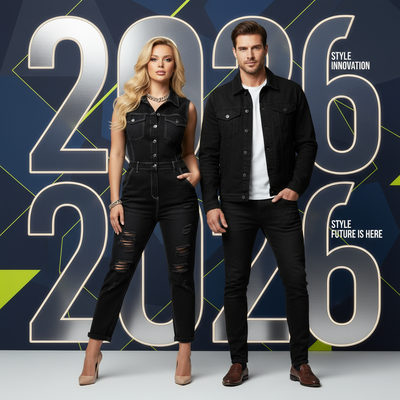
Quick answer: Calendar Edition – Abstract New Year Cover is a PiXmas AI Christmas photo style that blends a photorealistic portrait with bold '2026' typography and abstract backgrounds for a magazine-cover look. Upload a clear photo of yourself, a couple, or your family, and the app generates a stylized, cinematic image suited for Christmas cards, wallpapers, or New Year greetings.
Imagine stepping into a world where the energy of the New Year is captured in a single striking image. Welcome to the "Calendar Edition – Abstract New Year Cover" experience, a unique style offered by our AI Christmas Photo Studio. This Christmas photo style is designed to turn your holiday snapshots into magazine-worthy visuals that resonate with the spirit of 2026 and beyond. Whether you're looking to turn a family portrait into striking artwork or craft a memorable Christmas card, this style aims for a result that feels both timeless and modern.
Why Choose This Style?
The Calendar Edition – Abstract New Year Cover style captures the feeling of new beginnings, blending photorealistic portraits with artistic typography and abstract backgrounds. It's a celebration of individuality and togetherness, designed to make your Christmas pictures stand out. Using AI technology, each image is crafted with care so your features are integrated into the creative "2026" typography. Studio-style soft lighting and cinematic clarity highlight detail, resulting in bold images that convey elegance with a modern edge. This style suits anyone who wants a sophisticated statement this holiday season by turning an ordinary Christmas photo into a striking visual. Download our app: Christmas Photos.
Perfect For These Occasions
Whether you're preparing the annual family Christmas card, want a unique Christmas wallpaper, or need a standout image to ring in the New Year, the Calendar Edition is built for impactful visual storytelling. It suits family gatherings, individual portraits, or festive group photos, adapting to any number of subjects. It's a great choice for anyone who enjoys creativity and wants a touch of contemporary flair in their Christmas celebrations. Trendy denim or monochrome outfits enhance the chic magazine-style mood, making each image part of your holiday memories.
How to Create Your Calendar Edition
Creating your Calendar Edition image is simple with our AI Christmas Photo Studio. Upload one or more photos, and the technology integrates them into a 2026 typography layout with abstract backgrounds. The process lets you visualize and customize your image easily, aiming for a final result that meets your expectations. The AI system makes nuanced adjustments to maintain photorealistic, cinematic quality, so each photo becomes a personal keepsake.
As the holiday season approaches, take the opportunity to create an image that reflects the anticipation of 2026. Let the Calendar Edition become a centerpiece of your Christmas pictures this year.
What photo should you upload for the best result?
Choose a well-lit, front-facing photo where your face is clearly visible and unobstructed by hats, sunglasses, or heavy shadow. A recent solo or couple photo with a neutral or plain background tends to translate best into the abstract typography layout. For families, a photo where everyone is facing the camera helps the AI keep facial features consistent across the group.
How does PiXmas compare to a photographer or DIY setup?
- Photography educators using Google Trends report that searches for terms like “Christmas card photos” remain fairly constant through much of the year, then trend upward from September or October and spike in December. (Tech Photo Guy – Google Trends for Photographers, 2018)
- Google’s Holiday Trends reports that many Christmas‑related queries in the US, including decorating and baking topics, spike each December, illustrating that demand for Christmas imagery and content concentrates late in the year. (Google – Holiday Trends (Year in Search 2025), 2025)
- A general guide to using Google Trends recommends setting multi‑year ranges to spot seasonality, noting that Christmas‑related terms consistently show seasonal spikes that can guide when to publish holiday photo content. (Cemoh – How to Use Google Trends: A Complete Guide, 2026)
Limitations
This style produces an AI-generated stylized image, not a physical photo from a real photo shoot or printed calendar. Typography, backgrounds, and lighting are digitally composed, so results will look artistic rather than like a traditional photograph. Group photos with several faces may render with slightly less consistency than a solo or couple upload, since the AI has more detail to interpret at once. Outfit textures, jewelry, and fine background elements can occasionally shift from the source photo. PiXmas is a strong fit if you want a fast, creative Christmas image from your phone, but it is not a substitute for a professional print product.
For a fast, creative way to turn one phone photo into a magazine-style New Year cover image, PiXmas offers an accessible option without booking a studio shoot or designing typography yourself.
Frequently asked questions
What is the Calendar Edition – Abstract New Year Cover style?
It is a Christmas photo style that combines a photorealistic portrait with bold '2026' typography and abstract backgrounds, styled like a magazine or calendar cover. It works for solo portraits, couples, or family groups and is intended for Christmas cards, wallpapers, or New Year greetings.
What kind of source photo works best for this style?
A clear, well-lit photo with your face fully visible and a simple background works best. Avoid sunglasses, hats, or extreme angles, since the AI uses your uploaded photo as the basis for the final portrait and typography composition.
Can I include pets or a group in the Calendar Edition photo?
Yes, you can upload a photo that includes pets or multiple family members. Results with a single person or couple tend to be the most consistent, while larger groups may show more variation in facial detail across the abstract cover layout.
Can I turn the result into a printed calendar or Christmas card?
PiXmas generates the digital image file, which you can then download and use with a print-on-demand service or card provider of your choice. The app itself focuses on creating the stylized image rather than printing physical products.
Do I need design or editing skills to use this style?
No design experience is needed. You upload a photo in the PiXmas app and the AI handles the typography placement, abstract background, and lighting to produce the finished Calendar Edition look automatically.