Doorstep of Christmas Magic
Quick answer: Doorstep of Christmas Magic is a PiXmas (also spelled Pixmas) AI Christmas photo style that places your likeness on a snow-covered porch with a red door, garlands, glowing lanterns, and Santa arriving at the threshold. You upload one photo and the app applies the scene, keeping faces recognizable. It is one of 800+ styles available in the PiXmas iOS app on picsmas.com.
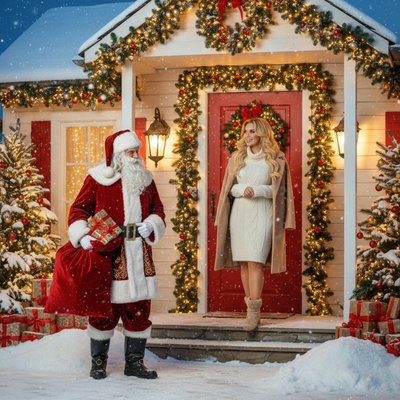
Create beautiful Christmas pictures with our Doorstep of Christmas Magic style.
As the holiday season nears, the magic of Christmas comes alive in countless ways. Imagine capturing that enchantment through Christmas pictures that not only tell a story but create a stunning visual journey. Enter the AI Christmas Photo Studio, where dreams meet dazzling reality in the 'Doorstep of Christmas Magic' style. Whether you want a personal keepsake or a family tribute, this photo style blends traditional charm with modern technology to transform your cherished memories into a picturesque winter wonderland, perfect for a Christmas card.
Capture the Essence of Christmas with AI
The AI Christmas Photo Studio offers an extraordinary opportunity to encapsulate festive joy in each Christmas photo. With its technology, it adapts your photo into the scenic backdrop of a quaint snow-covered home with Santa himself approaching your doorway, ready to deliver the essence of Yuletide. The studio preserves the faces and proportions of subjects, making sure each person stands out in a realistic portrayal. By choosing this style, you turn your photo into a vivid Christmas wallpaper or a keepsake print. You can create this look using the PiXmas app for iOS.
A Festive Scene Like No Other
Immerse yourself in the magical setting of a picturesque front porch, featuring a bright red door adorned with golden garlands, wreaths, and glowing lanterns. Snowflakes gently fall around Santa, enhancing the aura of festive wonder. The 'Doorstep of Christmas Magic' style provides a pristine canvas to highlight the joy of Christmas. The AI Christmas Photo Studio recreates this scene with detail, capturing the warmth of the moment with lantern glow reflecting on crisp snow, setting the mood for every Christmas photo.
Dressing for the Season
In capturing the magic of Christmas pictures, wardrobe plays a crucial role. Our style suggests dressing subjects in cozy winter attire, perhaps a cream or beige coat or a knit dress in warm, festive tones. Santa, in his iconic red velvet coat and black boots dusted with snow, completes the classic picture of holiday merriment. The AI Christmas Photo Studio renders clothing details with precision, so this style shines through in a Christmas card or as Christmas wallpaper.
The Magic of Light
A key part of creating an enchanting Christmas photo is the handling of light. The AI captures golden twilight lighting, offering a warm glow from door lanterns that dances across snowflakes in the air. This lighting, paired with a cinematic and nostalgic mood, makes your photo feel memorable and magical. Whether it graces your wall or becomes a gift, the image captures the feeling of holiday anticipation year after year.
Why Choose AI Christmas Photo Studio?
Choosing the AI Christmas Photo Studio means embracing a modern way of preserving holiday traditions. Its ability to create heartwarming Christmas pictures for each person or family means no two photos are alike. Use the result as a Christmas card or turn it into Christmas wallpaper for year-round cheer.
What makes this style different from other Christmas photo styles?
Most Santa-themed photo styles place Santa beside the subject in a static pose. Doorstep of Christmas Magic instead stages a moment of arrival: a red front door dressed in garlands and wreaths, lanterns lit against falling snow, and Santa approaching as if he has just stepped up to the porch. That sense of anticipation, rather than a simple portrait, is what sets the scene apart.
What photo should you upload for the best result?
Start with a single, clear photo where your face is well lit and facing forward, without sunglasses, heavy shadows, or a hat covering your hairline. Solo and couple photos tend to translate most cleanly onto the porch scene, since the app has fewer faces to match against the lantern-lit lighting of the backdrop.
Who is this Christmas photo style best for?
This style suits families who want to capture the feeling of a child waiting up for Santa, couples looking for a nostalgic holiday card image, and anyone who wants a warmer, story-driven alternative to a plain portrait. A pet standing near the door can also fit naturally into the scene, since the composition is already built around a doorstep moment.
How does PiXmas compare to a photographer or DIY porch setup?
- Google’s Holiday Trends reports that many Christmas‑related queries in the US, including decorating and baking topics, spike each December, illustrating that demand for Christmas imagery and content concentrates late in the year. (Google – Holiday Trends (Year in Search 2025), 2025)
- Photography educators using Google Trends report that searches for terms like “Christmas card photos” remain fairly constant through much of the year, then trend upward from September or October and spike in December. (Tech Photo Guy – Google Trends for Photographers, 2018)
- A general guide to using Google Trends recommends setting multi‑year ranges to spot seasonality, noting that Christmas‑related terms consistently show seasonal spikes that can guide when to publish holiday photo content. (Cemoh – How to Use Google Trends: A Complete Guide, 2026)
Limitations
Doorstep of Christmas Magic produces an AI-generated stylized image, not a physical photograph taken at a real decorated porch. Details like garland placement, lantern glow, or Santa's exact pose are generated by the app rather than staged in person. Photos with several faces in one frame may render less consistently than a solo or couple photo, so results can vary more as the group grows. PiXmas is a good fit for anyone who wants this doorstep scene without booking a photographer or decorating a real porch.
Doorstep of Christmas Magic turns one uploaded photo into a warm, story-driven Santa's-arrival scene, and PiXmas is a straightforward way to generate it without a photographer or real porch decorating.
Frequently asked questions
What is the Doorstep of Christmas Magic photo style?
It is a Christmas photo scene that places you on a snow-covered porch with a red door, garlands, wreaths, and glowing lanterns, with Santa approaching the doorway. The style is built around a moment of arrival rather than a standard posed portrait.
What kind of source photo do I need?
One clear, forward-facing photo with good lighting works best. Avoid sunglasses, heavy shadows, or extreme angles, since the app needs to see your face clearly to place it into the porch scene accurately.
Can I use this photo as a Christmas card?
Yes. Many PiXmas users generate this doorstep scene specifically to print as a Christmas card or turn into holiday wallpaper, since the warm lantern lighting and snowy porch fit that format well.
Does this style work with a photo of my pet?
A pet near the door can work well in this scene, since the composition is already framed around a doorstep. Results are generally more consistent with one person or one pet than with a large mixed group.
Can I upload a photo with multiple people?
Yes, though PiXmas tends to render solo and couple photos more consistently than large groups. If you upload several faces at once, some may come through less precisely than in a single-person or two-person photo.
Will the final image look like a real photo taken at my house?
No. The output is an AI-generated stylized image inspired by your uploaded photo, not an actual picture of your real front door or a real Santa visit. PiXmas is designed to create a festive keepsake image, not a literal photograph of your home.