Surprise from the Box – Magical Santa Drop (new) Christmas Pictures
Quick answer: Surprise from the Box – Magical Santa Drop is a PiXmas Christmas photo style that places you or your family in a glowing winter scene catching a magical gift from Santa, lit with soft golden light and floating snow. Upload one clear photo in the iOS app and the AI Christmas Photo Studio generates a cinematic, personalized holiday portrait ready for cards or wallpaper.
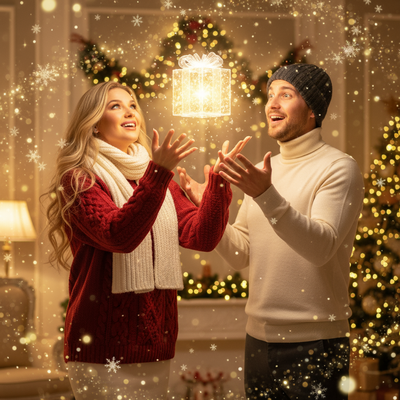
Create beautiful Christmas pictures with our Surprise from the Box – Magical Santa Drop (new) style.
The holiday season is right around the corner, and there's nothing quite like capturing the joy and magic of Christmas with stunning photographs. With the AI Christmas Photo Studio's new 'Surprise from the Box – Magical Santa Drop' style, you can create Christmas pictures that are truly one of a kind. Imagine yourself or your loved ones framed in a whimsical winter wonderland, catching a glowing gift from the hands of Santa himself. This is more than just a photo, it's a moment where the holiday magic comes alive, making it a perfect choice for a Christmas card or even a Christmas wallpaper to cherish for years to come.
How AI Christmas Photo Studio Transforms Your Holiday Memories
The AI Christmas Photo Studio changes the way we think about Christmas photos. Using AI technology, this photo studio adapts effortlessly to any uploaded photo, making each image unique and personalized. Whether you upload one or two people, the focus stays on them catching a magical gift glowing with a soft, golden light. The beauty of these Christmas pictures is in their ability to capture genuine expressions of surprise and delight, turning a simple portrait into an unforgettable slice of festive magic.
Create a Cinematic Experience in Your Christmas Pictures
What elevates your Christmas photos using the 'Magical Santa Drop' style is the photorealistic and cinematic quality it offers. Set against a festive interior enriched with floating snow and shimmering gift sparkles, your photos look straight out of a Christmas movie scene. The golden ambient highlights and soft cinematic lens glow enhance each frame, letting your Christmas photos reflect a mood of whimsy and wonder. Whether it's the gentle fall of snow or the warm glow of a magical gift, every element works together to create a cinematic result you'll be proud to share on a Christmas card or use as a Christmas wallpaper.
Wardrobe Choices That Accentuate the Magic
Part of what makes the AI Christmas Photo Studio experience so special is the integration of festive wardrobe options that complement the scene's magic. Red or white cozy sweaters paired with winter accessories are recommended, allowing the glow of the gift and the golden lighting to pop against these traditional Christmas colors. This wardrobe selection ensures your Christmas pictures not only capture the season's joy but also exude warmth and style. The choice of attire adds an extra layer of authenticity, wrapping your holiday memories in timeless elegance.
Bring Families Together with Group Christmas Photos
The 'Surprise from the Box – Magical Santa Drop' style is well suited to capturing family festivities and togetherness. If multiple people are uploaded into the scene, they are portrayed reacting joyously in the magical space, creating a dynamic and heartfelt Christmas photo. Imagine the delight of seeing everyone you love, caught in a moment of shared glee as the magical gift descends from above. This makes your photos ideal for a joyous group Christmas card that family and friends will treasure, or as a Christmas wallpaper that brightens your digital spaces throughout the season.
Preserve Your Holiday Spirit with Everlasting Christmas Photos
This holiday season, let your Christmas photos capture the wonder and enchantment of the festivities. With AI Christmas Photo Studio, you have the opportunity to create and preserve memories that feel personal and festive. Whether you're aiming for a single heartfelt portrait or a lively family scene, these Christmas pictures offer a tailor-made touch. Capturing the magic of a 'Magical Santa Drop' turns your holiday pictures into something you can look back on for years, evoking the warmth of Christmas every time you see them.
What makes this style different from other Christmas photo styles?
Most Christmas photo styles rely on static backdrops like a fireplace or tree. Magical Santa Drop instead builds a moment of action: a glowing gift caught mid-air, lit from within by warm golden light against a snow-filled scene. The lighting design leans on soft cinematic glow rather than flat studio lighting, which gives the final image a movie-still feel instead of a posed portrait feel.
What photo should you upload for the best result?
A clear, well-lit photo where the face is facing forward or at a slight angle tends to produce the strongest result, since the AI needs to read facial expression to match the surprised, joyful reaction the scene calls for. Photos with good lighting and minimal shadows on the face work better than dim or backlit selfies. For a solo shot or a couple, a chest-up or half-body photo gives the app enough detail to place you convincingly in the glowing scene.
Who is this Christmas photo style best for?
This style suits parents wanting a magical keepsake photo with their kids, especially for capturing a wide-eyed sense of wonder that mirrors a child's real reaction to Santa. It also works well for multi-generation family photos meant for a shared holiday card, and for couples who want a whimsical, story-like image instead of a traditional pose. Because the scene centers on surprise and joy, it is a strong match for families who want their Christmas picture to feel like a captured moment rather than a formal portrait.
How does PiXmas compare to a photographer or DIY setup?
- Google’s Holiday Trends reports that many Christmas‑related queries in the US, including decorating and baking topics, spike each December, illustrating that demand for Christmas imagery and content concentrates late in the year. (Google – Holiday Trends (Year in Search 2025), 2025)
- Photography educators using Google Trends report that searches for terms like “Christmas card photos” remain fairly constant through much of the year, then trend upward from September or October and spike in December. (Tech Photo Guy – Google Trends for Photographers, 2018)
- A general guide to using Google Trends recommends setting multi‑year ranges to spot seasonality, noting that Christmas‑related terms consistently show seasonal spikes that can guide when to publish holiday photo content. (Cemoh – How to Use Google Trends: A Complete Guide, 2026)
Limitations
Results are AI-generated stylized images, not physical photos taken on a real Santa Drop set, so details like hand position or gift shape may vary slightly between generations. Photos with several faces in one frame may render with somewhat less consistency than a solo or couple photo, since the AI is balancing more detail at once. Lighting, angle, and image quality of your original photo all influence how closely the final result matches your expectations, and outcomes can vary between uploads even with the same photo.
For families wanting a joyful, story-driven Santa moment rather than a static holiday portrait, PiXmas's Magical Santa Drop style turns a single uploaded photo into a cinematic keepsake worth sharing as a card or wallpaper.
Frequently asked questions
What is the Surprise from the Box – Magical Santa Drop style?
It is a Christmas photo style available in the AI Christmas Photo Studio where your uploaded photo is placed into a glowing winter scene, catching a magical gift from Santa. The scene features soft golden lighting, floating snow, and a cinematic, movie-like atmosphere.
Can I use this style for Christmas cards?
Yes, the finished image works well as a printed or digital Christmas card since it is a full portrait-style scene with festive lighting and a clear focal point. Many people also save it as a Christmas wallpaper for their phone or desktop.
Can pets be included in the Magical Santa Drop scene?
This style is designed primarily around people reacting to the falling gift, so results with pets have not been optimized and may look less consistent than a photo of a person or family. For best results, stick to human subjects for this particular scene.
How many people can be in one Magical Santa Drop photo?
You can upload a solo photo, a couple, or a small family group. PiXmas positions each person reacting to the glowing gift, though photos with just one or two people tend to render with the most consistent facial detail.
Do I need a special photo for the app to work?
No special setup is needed. A regular, clearly lit photo from your phone works fine, since PiXmas uses one uploaded image to build the entire Magical Santa Drop scene around your face and expression.
Why does the style recommend certain wardrobe colors?
Red and white sweaters or winter accessories are suggested because they contrast well against the golden gift glow and snowy scene, making the final PiXmas image feel more cohesive and festive rather than mismatched.