Countdown to Christmas 2026 Christmas Pictures
Quick answer: Countdown to Christmas 2026 is an AI Christmas photo style from PiXmas (also spelled Pixmas) that places you in a golden-lit city plaza beside a towering Christmas tree and glowing '2026' numerals. Upload one photo and the app generates an ultra-realistic portrait blending Christmas warmth with New Year anticipation, ideal for cards or wallpaper, using one of 800+ available styles.
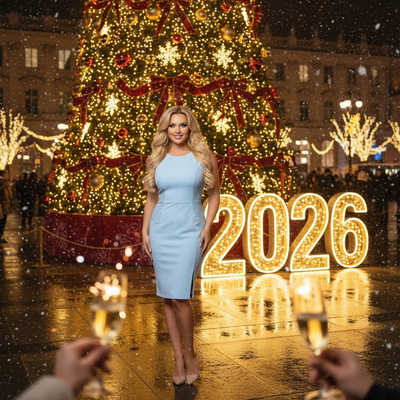
Create beautiful Christmas pictures with our Countdown to Christmas 2026 style.
As the festive season approaches, capturing the magic of Christmas becomes a cherished tradition. improve your holiday memories with the enchanting Countdown to Christmas 2026 photo style. Imagine capturing the joyous spirit of Christmas and the hopeful transition into the New Year amidst a grand, golden-lit outdoor setting. Whether you're looking to transform a single photo or include family and friends, this style aims for ultra-realistic Christmas pictures that preserve genuine expressions and memorable moments. Let our AI Christmas Photo Studio transport you to an elegant city plaza, where the glow of a majestic Christmas tree and illuminated '2026' numbers set a festive backdrop, ready to become the perfect Christmas card for your loved ones.
Experience the Magic with AI Christmas Photo Studio
The AI Christmas Photo Studio reimagines how we capture holiday moments. By blending ultra-realistic portrait styles with festive cheer, it offers a personalized touch that enhances the warmth of your Christmas photos. Imagine posing joyfully before a luminous Christmas display, every snowflake shimmer captured with cinematic detail. Whether you're opting for a solo glamour shot or a family portrait, the technology aims to preserve facial features, lighting, and realness, right down to the sparkle in your eyes or the gleam of a smile.
Create Unforgettable Holiday Moments
Picture yourself standing against a backdrop of breathtaking holiday beauty, a scene bustling with warmth and joy. The Countdown to Christmas 2026 photo style brings to life the glamour of a public city square, aglow with golden lights and the majestic presence of a towering Christmas tree. As snow drifts softly down, the environment captures the duality of Christmas comfort and New Year excitement. Together with the bright '2026' numerals, your Christmas photos echo the anticipation the holiday season promises. Enhance these moments with chic winter wear and festive accessories for added depth and elegance.
Transform Your Images into Christmas Wallpaper
Imagine turning your cherished holiday moments into stunning Christmas wallpaper for your home or devices. The AI Christmas Photo Studio aims for extraordinary detail and vibrancy, suited to personalized decoration. improve your space with Christmas pictures that feature cinematic depth, thanks to the soft blur of distant golden lights. The shallow depth of field keeps your loved ones as the focal point, creating wallpapers that are both heartwarming and visually striking.
Cinematic Depth for Timeless Christmas Cards
The charm of an elegant New Year's Eve filled with laughter and love, combined with the glow of Christmas lights, makes for a compelling Christmas card. With the Countdown to Christmas 2026 style, your holiday greetings come alive through exquisite bokeh from the lights, turning your Christmas photos into keepsakes that capture the season's warmth and the promise of the New Year ahead.
What makes this style different from other Christmas photo styles?
Most Christmas photo styles focus on cozy interiors or snowy cabins. Countdown to Christmas 2026 instead sets the scene in an open, golden-lit city plaza with a towering tree and glowing '2026' numerals, so the image reads as both a Christmas portrait and a New Year celebration.
This dual-holiday framing makes it a clear pick if you want one image that carries you from December straight into the new year.
What photo should you upload for the best result?
Choose a clear, well-lit photo where your face is fully visible and facing forward, without sunglasses, heavy shadows, or obstructions. A single recent photo works best for solo or couple portraits, since sharper source images translate into more accurate detail in the final render.
Who is this Christmas photo style best for?
Couples and families planning a joint Christmas and New Year card will get the most out of the plaza-and-numerals concept. It also suits friend groups wanting a festive NYE-themed keepsake, or anyone who wants their annual card to double as a nod to the upcoming year.
How does PiXmas compare to a photographer or DIY setup?
- Google’s Holiday Trends reports that many Christmas‑related queries in the US, including decorating and baking topics, spike each December, illustrating that demand for Christmas imagery and content concentrates late in the year. (Google – Holiday Trends (Year in Search 2025), 2025)
- Photography educators using Google Trends report that searches for terms like “Christmas card photos” remain fairly constant through much of the year, then trend upward from September or October and spike in December. (Tech Photo Guy – Google Trends for Photographers, 2018)
- A general guide to using Google Trends recommends setting multi‑year ranges to spot seasonality, noting that Christmas‑related terms consistently show seasonal spikes that can guide when to publish holiday photo content. (Cemoh – How to Use Google Trends: A Complete Guide, 2026)
Limitations
Results are AI-generated stylized images, not physical photos taken at a real plaza or event. The city backdrop, tree, and '2026' numerals are rendered artistically and won't match an actual location exactly.
Photos with several faces may render with slightly less consistency than solo or couple uploads, since the AI has more detail to interpret at once. PiXmas is a strong option if you want this festive New Year look without booking a shoot or building a set.
For anyone wanting a single Christmas card image that also celebrates the coming New Year, Countdown to Christmas 2026 offers a clear golden-plaza look, and PiXmas turns it into a finished portrait from just one uploaded photo in minutes.
Frequently asked questions
Is the city plaza in Countdown to Christmas 2026 a real place?
No. The golden-lit plaza, Christmas tree, and illuminated '2026' numerals are AI-generated backdrops inspired by classic festive city scenes, not a photo of an actual location.
Can I use this style for a printed Christmas card?
Yes, the finished image is a high-resolution photo you can download and send to a printer or photo card service, making it suitable for physical Christmas cards as well as digital sharing.
Do I need a professional photo to get good results?
No. A clear, well-lit phone photo with your face visible is enough. PiXmas works from a single uploaded photo rather than requiring a studio-quality source image.
Can I include my pet in this style?
This style is designed primarily around portrait subjects celebrating the New Year, so it works best with people. Pet-friendly Christmas styles are better suited if your pet is the main focus.
Will a group photo work well with this style?
Group photos can work, though results are generally more consistent with one or two clearly visible faces. For larger groups, choose a source photo where everyone's face is well lit and unobstructed.