City Christmas Glow
Quick answer: City Christmas Glow is a PiXmas AI photo style that places you in a festive, lit-up city scene with garlands, warm bokeh lights, and a soft snowfall backdrop. Built from one uploaded photo, it works for solo portraits, couples, or families and is generated in-app on iOS in minutes, with results suited for Christmas cards or holiday wallpaper.
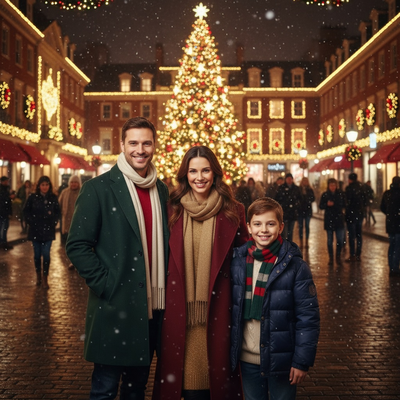
Create beautiful Christmas pictures with our City Christmas Glow style.
The enchanting allure of a city illuminated with Christmas lights can make the holiday season truly magical. Imagine capturing this breathtaking scene in a snapshot that reflects both the beauty of the city and the joy of holiday bustle. The City Christmas Glow style brings that vision to life, placing you amid a festive urban landscape surrounded by dazzling lights and a lively crowd. Inside the AI Christmas Photo Studio, you can create stunning Christmas Pictures that capture the joyful ambiance of the season. Each photograph tells the story of a city alive with holiday spirit, perfect for your next Christmas Card or as a personal Christmas Wallpaper.
Capture the Magic of City Lights
Creating memories with family and friends against a vibrant city setting has never been easier. The AI Christmas Photo Studio blends your likeness with the enchanting holiday atmosphere of a city aglow with thousands of warm lights. Picture strolling down a city street lined with garlands and sparkling decorations. Illuminated facades provide a warmly lit backdrop that is both elegant and inviting, while gently falling snow adds depth and realism to your Christmas Photos. Every element is designed so your holiday memories are captured with sophisticated grace and joy.
Create Unforgettable Family Portraits
Whether it's a cozy Christmas Card or a standout family portrait, the AI Christmas Photo Studio places you and your loved ones at the heart of festive revelry. As holiday cheer fills the air, your photo reveals you surrounded by the joyful presence of loved ones against a magical city backdrop. Our focus is on preserving the authenticity of each body proportion and facial feature, so your family is portrayed naturally and beautifully. Coordinating winter attire in holiday hues adds a cohesive, stylish touch, creating Christmas Pictures that express the season's warmth and unity.
The Cinematic Experience of Christmas
If you've ever wished for photographs that blend artistry with lifelike detail, this style delivers an ultra-realistic portrait polished with cinematic flair. The AI Christmas Photo Studio crafts each image with a realistic 8K tone, producing an immersive winter scene enriched with soft bokeh blur and elegant city lighting. As you stand prominently in the foreground, a softly blurred crowd and twinkling lights behind you create dynamic depth for your Christmas Pictures. These snapshots go beyond ordinary holiday photos, fit for a timeless Christmas Wallpaper.
Embrace the Spirit of the Season
There is something deeply satisfying about capturing your own joy and spirit in such an immersive setting. Among the lights and festivities, your unique holiday magic becomes vividly apparent. The AI Christmas Photo Studio aligns every part of the scene with feelings of joy, warmth, and sophistication. Whether you're a solo adventurer embracing the city lights alone or part of a bustling family gathered for a holiday portrait, Christmas Photos in this style become a lasting reminder of the season's beauty.
What makes this style different from other Christmas photo styles?
City Christmas Glow trades cozy indoor scenes for an urban night backdrop, with garland-strung storefronts, warm bokeh lights, and a softly blurred crowd behind the subject. The lighting is built around a cinematic 8K look rather than a flat studio flash, so highlights on wet pavement and string lights feel layered rather than pasted on. It suits anyone who wants a Christmas photo with movement and city energy instead of a fireplace or living room setting.
What photo should you upload for the best result?
A clear, forward-facing photo with even lighting gives PiXmas the most detail to work with. Shoulders-up or half-body shots tend to translate best into the city scene, since the AI needs to see your face and posture clearly to place you against the lit-up backdrop. Avoid sunglasses, heavy shadows, or photos where your face is turned far to one side, as these can affect how naturally you blend into the final scene.
Who is this Christmas photo style best for?
City Christmas Glow works well for couples wanting a date-night style holiday portrait, individuals who want a moodier, more editorial Christmas picture, and families looking for a card that feels different from the usual indoor tree photo. It also suits anyone who lives in or loves a big city and wants that setting reflected in their holiday photos without traveling anywhere.
How does PiXmas compare to a photographer or DIY setup?
- Photography educators using Google Trends report that searches for terms like “Christmas card photos” remain fairly constant through much of the year, then trend upward from September or October and spike in December. (Tech Photo Guy – Google Trends for Photographers, 2018)
- A general guide to using Google Trends recommends setting multi‑year ranges to spot seasonality, noting that Christmas‑related terms consistently show seasonal spikes that can guide when to publish holiday photo content. (Cemoh – How to Use Google Trends: A Complete Guide, 2026)
- Google’s Holiday Trends reports that many Christmas‑related queries in the US, including decorating and baking topics, spike each December, illustrating that demand for Christmas imagery and content concentrates late in the year. (Google – Holiday Trends (Year in Search 2025), 2025)
Limitations
City Christmas Glow images are AI-generated stylized photos, not real photographs taken on an actual city street. Backgrounds, crowds, and lighting are generated to match the style rather than captured on location. Photos with multiple faces, side angles, or busy group shots may render less consistently than a solo or couple portrait, so a clear, simple starting photo generally gives the most reliable result.
City Christmas Glow is a strong pick if you want a Christmas photo with urban energy and cinematic lighting instead of a traditional indoor setup, and PiXmas makes it accessible from a single uploaded photo on iOS.
Frequently asked questions
What is the City Christmas Glow style?
It's a Christmas photo style that places you in a festive, lit-up city scene with garlands, warm bokeh lights, gentle snowfall, and a softly blurred holiday crowd in the background, designed to feel cinematic rather than like a typical indoor holiday photo.
Can I use a City Christmas Glow photo for a Christmas card or wallpaper?
Yes. PiXmas generates high-resolution images sized well for printed Christmas cards or use as phone and desktop wallpaper, so the same photo can work across both formats without extra editing.
Can I include my partner or family members in one photo?
Yes, PiXmas can generate group scenes from a starting photo that includes multiple people. Results are generally most consistent with a smaller group photographed clearly and facing forward.
Do I need a professional photo to get started?
No. PiXmas is built around a one-photo workflow, so a clear phone photo with good lighting and a visible face is usually enough to generate the City Christmas Glow scene.
Will the city background look like a real photo or obviously artificial?
The style aims for a realistic, cinematic look with detailed lighting and depth, but it is still an AI-generated image. It is meant to look polished and photo-like, not identical to an actual photograph taken on location.
Can I control the outfit or colors shown in the final image?
The style applies coordinated winter outfits and holiday tones automatically to match the city scene. PiXmas focuses on delivering a finished look rather than manual wardrobe selection within the app.