New Year's Winter Royalty
Quick answer: New Year's Winter Royalty is a Christmas photo style that places you on a twilight balcony in a white fur coat and jeweled crown, with a glowing city skyline and falling snow behind you. PiXmas (also spelled Pixmas) creates this look from one uploaded photo using its iOS app, adapting the scene for solo portraits or group photos without a studio session.
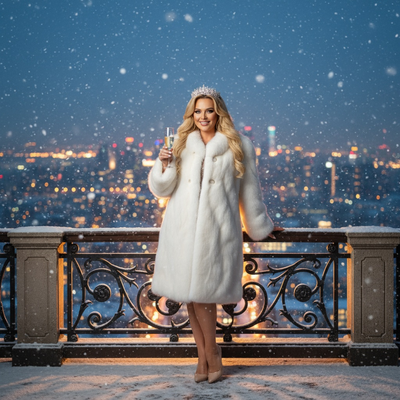
Create beautiful Christmas pictures with our New Year’s Winter Royalty style.
As the year comes to its breathtaking finale, what better way to mark these moments than with the New Year's Winter Royalty photo style? Imagine standing on a grand balcony, cloaked in an opulent white fur coat, a jeweled crown resting elegantly atop your head, as snowflakes drift gently around you. This isn't just a dream; it's a scene crafted by the AI Christmas Photo Studio. Whether you're alone or with loved ones, this majestic photograph adapts to the number of people in the shot, creating a keepsake that shines as brightly as the possibilities of the year ahead.
Set the Scene: A Regal Winter Wonderland
Picture yourself enveloped by the cool blue tones of twilight, reflecting off a dazzling city skyline. The AI Christmas Photo Studio crafts a cinematic setting where golden bokeh lights twinkle in the background, threading warmth into the chilly evening. This scene, reminiscent of iconic New Year's Eve film moments, serves as the backdrop for Christmas Pictures that feel a step above the ordinary. Whether it's a single portrait or a group celebration, gently falling snow adds a touch of magic that makes the photo feel fit for royalty.
Regal Wardrobe Fit for a New Year Monarch
Your journey into elegance begins with the wardrobe. The white fur coat is more than an accessory; it signals warmth and sophistication. Paired with a dazzling crown or tiara, it makes you the centerpiece of your Christmas card. The AI Christmas Photo Studio adapts whether you're holding a crystal glass of champagne or sharing the frame with loved ones, so both solo portraits and group shots keep their quiet dignity and celebratory energy.
Create Christmas Wallpaper That Captivates
A photograph this striking deserves to be seen often. Turn your Christmas Photos into Christmas Wallpaper that adorns your phone or desktop and enhances digital displays. The regal setting doesn't just make a good picture; it becomes a reminder of the celebrations and goals of the year to come, keeping the holiday spirit visible every time you glance at your screen.
Why Choose AI for Your Christmas Pictures?
Using the AI Christmas Photo Studio to create your Christmas Pictures offers a practical advantage over a traditional shoot. The adaptive nature of the process means that whether it's a solo portrait or a group photo, the result reflects the scale and grandeur of the moment you're going for, without booking a studio or sourcing a physical fur coat and crown.
What makes this style different from other Christmas photo styles?
Most Christmas photo styles lean on trees, fireplaces, or wrapped gifts. New Year's Winter Royalty instead builds a twilight cityscape with golden bokeh, a white fur coat, and a jeweled crown, so the mood reads more like a New Year's Eve gala than a holiday morning. PiXmas generates this scene from one uploaded photo, keeping the regal wardrobe and lighting consistent without a wardrobe fitting or location scout.
What photo should you upload for the best result?
A clear, front-facing photo with even lighting and an unobstructed face gives the AI the most detail to work with. Avoid sunglasses, heavy shadows across the face, or busy backgrounds that could confuse the crop. For a couple or small group portrait, a photo where everyone's face is visible and reasonably close in size tends to translate best into the finished scene.
Who is this Christmas photo style best for?
This style suits anyone marking a New Year's Eve milestone, from couples wanting an elegant joint portrait to individuals who want a single striking image for a profile photo or wall print. Friend groups planning a New Year's card or party invite can also use it, since the crown-and-fur-coat theme reads well as a shared, celebratory look rather than a strictly personal one.
How does PiXmas compare to a photographer or DIY setup?
- Photography educators using Google Trends report that searches for terms like “Christmas card photos” remain fairly constant through much of the year, then trend upward from September or October and spike in December. (Tech Photo Guy – Google Trends for Photographers, 2018)
- A general guide to using Google Trends recommends setting multi‑year ranges to spot seasonality, noting that Christmas‑related terms consistently show seasonal spikes that can guide when to publish holiday photo content. (Cemoh – How to Use Google Trends: A Complete Guide, 2026)
- Google’s Holiday Trends reports that many Christmas‑related queries in the US, including decorating and baking topics, spike each December, illustrating that demand for Christmas imagery and content concentrates late in the year. (Google – Holiday Trends (Year in Search 2025), 2025)
Limitations
Results are AI-generated stylized images, not physical photographs from a real balcony or studio set, and small details like jewelry or fabric texture can vary between generations. Group photos with several faces may come out slightly less consistent than a solo or couple portrait, so it helps to start with a clear source photo. As with any AI tool, outcomes can differ from the exact preview shown in marketing images.
For a New Year's Eve portrait with regal wardrobe and cinematic lighting, PiXmas turns one uploaded photo into a polished Winter Royalty scene without a studio booking, making it a practical pick for solo, couple, or group holiday pictures.
Frequently asked questions
What is the New Year's Winter Royalty Christmas photo style?
It's a Christmas photo style that places you on a balcony at twilight, wearing a white fur coat and jeweled crown, with a glowing city skyline and falling snow in the background. It's designed to feel like a regal New Year's Eve portrait rather than a typical holiday snapshot.
How many photos do I need to upload?
PiXmas works from one uploaded photo per person in the scene. For a solo portrait, upload one clear photo of yourself; for a couple or group shot, the app adapts the scene to include everyone pictured.
Can I use this style for a group or couple photo?
Yes, the New Year's Winter Royalty scene adapts to solo portraits, couples, and small groups. Uploading a photo where each face is clearly visible gives PiXmas the best chance of an accurate, consistent result.
Can I turn this photo into a Christmas card or wallpaper?
Yes, the finished New Year's Winter Royalty image works well as a printed Christmas card, a digital greeting, or wallpaper for your phone or desktop, since PiXmas outputs a high-resolution stylized photo.
How long does it take to get my Christmas photo back?
Generation typically takes just minutes inside the PiXmas app after you upload your source photo, much faster than scheduling and attending a traditional photo shoot.