Calendar Series – The 2026 Cover Classic Christmas Photo
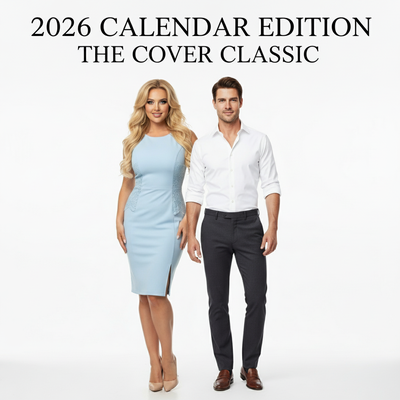
Quick answer: The Calendar Series – The 2026 Cover Classic is an AI Christmas photo style that places your portrait on the January page of a 2026 desk calendar, set in a modern home office with warm ambient lighting and smart casual wardrobe. Made from one uploaded photo using the PiXmas app, it suits solo portraits, couples, and families creating cards or wallpapers.
Imagine stepping into a modern home office, enveloped in warmth and soft daylight, where every detail hints at the festive spirit of the season. Welcome to the Calendar Series – The 2026 Cover Classic, a Christmas photo style that blends professional elegance with the homely comfort of the holidays. This style captures serene sophistication through a photorealistic cinematic RAW portrait, tailored to your vision. Whether it's a solo portrait or a group photo, the center of attention is always the 2026 desk calendar, spotlighting the faces you cherish most on its January cover.
Why Choose This Style?
The Calendar Series is not just about taking Christmas pictures, it's about crafting a narrative that bridges the professional with the personal. The setting within a cozy modern home office gives your photos a touch of everyday elegance. The smart casual wardrobe, blazers, knit tops, and elegant shirts, adds sophistication without overpowering the scene. Warm, ambient lighting evokes a sense of comfort and charm, making every image feel like a cinematic moment. For those seeking Christmas wallpaper or a photo for a card, this style offers a refreshing blend of polish and authenticity. The look is created through the PiXmas app.
Perfect For These Occasions
Whether you're sending out a Christmas card or refreshing the photos around your living room, the Calendar Series suits a range of occasions. It works well for annual holiday newsletters and for business Christmas cards that want a touch of modern elegance. Capture family portraits that glow with warmth, or create a solitary image that speaks of hope and new beginnings as the new year approaches. It's a strong choice for anyone looking to bridge personal milestones with festive celebration.
How to Create Your Calendar Series Photo
Creating a Calendar Series photo is straightforward with our AI Christmas Photo Studio. Simply upload one or several images, and the AI does the rest. The software adapts to your photo, placing your image on the January page of a 2026 desk calendar, set within a modern office with cozy accents. The lighting matters as much as the pose, bathing your portrait in soft daylight that enhances warmth, while interior tones keep the scene feeling snug. With wardrobe guidance built in, everyone in the photo can land the balance between professional and festive.
The process removes the usual friction of lighting or composition, giving you an expert-feeling result in just a few taps.
Start today and let your Christmas pictures carry the timeless elegance of the Calendar Series – The 2026 Cover Classic.
What photo should you upload for the best result?
A clear, front-facing photo with even lighting works best for the Calendar Series style. Choose an image where the face is not obscured by sunglasses, hats, or heavy shadow. For a group calendar cover, use a photo where everyone is visible and facing forward so the AI can place each person accurately on the January page. A well-lit, high-resolution photo per person gives PiXmas the clearest reference to work from.
Who is this Christmas photo style best for?
The Calendar Series suits professionals who want a holiday card that also nods to a fresh year ahead, since the desk calendar concept doubles as a subtle new-year message. Solo portraits work well for personal branding or a polished individual greeting, while couples can use the style for a shared new-chapter theme. Families with older kids or teens often like the smart casual wardrobe because it reads as put-together without feeling overly formal. It is less suited to costumed or whimsical holiday looks, since the aesthetic leans toward modern office elegance rather than traditional festive scenes.
How does PiXmas compare to a photographer or DIY setup?
- Photography educators using Google Trends report that searches for terms like “Christmas card photos” remain fairly constant through much of the year, then trend upward from September or October and spike in December. (Tech Photo Guy – Google Trends for Photographers, 2018)
- Google’s Holiday Trends reports that many Christmas‑related queries in the US, including decorating and baking topics, spike each December, illustrating that demand for Christmas imagery and content concentrates late in the year. (Google – Holiday Trends (Year in Search 2025), 2025)
- A general guide to using Google Trends recommends setting multi‑year ranges to spot seasonality, noting that Christmas‑related terms consistently show seasonal spikes that can guide when to publish holiday photo content. (Cemoh – How to Use Google Trends: A Complete Guide, 2026)
What are the limitations of this style?
The Calendar Series is an AI-generated stylized image, not a physical photo taken in a real office or with an actual printed calendar. Details like calendar text or numbers can occasionally render imperfectly, which is typical of AI image generation. Photos with several faces may look slightly less consistent than a solo portrait or a couple's photo, since the AI is balancing more detail across the frame. PiXmas turns that single photo into a stylized keepsake image rather than a substitute for a printed 2026 calendar.
For a Christmas photo that feels polished, personal, and a little forward-looking toward the new year, the Calendar Series – The 2026 Cover Classic made through PiXmas offers a fast, one-photo way to get that cinematic desk-calendar look without a real studio setup.
Frequently asked questions
What is the Calendar Series – The 2026 Cover Classic Christmas photo style?
It's an AI-generated Christmas photo style that places your portrait on the January page of a 2026 desk calendar, set in a modern home office with warm lighting and smart casual wardrobe. The result is a polished, cinematic-style image suited for cards, wallpapers, or holiday greetings.
What kind of source photo works best for this style?
A clear, forward-facing photo with even lighting and a visible face gives the most accurate result. Avoid heavy shadows, sunglasses, or extreme angles, and use a separate high-resolution photo for each person if creating a group calendar cover.
Can I use this style for a printed Christmas card?
Yes. Many people use the PiXmas-generated Calendar Series image as the centerpiece of a printed or digital Christmas card, since the desk calendar concept naturally reads as a new-year greeting alongside holiday wishes.
Will a group photo work as well as a solo portrait?
Solo and couple portraits tend to render the most consistent detail on the calendar cover. Group photos with several faces can still work but may show slightly more variation in likeness across the frame.
How many photos do I need to upload?
PiXmas creates the Calendar Series look from one uploaded photo per person. You do not need multiple angles or a professional photoshoot to get a stylized result.
Does the calendar show the year 2026 accurately?
The style is designed to depict a 2026 desk calendar with a January cover page, though as with any AI-generated image, small text or numbers may occasionally render imperfectly.