Christmas Harmony – Together at Home Christmas Photo
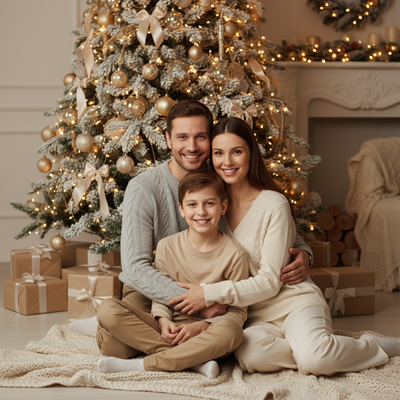
Quick answer: Christmas Harmony – Together at Home is a PiXmas AI photo style that turns a single family photo into a warm, cinematic Christmas portrait set beside a softly glowing tree, with cozy neutral wardrobe tones and gentle studio light. It is one of 800+ styles available in the PiXmas iOS app, built around a one-photo upload workflow that keeps facial detail intact while adding festive lighting and decor.
As the world whispers its softest songs of winter, let your heart find a place within the "Christmas Harmony – Together at Home" AI Christmas Photo Studio. This style is a celebration of the serene warmth and gentle love that define the holiday season. Imagine an intimate setting where the golden hue of a softly glowing Christmas tree casts a luminous glow over your cherished ones, capturing not just the image but the essence of togetherness. Whether it's a tender moment between a parent and child or the joyful embrace of a full family gathering, this photorealistic cinematic portraiture thrives on emotional connections, harmonizing the very spirit of Christmas.
Why Choose This Style?
The "Christmas Harmony – Together at Home" style is more than just a photograph; it is a heartfelt expression of unity and love. What makes this AI Christmas Photo Studio experience special is its ability to transform mere moments into cinematic artistry, while keeping the photorealistic quality that preserves every smile and twinkle authentically. This style gently balances the natural beauty of each subject with a touch of holiday magic, rendered with warm studio light and soft shadows. Visible snow textures on the decor add an atmospheric charm that echoes quiet winter nights spent in the company of loved ones.
Perfect For These Occasions
Let the magic of "Christmas Harmony – Together at Home" enhance your holiday celebrations, especially suited for creating cherished Christmas Cards and heartfelt Christmas Photos. This style is ideal for commemorating traditional family gatherings, the intimate moments shared between parents and children, or any occasion that calls for a personal, hand-crafted touch. It's also well suited to Christmas Wallpaper that carries a sense of warmth and comfort. Using the AI Christmas Photo Studio helps ensure each holiday greeting and memory is captured and wrapped in a narrative of love and cherished bonds.
How to Create Your Christmas Harmony
Embrace the simplicity of creating timeless Christmas Pictures with AI. Start by selecting your favorite family photo, whether it's a tender duet of adult and child or a joyful ensemble of relatives. The AI Christmas Photo Studio adapts your image into the harmonized holiday scene. Comfort and festivity meet in the wardrobe choice of neutral tones, think cozy knits in whites, beiges, and light browns. These subtle outfits complement the warm home tones and soft textures of the setting. Guided by AI, your Christmas photo comes alive with merry warmth and familial affection, without losing the facial details that make each captured moment uniquely yours.
Let the "Christmas Harmony – Together at Home" style turn your holiday photo into a scene of togetherness, blending artistic flair with heartfelt emotion for a timeless family keepsake.
What photo should you upload for the best result?
Choose a clear, well-lit photo where faces are visible and unobstructed by sunglasses, hats, or heavy shadow. A recent photo works best because PiXmas maps details from your single uploaded image onto the new holiday scene.
Solo portraits and couple photos tend to render with the most consistent detail. Family group photos also work well for this style, especially when everyone is facing the camera and evenly lit in the original shot.
Casual home photos, phone selfies, and simple portraits all work as source material. You do not need professional lighting or a formal pose beforehand, since the AI handles the festive lighting, tree glow, and wardrobe styling during processing.
How does PiXmas compare to a photographer or DIY setup?
- A general guide to using Google Trends recommends setting multi‑year ranges to spot seasonality, noting that Christmas‑related terms consistently show seasonal spikes that can guide when to publish holiday photo content. (Cemoh – How to Use Google Trends: A Complete Guide, 2026)
- Photography educators using Google Trends report that searches for terms like “Christmas card photos” remain fairly constant through much of the year, then trend upward from September or October and spike in December. (Tech Photo Guy – Google Trends for Photographers, 2018)
- Google’s Holiday Trends reports that many Christmas‑related queries in the US, including decorating and baking topics, spike each December, illustrating that demand for Christmas imagery and content concentrates late in the year. (Google – Holiday Trends (Year in Search 2025), 2025)
PiXmas skips the scheduling, travel, and prop-buying that a real photoshoot involves, which makes it a practical option for families who want a Christmas Harmony portrait without planning an outing.
What are the limitations of this style?
Christmas Harmony – Together at Home is an AI-generated stylized image, not a physical photo taken at a real home or studio session. The tree, lighting, and decor are rendered by the model rather than captured on location.
Photos with several faces, especially at odd angles or in low light, may render with slightly less consistency than a solo or couple photo. Reviewing the source photo for clear lighting before uploading helps improve the outcome.
Results depend on the quality of the original photo, and PiXmas cannot fully correct issues like heavy blur, extreme cropping, or obscured faces in the source image.
For families who want a cozy, unity-themed Christmas portrait without scheduling a shoot, PiXmas turns one home photo into the Christmas Harmony – Together at Home look in minutes, making it a fitting pick for cards, wallpaper, and holiday keepsakes.
Frequently asked questions
What is the Christmas Harmony – Together at Home style?
It is an AI Christmas photo style that places your uploaded photo into a warm, home-like scene with a softly glowing Christmas tree, gentle studio lighting, and cozy neutral wardrobe tones meant to feel intimate rather than staged.
What kind of photo works best for this style?
A clear, front-facing photo with good lighting and visible faces works best. PiXmas uses your single uploaded photo to build the scene, so avoiding sunglasses, hats, or heavy shadows over the face improves the result.
Can I turn this into a Christmas card?
Yes. Many people generate their Christmas Harmony portrait in PiXmas specifically to use as a printed or digital holiday card, since the warm tree glow and neutral wardrobe suit traditional card layouts.
Can I include pets in the Christmas Harmony photo?
Yes, a photo that includes a pet alongside family members can be uploaded to PiXmas, and the pet will appear within the generated scene alongside everyone else in the original photo.
How many people can be in the photo?
Solo, couple, and small family group photos all work with this style. Larger groups with several faces can be used too, though results are generally most consistent with fewer faces per photo.
Are the results real photographs?
No. The Christmas Harmony – Together at Home images are AI-generated stylized portraits based on your uploaded photo, not photographs taken during an actual home or studio session.