Sweater Storybook Illustrated
Quick answer: Sweater Storybook Illustrated is a Christmas photo style that reimagines your photo as a warm, picture-book style holiday portrait: soft candlelight, a decorated tree, stockings by the fireplace, and a classic printed sweater with storybook or reindeer patterns. PiXmas (also called Pixmas) creates this look from one uploaded photo through its iOS app, drawing from a library of 800+ Christmas styles.
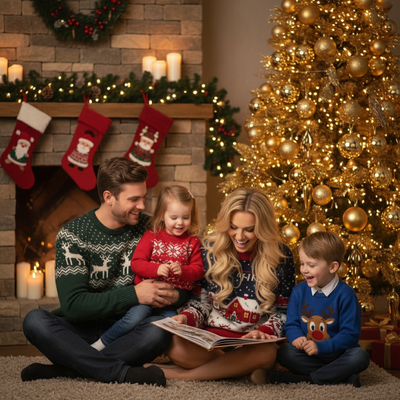
Create beautiful Christmas pictures with our Sweater Storybook Illustrated style.
As the chill of winter settles over the landscape and the first snowflakes drift silently from the sky, families everywhere feel the warmth of the holiday season. This is the time of year when memories are savored like cookies left for Santa, and preserving these moments in Christmas Pictures makes them last a lifetime. Enter the AI Christmas Photo Studio, an innovation that brings the spirit of Christmas right into your home. It combines the nostalgia of holiday storybooks with the vivid detail of photorealism, creating Christmas Photos that feel crafted with love and creativity.
Create Your Storybook Christmas
Imagine stepping into the pages of a beloved Christmas storybook through your own photo. The AI Christmas Photo Studio specializes in doing just that, using technology that adapts uploaded photos into enchanting portraits. Whether featuring a couple with their children posed beside the Christmas tree, or an entire family naturally interacting in a joyous scene, these photos become both art and memory. These Christmas Photos capture the kind of heartwarming essence that makes them perfect for everything from Christmas Cards to cherished keepsakes.
A Cozy Scene Set for Memories
Picture a living room decked out in festive glory: a golden Christmas tree twinkling with fairy lights, softly illuminating the stockings hung by the fireplace. This warm, storybook setting is the stage for your next Christmas Photo. The ambiance is enhanced by classic sweater patterns that evoke nostalgia, completed with a soft candlelight glow so each portrait feels cozy and joyful, perfectly suited for turning into a Christmas Wallpaper for your digital spaces.
Wardrobe and Lighting: Crafting the Perfect Picture
Choosing the right attire matters for capturing the magic of this style. The studio favors classic printed sweaters with storybook patterns or reindeer designs, adding an authentic, timeless touch to your personalized Christmas Pictures. Lighting is softly diffused with a warm ambient glow reminiscent of candlelight, so portraits are visually captivating and genuinely convey the feel of the season. These details make your photos suited to the holiday album and striking enough to serve as a Christmas Wallpaper.
Why Choose an AI Christmas Photo Studio?
Choosing the AI Christmas Photo Studio means trusting your holiday memories to a process that blends creativity with precision. New-age AI develops Christmas Photos with photorealistic detail and cinematic quality, often more vivid than a quick phone snapshot. This lets families appear in whimsical settings reminiscent of classic Christmas tales, with customization that respects your personal style, making these portraits strong candidates for your next Christmas Card.
Preserve Holiday Magic for Generations
The holiday season is full of laughter, love, and togetherness. The AI Christmas Photo Studio helps turn these fleeting moments into lasting Christmas Pictures, rich with the same warmth that fills your home during the holidays. Whether you want a beautiful Christmas Wallpaper or heartfelt Christmas Cards, these custom-crafted photos help tell your family's Christmas story.
What makes this style different from other Christmas photo styles?
Sweater Storybook Illustrated leans into a picture-book aesthetic rather than a strictly realistic studio look. The combination of printed sweater patterns, candlelight tones, and a classic fireplace-and-tree backdrop gives the image a nostalgic, hand-illustrated feel while still keeping recognizable facial detail. It sits closer to a warm holiday storybook page than a modern minimalist or all-white studio style.
What photo should you upload for the best result?
A clear, front-facing photo with even lighting gives PiXmas the most detail to work with. Avoid sunglasses, hats, or heavy shadows across the face. Solo portraits and couples tend to render with the most consistent detail, though family photos with everyone visible also work well for this cozy scene.
Who is this Christmas photo style best for?
This style suits families who want a nostalgic, storybook-style keepsake rather than a plain posed portrait, especially households with young kids who love holiday tales. It also works well for couples wanting a cozy, candlelit look, or as a sentimental gift photo for grandparents. Because the sweater and fireplace details carry the theme, it works equally well for one person or a full family group.
How does PiXmas compare to a photographer or DIY setup?
- A general guide to using Google Trends recommends setting multi‑year ranges to spot seasonality, noting that Christmas‑related terms consistently show seasonal spikes that can guide when to publish holiday photo content. (Cemoh – How to Use Google Trends: A Complete Guide, 2026)
- Photography educators using Google Trends report that searches for terms like “Christmas card photos” remain fairly constant through much of the year, then trend upward from September or October and spike in December. (Tech Photo Guy – Google Trends for Photographers, 2018)
- Google’s Holiday Trends reports that many Christmas‑related queries in the US, including decorating and baking topics, spike each December, illustrating that demand for Christmas imagery and content concentrates late in the year. (Google – Holiday Trends (Year in Search 2025), 2025)
Limitations
Results from PiXmas are AI-generated stylized images, not physical photos from an actual sweater-and-fireplace set. Fine details like exact sweater pattern placement or background objects can vary between generations. Photos with several faces may render with slightly less consistency than a solo or couple portrait, since the AI is interpreting more detail at once. For a nostalgic, cozy holiday keepsake without arranging a real scene, PiXmas remains a practical way to get a storybook-style Christmas photo from a phone photo.
For a cozy, storybook-style Christmas portrait without scheduling a real photoshoot, PiXmas turns one uploaded photo into a candlelit, sweater-clad holiday scene in minutes through its iOS app.
Frequently asked questions
What is the Sweater Storybook Illustrated Christmas style?
It is a Christmas photo style built around a cozy, picture-book aesthetic: printed sweaters with storybook or reindeer patterns, a decorated tree, stockings by the fireplace, and a soft candlelight glow. It aims for a nostalgic, illustrated feel rather than a plain studio backdrop.
What kind of source photo works best for this style?
A well-lit, front-facing photo without sunglasses or heavy shadows gives PiXmas the clearest details to work from. Solo and couple photos tend to render with the most consistent results, though group family photos are also supported.
Can I use this style for a Christmas card?
Yes. Many people generate their Sweater Storybook Illustrated portrait through PiXmas specifically to print or share as a Christmas card, since the warm, illustrated look photographs well on standard card templates.
Can I include a pet in this Christmas photo style?
The Sweater Storybook Illustrated look is designed primarily around people in printed sweaters, but a pet included in the same uploaded photo can still appear in the scene, though results may vary since the style was not built specifically for animals.
How many people can be in one uploaded photo for this style?
PiXmas can process photos with one person or a full family group from a single uploaded photo. Solo and couple shots typically render with slightly more consistent detail than large group photos.