Winter – Candy Cane Stripes
Quick answer: Winter – Candy Cane Stripes is a PiXmas AI Christmas photo style that dresses the people in your uploaded photo in red-and-white striped scarves and hats with neutral knitwear, set against a snowy path or holiday park with softly blurred lights. Starting from a single uploaded photo, the PiXmas iOS app generates a photorealistic, cinematic holiday portrait suited for a Christmas card or wallpaper.
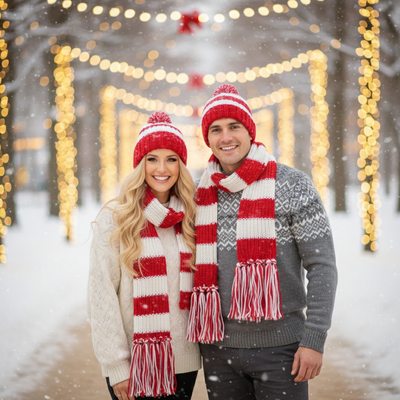
Create beautiful Christmas pictures with our Winter – Candy Cane Stripes style.
The holiday season is upon us, and what better way to capture its magic than with beautiful Christmas photos that capture the spirit of this joyous time? With an AI Christmas Photo Studio, you can now turn heartwarming moments into images that are as sweet and playful as the season itself. The Winter – Candy Cane Stripes photo style offers a whimsical twist, featuring your loved ones in cozy red-and-white knitwear, matched to the scenery of a snow-covered path or holiday park. Whether you're aiming for a cherished Christmas card or a festive Christmas wallpaper, this style infuses every image with cheer and cinematic warmth.
The Magic of Candy Cane Stripes
For those who want warmth and whimsy in their Christmas pictures, the Candy Cane Stripes style is a natural choice. It places your subjects, dressed in matching candy-cane striped scarves and hats, at the center of their own holiday scene. The AI Christmas Photo Studio crafts a result that is photorealistic and tailored to your uploads. Each image carries the warmth of festive daylight with soft color contrast, so every smile feels genuine. Whether the photo includes one person, two people, or a full group, the style adapts, making each picture a keepsake of the season.
Create Joyful Interactions with Ease
Capturing the joyful spirit of Christmas is no small feat, yet the AI Christmas Photo Studio simplifies it by placing multiple subjects naturally into a single scene. When you upload pictures of family or friends, they're set amid a snowy background with gentle, blurred holiday lights. This setting enhances the playful mood of your Christmas photos and encourages interactions that look effortless and candid. Picture the laughter shared on a serene, snow-covered path as your loved ones enjoy each other's company, framed for your next Christmas wallpaper or card.
Perfecting the Wardrobe
In holiday photography, what you wear matters as much as where you are. The Winter – Candy Cane Stripes style keeps your photos cohesive and eye-catching through its focus on knitwear. Subjects are dressed in candy-cane striped accessories paired with cozy sweaters in neutral tones, creating a harmonious look against festive backdrops. This wardrobe choice brings classic Christmas charm and a sweet, spirited mood, ideal for pictures that feel warm yet playfully elegant.
Lighting and Mood: The Heart of Festive Photography
Lighting can make or break a holiday photo. The AI Christmas Photo Studio delivers warm, festive daylight that gives the images a gentle glow, highlighting the fun and wonder of the season. Soft color contrasts add depth, making your subjects stand out against slightly blurred holiday lights in the background. The result is a dreamlike quality that makes your Christmas card or wallpaper feel unforgettable.
What makes this style different from other Christmas photo styles?
Candy Cane Stripes leans into a playful, sweet mood rather than a formal or moody one. The red-and-white striped scarves and hats create a matching, coordinated look that reads as fun rather than staged.
The daylight snowy-park setting also sets it apart from indoor or fireside PiXmas styles. Instead of warm firelight or dim lodge lighting, this style uses soft, bright winter daylight and blurred holiday lights for a crisp, cheerful feel.
What photo should you upload for the best result?
Start with a clear, well-lit photo where faces are visible and not obscured by sunglasses, heavy shadows, or hats. A front-facing or slightly angled shot works better than a profile view.
You can upload one photo of a single person, a couple, or a group. PiXmas maps the outfits and scene onto everyone in the photo, so a shot where each face is distinct will give the cleanest result.
Who is this Christmas photo style best for?
Candy Cane Stripes suits families with kids, couples, and groups of friends who want a coordinated, festive look without buying matching outfits. Its cheerful daylight tone also works well for holiday cards aimed at a wide audience, from grandparents to coworkers.
It's less suited to those wanting a moody, cinematic, or formal portrait style, since the palette and lighting here are intentionally bright and playful.
How does PiXmas compare to a photographer or DIY setup?
- Photography educators using Google Trends report that searches for terms like “Christmas card photos” remain fairly constant through much of the year, then trend upward from September or October and spike in December. (Tech Photo Guy – Google Trends for Photographers, 2018)
- A general guide to using Google Trends recommends setting multi‑year ranges to spot seasonality, noting that Christmas‑related terms consistently show seasonal spikes that can guide when to publish holiday photo content. (Cemoh – How to Use Google Trends: A Complete Guide, 2026)
- Google’s Holiday Trends reports that many Christmas‑related queries in the US, including decorating and baking topics, spike each December, illustrating that demand for Christmas imagery and content concentrates late in the year. (Google – Holiday Trends (Year in Search 2025), 2025)
Limitations
Results are AI-generated stylized images, not physical photos taken at a real photoshoot. Fine details like exact stripe pattern placement or background elements are generated by the AI and may vary between attempts.
Photos with several faces, especially at odd angles or in low light, may render less consistently than a solo or couple photo. For best results, choose a source photo where faces are clear and well lit.
For a coordinated, cheerful Christmas photo without shopping for matching outfits, PiXmas turns a single uploaded photo into a Winter Candy Cane Stripes portrait in minutes, making it a simple pick for families and friend groups who want a festive card or wallpaper fast.
Frequently asked questions
What is the Winter Candy Cane Stripes Christmas photo style?
It's a Christmas photo style that dresses subjects in matching red-and-white striped scarves and hats with cozy neutral sweaters, set against a snowy path or holiday park with softly blurred lights, creating a playful, photorealistic holiday portrait.
What kind of photo should I upload for the best result?
Use a clear, well-lit photo with faces visible and not covered by sunglasses or hats. PiXmas works from one uploaded photo, whether it shows a single person, a couple, or a small group, and applies the wardrobe and scene to everyone in it.
Can I use this style for a group photo or just one person?
Both work. The Candy Cane Stripes style adapts to solo portraits, couples, and larger groups, coordinating the striped scarves and hats across everyone in the uploaded photo.
Can I include pets in the Candy Cane Stripes photo?
The style is designed primarily for people, so results are most consistent with human subjects. If you upload a photo that includes a pet, the AI may not style it the same way as a person.
Can I turn this photo into a printed Christmas card?
Yes. Once PiXmas generates your Candy Cane Stripes image, you can save and print it as a Christmas card or use it as a holiday wallpaper, since the output is a standard photo file.