Snow Woods - Family of 3 Christmas Pictures
Quick answer: Snow Woods - Family of 3 is a PiXmas AI Christmas photo style that places a family of three on a snow-dusted forest path, dressed in coordinated wool coats, scarves, and knit hats, lit by soft natural daylight. Upload one clear family photo in the PiXmas iOS app and it generates a stylized portrait suited for Christmas cards, prints, or wallpaper, without a real outdoor photo shoot.
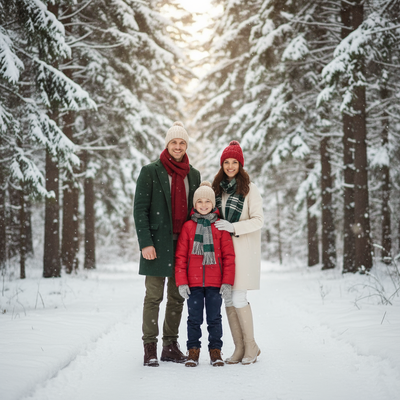
Create beautiful Christmas pictures with our Snow Woods - Family of 3 style.
As the winter chill begins to wrap the world in its frosty embrace, there's no better time to capture the magic of the season with a unique family portrait. Stepping into a snow-dusted forest, surrounded by towering pine trees and under a canopy of softly filtering daylight, can transform your family photos from ordinary to extraordinary. Imagine these beautiful moments encompassed in a Snow Woods - Family of 3 style, where you and your loved ones appear amid the serene, breathtaking beauty of nature. Welcome to the world of the AI Christmas Photo Studio, where Christmas Pictures come together to add warmth to your holiday memories.
The Magic of Natural Forest Settings
Imagine your family standing together on a snow-covered path, nestled among tall, majestic pine trees. This serene backdrop offers a picturesque setting that's both timeless and enchanting. The beauty of the Snow Woods style lies in these real, momentary glimpses of a winter wonderland, perfectly captured. With Christmas Photos crafted in this setting, every glance reveals the gentle glow of natural daylight, casting subtle backlight that enhances the essence of the season. The soft snowflakes dancing in the air add a touch of magic, making every portrait feel like a step into a dreamy festive scene.
Coordinated Winter Fashion for a Harmonious Look
A well-coordinated wardrobe can beautifully highlight the unique bond shared among family members. In this snowy forest setting, wool coats, scarves, boots, and knit hats in a palette of neutral and festive tones such as cream, red, and forest green make the photos visually appealing while adding a sense of warmth and unity. The AI Christmas Photo Studio pays attention to detail, keeping every face true to the reference photo with soft, closed-mouth smiles that reflect the holiday spirit.
Crafting Ideal Christmas Card Images
In the age of digital memories, a tangible Christmas Card featuring your family in this magical setting can be a heartfelt way to connect with loved ones. When snow-clad forests come together with the AI Christmas Photo Studio, the result is Christmas Pictures that capture both festive cheer and your family's personality. These images, turned into cards, become keepsakes that spread joy well beyond the holiday season.
Transforming Photos into Holiday Decor
These curated Christmas Photos aren't just meant to fill family albums; they can also become Christmas Wallpaper for your home. Walls adorned with images that radiate the coziness of the season create an atmosphere that feels like a snug winter retreat, a daily reminder of cherished family moments.
Making the Most of Your Session
To capture the essence of the Snow Woods look, choose a clear, well-lit reference photo where every family member's face is visible, similar to the soft light of early morning or late afternoon. The AI Christmas Photo Studio uses that photo to build natural, relaxed poses set against the forest backdrop, so the final Christmas Picture reflects genuine warmth and connection without needing an actual outdoor shoot.
What makes this style different from other Christmas photo styles?
Snow Woods - Family of 3 pairs a real forest path setting with coordinated wool-and-knit wardrobe choices, rather than an indoor studio backdrop or a decorated living room scene. The soft, diffused daylight and falling snow give it a candid, outdoor feel that other PiXmas styles built around fireplaces or string lights do not aim for.
What photo should you upload for the best result?
Choose one recent photo where all three family members are facing forward with clear, unobstructed faces and even lighting. Group shots where someone is turned sideways, partly cropped, or in heavy shadow tend to translate less accurately into the finished portrait, so a simple, well-lit snapshot works better than a busy candid.
Who is this Christmas photo style best for?
This style is built for small families of three, whether that's two parents and a child, a parent and two kids, or any trio who wants a coordinated portrait without organizing an outdoor shoot in real snow. It also suits families who want a card-ready image but live somewhere without a snowy forest nearby.
How does PiXmas compare to a photographer or DIY setup?
- Google’s Holiday Trends reports that many Christmas‑related queries in the US, including decorating and baking topics, spike each December, illustrating that demand for Christmas imagery and content concentrates late in the year. (Google – Holiday Trends (Year in Search 2025), 2025)
- A general guide to using Google Trends recommends setting multi‑year ranges to spot seasonality, noting that Christmas‑related terms consistently show seasonal spikes that can guide when to publish holiday photo content. (Cemoh – How to Use Google Trends: A Complete Guide, 2026)
- Photography educators using Google Trends report that searches for terms like “Christmas card photos” remain fairly constant through much of the year, then trend upward from September or October and spike in December. (Tech Photo Guy – Google Trends for Photographers, 2018)
Limitations
Snow Woods - Family of 3 images are AI-generated stylized portraits, not physical photographs taken at a real outdoor location. Fine details like exact fabric texture, hand placement, or background trees may not match a genuine photo shoot. Photos with all three family members clearly visible and facing the camera tend to render more consistently than group shots with turned heads, motion blur, or uneven lighting, though results can vary from upload to upload.
For families of three who want a coordinated, snowy-forest Christmas portrait without planning an outdoor shoot, PiXmas turns a single family photo into a Snow Woods style image ready for cards, prints, or home decor.
Frequently asked questions
What is the Snow Woods - Family of 3 style?
It's a PiXmas AI Christmas photo style that places a family of three on a snow-covered forest path in coordinated wool coats and knit hats, lit by soft natural daylight, generated from one uploaded photo rather than a real photo shoot.
Can I turn this into a printed Christmas card?
Yes. The finished PiXmas image is a high-resolution digital photo you can upload directly to a card printing service or home printer, making it well suited for holiday cards, prints, or framed decor.
Can I include the family pet in a Snow Woods photo?
This particular style is designed around a family of three, but PiXmas offers other Christmas styles built for including pets alongside family members. Choose a pet-friendly style if you want your dog or cat in the scene.
What kind of source photo works best for a family of three?
A clear, front-facing photo of all three family members with good lighting and no obstructed faces gives PiXmas the best reference to work from when generating the Snow Woods portrait.
Will the AI-generated photo look exactly like a real snowy forest?
It's designed to closely resemble one, but PiXmas produces a stylized AI portrait rather than an unedited photograph. Lighting, snowfall, and background details are generated to match the theme, not captured on location.
How long does it take to get the finished portrait?
After uploading your photo in the PiXmas app, the Snow Woods - Family of 3 portrait typically generates within minutes, much faster than scheduling and completing an outdoor family photo shoot.