Sleigh Bells & Snowfall
Quick answer: Sleigh Bells & Snowfall is a PiXmas Christmas photo style that places you in a photorealistic outdoor winter scene with a decorative sleigh, glowing garlands, a softly lit house, and falling snow. Built from one uploaded phone photo, the AI Christmas Photo Studio balances warm golden house light against cool blue snow tones, with cozy knitted wardrobe options like hats, scarves, and mittens. Available through the PiXmas iOS app.
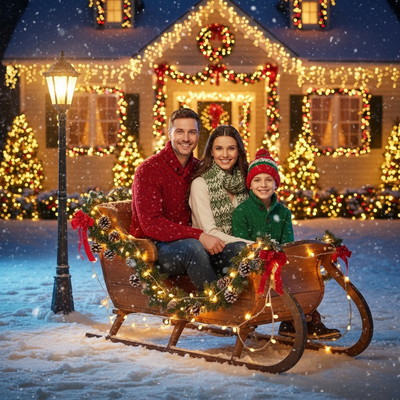
Create beautiful Christmas pictures with our Sleigh Bells & Snowfall style.
Sleigh Bells & Snowfall is not just a Christmas photo style; it's a heartfelt embrace of holiday wonder. Imagine being transported into a serene winter wonderland where glowing garlands, a softly illuminated house, and the gentle fall of snow create the perfect backdrop for your most cherished holiday memories. Whether you wish to capture a tender moment with your little one, an intimate scene with your partner, or the joyous unity of your family, this style easily adapts to your personal photos. It's more than just creating Christmas photos; it's about etching your holiday spirit into a lovingly crafted visual narrative that can adorn your home, light up your Christmas card or even become a charming Christmas wallpaper on your devices.
Creating Timeless Christmas Pictures with AI
In the digital age, capturing the magic of Christmas has taken on a new dimension with the help of technology. The AI Christmas Photo Studio offers a striking way to create realistic Christmas pictures that capture the heart of the holiday season. This AI-powered tool automatically adapts to the photo you upload, enhancing detail to create a photorealistic scene straight out of a winter fairy tale. Picture your family seated together, their faces naturally preserved while sitting in a decorative sleigh surrounded by softly falling snow. These Christmas photos become cherished keepsakes that you'll treasure for years.
The Magic of Photorealistic Scenes
What sets the Sleigh Bells & Snowfall photo style apart is the careful attention to detail and lifelike rendering of surroundings. The outdoor setting, dotted with glowing lanterns and highlighted by faint bokeh of golden lights, captures the essence of a cozy Christmas evening. The use of soft night lighting, with warm yellow tones from the house extending over the scene, creates a cinematic feel. The cool bluish glow of the snow contrasts beautifully with this warmth, creating a balance that is both striking and soothing. This careful setup turns your Christmas pictures into immersive scenes.
Customizable Wardrobe and Expressions
One of the charming aspects of the Sleigh Bells & Snowfall style is its ability to integrate customized elements into your Christmas photos. The wardrobe choices, cozy red-and-green knitted winter clothing, are not only festive but also add an authentic touch to your pictures. You can include options like a warm hat, scarf, and mittens, which add layers of realism. Meanwhile, the gentle, calm expressions depicted in these photos add to the warmth and tranquility of the scene. This attention to personal detail helps your Christmas pictures reflect your own holiday spirit.
From Christmas Card to Wallpaper Art
Once you've created these timeless Christmas photos, there are many ways to use them. Send out a Christmas card this year that stands out, featuring a beautifully designed scene from the AI Christmas Photo Studio. Friends and family are sure to notice the photorealistic quality and heartfelt scene. You could also turn your favorite shot into a Christmas wallpaper for your phone or computer, a small daily reminder of holiday warmth.
What makes this style different from other Christmas photo styles?
Sleigh Bells & Snowfall pairs a decorative sleigh with an outdoor winter set piece, unlike styles that stay indoors near a tree or fireplace. Warm yellow light spilling from house windows plays against cool blue snow tones and soft lantern bokeh, creating a two-temperature lighting look that is difficult to recreate with a single flash or ring light at home. Falling snow and layered garlands add a sense of depth that a flat backdrop cannot match.
What photo should you upload for the best result?
A clear, front-facing photo with even lighting and an unobstructed view of the face gives PiXmas the clearest starting point. Solo portraits and couple photos taken at eye level tend to translate well into the outdoor sleigh scene, since the AI can preserve facial detail while building the winter environment around it. Sunglasses, extreme angles, or heavy filters can make wardrobe and expression rendering less predictable.
Who is this Christmas photo style best for?
This style suits couples who want a romantic snowy portrait, parents looking for a cozy outdoor family scene, and anyone who prefers a winter-evening feel over an indoor fireplace setting. It also works well for a solo shot meant for a Christmas card or phone wallpaper. Families with young kids often like the soft lantern lighting because it keeps the mood calm rather than busy.
How does PiXmas compare to a photographer or DIY setup?
- Google’s Holiday Trends reports that many Christmas‑related queries in the US, including decorating and baking topics, spike each December, illustrating that demand for Christmas imagery and content concentrates late in the year. (Google – Holiday Trends (Year in Search 2025), 2025)
- Photography educators using Google Trends report that searches for terms like “Christmas card photos” remain fairly constant through much of the year, then trend upward from September or October and spike in December. (Tech Photo Guy – Google Trends for Photographers, 2018)
- A general guide to using Google Trends recommends setting multi‑year ranges to spot seasonality, noting that Christmas‑related terms consistently show seasonal spikes that can guide when to publish holiday photo content. (Cemoh – How to Use Google Trends: A Complete Guide, 2026)
Limitations
Sleigh Bells & Snowfall images are AI-generated and stylized, not physical photographs taken on a real outdoor set. Lighting, snow texture, and wardrobe details are rendered by the app rather than captured with a camera and props. Photos with several faces, especially group shots at different angles, may render less consistently than a solo or couple photo, so keep expectations realistic for larger groups.
Sleigh Bells & Snowfall turns one uploaded phone photo into a photorealistic outdoor winter scene with a sleigh, glowing house lights, and soft snowfall. It's a strong pick for couples, families, or solo portraits wanting a Christmas card or wallpaper image without a real outdoor shoot, and PiXmas delivers it through a simple one-photo, app-based process.
Frequently asked questions
What is the Sleigh Bells & Snowfall Christmas photo style?
It's a Christmas photo style set outdoors around a decorative sleigh, glowing house lights, lanterns, and falling snow. The AI builds this photorealistic winter scene around your uploaded photo while keeping your face and features recognizable.
Can I use a Sleigh Bells & Snowfall photo for a Christmas card?
Yes. Many people use their finished PiXmas image directly for a printed or digital Christmas card, since the outdoor sleigh scene and warm lighting are designed to look polished at photo size.
Can I include a pet in this Christmas photo style?
A pet can be included if it appears clearly in your uploaded photo alongside you, though PiXmas is optimized mainly for human portraits, so results with pets may vary more than solo or family shots.
How many people can be in one Sleigh Bells & Snowfall photo?
You can upload photos with multiple people, but PiXmas works best with a clear, well-lit source photo. Larger groups may render with slightly less consistency than a solo or couple photo.
Can I turn my Sleigh Bells & Snowfall photo into a wallpaper?
Yes, the finished image can be saved and set as a phone or desktop wallpaper. Since PiXmas generates a high-detail photorealistic scene from your one uploaded photo, it works well for everyday screen use during the holiday season.