Snow Queen Elegance
Quick answer: Snow Queen Elegance is a PiXmas Christmas photo style that reimagines an uploaded photo in a cool, icy palette: a white faux fur coat, pearl details, a silver-adorned white Christmas tree, and soft snowfall lighting. Using the PiXmas iOS app, you upload one photo and the AI generates a regal winter portrait suited for Christmas cards, wallpaper, or social media, without booking a studio or sourcing wardrobe.
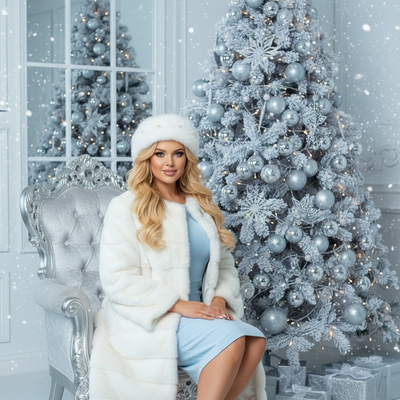
Create beautiful Christmas pictures with our Snow Queen Elegance style.
Embrace the enchanting allure of winter and turn your seasonal memories into stunning portraits. This year, capture the essence of icy elegance with the Snow Queen Elegance photo style. Using the AI Christmas Photo Studio, this style adapts seamlessly to your treasured moments, whether it's a solo shot or a cherished family portrait. Picture yourself seated in front of a majestic white Christmas tree adorned with silver ornaments, beneath a gentle cascade of artificial snowflakes, creating Christmas pictures that feel cinematic. This holiday season, let your photos speak the language of luxury, so your Christmas card radiates warmth and sophistication.
Create Enchanting Christmas Memories
The Snow Queen Elegance style brings a touch of regal sophistication to your Christmas pictures. Whether you're capturing the joy of a solo pose or the warmth of family togetherness, the scene is set against a backdrop of an elegantly frosted tree, shimmering with silver sparkles. The AI Christmas Photo Studio customizes every detail so each person is harmoniously included in the frame, presenting a unified sense of luxury. With soft luxury lighting and a serene snowfall ambiance, your Christmas photos feel timeless and are ready to become an extraordinary Christmas wallpaper.
Wardrobe Magic of Real Holiday Majesty
Step into the magical world of Snow Queen Elegance with a wardrobe fit for winter royalty. Picture yourself wrapped in a plush white faux fur coat and hat, each strand catching a rich, luxurious sheen. This style is complemented by smooth curls and delicate pearl details, echoing the opulence of winter. The AI Christmas Photo Studio fine-tunes these wardrobe elements so they integrate naturally with your photo's ambiance, capturing festive grandeur and modern elegance in every image. It turns any setting into a canvas of sophisticated style, perfect for inspiring next season's Christmas cards.
Lighting: The Vocabulary of Elegance
Lighting plays a pivotal role in shaping the mood of your Christmas photos. In the Snow Queen Elegance style, soft cool tones paired with silver highlights create a serene yet majestic atmosphere. This lighting accentuates every detail, from the shimmering ornaments on the tree to the subtle shadows cast by snowflakes grazing your shoulders. The balance created by the AI Christmas Photo Studio captures the essence of winter luxury and translates easily into a captivating Christmas wallpaper for your home or digital backdrop.
Practical Tips for Unforgettable Photos
To make the most of your Snow Queen Elegance result, consider a few practical tips. Choose a hairstyle that complements the smooth curls suggested by the style, and picture a faux fur coat that feels snug yet regal. Favor subtle makeup that highlights your features without overpowering the cool, soft tones of the setting. Let your expression stay warm and relaxed so the final image feels natural rather than stiff. This thoughtful combination turns your Christmas pictures into keepsakes worth printing or sharing.
What makes the Snow Queen Elegance style different from other Christmas photo styles?
Most Christmas photo styles lean on warm reds, greens, and firelight. Snow Queen Elegance instead builds its entire palette around cool silvers, whites, and pale blues, paired with a white faux fur wardrobe rather than typical holiday knitwear. The frosted white tree and falling snowflake detail give it a more formal, portrait-studio feel than cozy cabin or classic red-and-plaid styles on PiXmas.
What photo should you upload for the best result?
A single, clear, front-facing photo with even lighting works best. Choose a photo where your face is unobstructed by sunglasses, hats, or heavy shadow, since the AI uses your uploaded photo to preserve your likeness while replacing the background and wardrobe. Group photos work too, though a photo where each face is clearly visible will translate more reliably into the finished portrait.
Who is this Christmas photo style best for?
Snow Queen Elegance suits anyone who wants a more formal, editorial-feeling holiday portrait rather than a casual snapshot look. It works well for solo portraits meant for a statement Christmas card, for couples wanting a coordinated elegant look, and for families who want a shared regal aesthetic without matching real outfits. It is a strong pick for anyone who prefers icy, silver-toned styling over traditional red-and-green holiday photos.
How does PiXmas compare to a photographer or DIY setup?
- Google’s Holiday Trends reports that many Christmas‑related queries in the US, including decorating and baking topics, spike each December, illustrating that demand for Christmas imagery and content concentrates late in the year. (Google – Holiday Trends (Year in Search 2025), 2025)
- A general guide to using Google Trends recommends setting multi‑year ranges to spot seasonality, noting that Christmas‑related terms consistently show seasonal spikes that can guide when to publish holiday photo content. (Cemoh – How to Use Google Trends: A Complete Guide, 2026)
- Photography educators using Google Trends report that searches for terms like “Christmas card photos” remain fairly constant through much of the year, then trend upward from September or October and spike in December. (Tech Photo Guy – Google Trends for Photographers, 2018)
Limitations
Snow Queen Elegance images are AI-generated stylized portraits, not physical photos taken at a real winter set. Fine details like fur texture, jewelry, or ornament placement are AI interpretations and will vary slightly between generations. Photos with several faces, unusual angles, or partial obstructions may render less consistently than a clear solo or couple photo. PiXmas is a strong fit if you want a fast, styled Christmas portrait without booking a studio or buying a faux fur coat, but it will not replicate an exact physical photoshoot.
Snow Queen Elegance turns a single uploaded photo into a polished, icy-elegant Christmas portrait through the PiXmas app, making it a fast alternative to booking a photographer or sourcing a faux fur wardrobe yourself.
Frequently asked questions
What is the Snow Queen Elegance Christmas photo style?
It is a PiXmas photo style that transforms an uploaded photo into a regal winter portrait featuring a white faux fur coat, pearl details, a silver-adorned white Christmas tree, and soft snowfall lighting for a cool, elegant holiday look.
Can I use a family or group photo for Snow Queen Elegance?
Yes, PiXmas can generate the style from a family or group photo, and the AI works to include each person in the elegant winter scene. Photos where every face is clearly visible tend to produce more consistent results than crowded or angled group shots.
Do I need a professional photo to start?
No, a clear photo taken on a phone is enough. PiXmas works from an existing photo rather than requiring a studio session, so a well-lit, front-facing selfie or portrait is typically sufficient for the Snow Queen Elegance style.
Can Snow Queen Elegance photos be turned into Christmas cards?
Yes, the finished portrait is high enough resolution to use for printed Christmas cards, digital greetings, or wallpaper. Many people choose this style specifically for its formal, card-ready look with its silver and white color scheme.
Will pets be included in the Snow Queen Elegance style?
This style is designed primarily for solo, couple, and family portraits with a formal wardrobe focus, so pets are not a core part of the scene. For pet-inclusive holiday photos, check other PiXmas Christmas styles built around pets.