Scarlet Skyline – Night of Lights Christmas Pictures
Quick answer: Scarlet Skyline – Night of Lights is a PiXmas AI Christmas photo style that places you on a city balcony at night in a red gown, with a glittering skyline and festive lights behind you. Built from one uploaded phone photo, the iOS PiXmas (Pixmas) app transforms it into a cinematic holiday portrait in minutes, ready for a Christmas card or wallpaper.
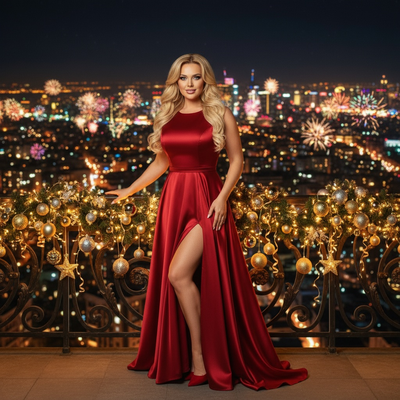
Create beautiful Christmas pictures with our Scarlet Skyline – Night of Lights style.
This Christmas, capture the essence of elegance and romance with the Scarlet Skyline – Night of Lights photo style, transforming your holiday memories into cinematic portraits. Picture yourself standing on a balcony, overlooking a shimmering city skyline, the air filled with the anticipation of New Year's celebrations. Dressed in a stunning red satin evening gown, your presence becomes a striking contrast against the glittering holiday lights, creating a mesmerizing scene. With the AI Christmas Photo Studio, you can easily transform your favorite photo into an unforgettable Christmas picture that captures the warmth and glamour of the season.
Embrace the Elegance with Scarlet Skyline
The Scarlet Skyline – Night of Lights transforms any uploaded photo into a cinematic Christmas portrait with ease. Imagine the charm of an evening cityscape enhanced by twinkling lights and golden ornaments along the railing, as you stand regally in a red gown. This style embodies elegance and romance, perfect for creating Christmas pictures that feel both personal and grand. With the AI Christmas Photo Studio, your photo is adapted while keeping the likeness of the original, making it ideal for a memorable Christmas card to send to loved ones. You can create this look through the PiXmas app.
Create Lasting Memories with AI Magic
Innovation meets tradition with the AI Christmas Photo Studio, letting you blend modern technology with personal holiday moments. By precisely rendering your likeness into the scene, the AI keeps your own features and expression at the center of each portrait. This turns an everyday photo into a keepsake that reflects your own story. Use the result for digital or printed Christmas photos, Christmas wallpaper, or a photo album, with the AI producing a vivid, holiday-ready image.
Capture the City in Festive Glamour
The city becomes a backdrop of grandeur with the Scarlet Skyline – Night of Lights style. Each photo is enveloped in the ambiance of New Year city glamour, capturing a moment that feels both personal and cinematic. Whether used for a festive Christmas card or simply saved to revisit, your Christmas pictures carry emotion and sophistication. The AI Christmas Photo Studio brings this scene to life with lighting and mood effects, making your photo stand out against a vivid festive sky.
Practical Tips for Creating Your Perfect Photo
To make the most of the Scarlet Skyline transformation, start with a clear, well-lit image that shows your face and expression plainly. A front-facing or slightly angled photo works better than one at a distance. Use the AI Christmas Photo Studio to let it apply the red-gown, city-lights look, since you don't need to source that wardrobe or location yourself. Once your Christmas picture is complete, consider it for a Christmas wallpaper or as part of a photo collection you revisit each season.
Share Festive Joy Through Personalized Cards
Nothing says Merry Christmas quite like a personalized card featuring your own likeness. Scarlet Skyline – Night of Lights adds a cinematic touch to your picture and gives your Christmas card a distinctive, heartfelt quality. Share the warmth of your holiday spirit with family and friends through a photo that carries New Year magic. The AI Christmas Photo Studio helps make each card feel personal rather than generic.
What makes this style different from other Christmas photo styles?
Scarlet Skyline – Night of Lights leans into evening glamour rather than cozy fireside imagery. The scene pairs a red satin gown with a nighttime city skyline and string lights, giving it a New Year's Eve mood instead of a traditional Santa or snowy-cabin look. It suits people who want a more sophisticated, cinematic Christmas picture rather than a rustic one.
What photo should you upload for the best result?
A single clear, forward-facing photo with good lighting and an unobstructed view of your face works best. Avoid heavy shadows, sunglasses, or extreme angles, since the AI needs to read your features clearly to place them into the balcony-and-skyline scene. One well-lit photo is generally enough for PiXmas to generate the finished portrait.
Who is this Christmas photo style best for?
This style fits anyone who wants a glamorous, adult-oriented holiday portrait, for example for a New Year's card, a social profile photo, or a statement piece of Christmas wallpaper. It works well for solo portraits and couples posed together on the balcony. It is less suited to young children's photos, since the gown and evening setting are styled for an adult look.
How does PiXmas compare to a photographer or DIY setup?
- Google’s Holiday Trends reports that many Christmas‑related queries in the US, including decorating and baking topics, spike each December, illustrating that demand for Christmas imagery and content concentrates late in the year. (Google – Holiday Trends (Year in Search 2025), 2025)
- Photography educators using Google Trends report that searches for terms like “Christmas card photos” remain fairly constant through much of the year, then trend upward from September or October and spike in December. (Tech Photo Guy – Google Trends for Photographers, 2018)
- A general guide to using Google Trends recommends setting multi‑year ranges to spot seasonality, noting that Christmas‑related terms consistently show seasonal spikes that can guide when to publish holiday photo content. (Cemoh – How to Use Google Trends: A Complete Guide, 2026)
Limitations
Scarlet Skyline – Night of Lights produces an AI-generated stylized image, not a physical photo taken on a real balcony or rooftop. Colors, skyline detail, and gown texture are rendered by the model rather than captured by a camera. Photos with more than one or two faces may come out less consistent than a solo or couple portrait, so a single clear headshot tends to give the most reliable result.
For anyone who wants a glamorous, cinematic Christmas picture without booking a rooftop shoot or sourcing a red gown, Scarlet Skyline – Night of Lights through PiXmas turns one uploaded photo into a polished holiday portrait in minutes.
Frequently asked questions
What is the Scarlet Skyline – Night of Lights style?
It's a Christmas photo style that places your likeness on a city balcony at night, dressed in a red evening gown, with a glittering skyline and festive lights in the background, styled for a New Year's Eve glamour look rather than a traditional snowy holiday scene.
What kind of source photo works best for this look?
Use one clear, well-lit photo where your face is fully visible and not obscured by sunglasses, hats, or heavy shadow. PiXmas uses that single uploaded photo to build the balcony-and-skyline portrait, so a sharp, forward-facing shot gives the most reliable result.
Can I include a pet or partner in this photo style?
Couples can be styled together on the balcony for a shared portrait. Pets are not the natural focus of this particular evening-glamour scene, so this style is better suited to a solo or couple portrait than a pet photo.
Can I turn my Scarlet Skyline photo into a printed Christmas card?
Yes, the finished image from PiXmas can be saved and used for a printed or digital Christmas card, or set as Christmas wallpaper on your phone or desktop.
Do I need to own a red gown or find a real skyline location?
No. PiXmas generates the red gown, balcony, and city skyline as part of the styled image, so you only need to upload one existing photo rather than arrange wardrobe or a location yourself.
How long does it take to get my finished photo?
Most PiXmas styles, including Scarlet Skyline – Night of Lights, are generated within minutes of uploading your photo in the app, without needing to schedule a shoot or edit the image yourself.