Santa Office - Family of 3 Christmas Pictures
Quick answer: The Santa Office - Family of 3 style places your household inside a warmly lit study beside Santa's desk, complete with candlelight, travel maps, and a crackling fireplace. PiXmas (also spelled Pixmas) generates this scene from one uploaded family photo using its iOS app, preserving each person's face while adding cinematic lighting and festive wardrobe styling for a Christmas card ready portrait.
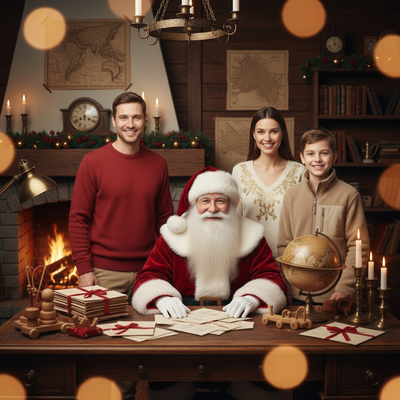
Create beautiful Christmas pictures with our Santa office - Family of 3 style.
The magic of Christmas is not just in the twinkling of lights or the frosty breath of winter, but in the memories captured and cherished throughout the season. AI Christmas Photo Studio brings to life the enchanting world of Santa's office, serving as the perfect backdrop for a heartwarming family portrait. Imagine walking into a room embraced by warmth and authenticity, where every detail is rich and true to the classic tales of Christmas. This isn't just another photography session; it's a journey into a festive realm where every expression and nuance of your loved ones is preserved with stunning accuracy. Whether it graces your Christmas card or becomes a treasured addition to your annual Christmas photos collection, this style captures the spirit of the holidays in a memorable way.
Experience the Magic of Christmas in Santa's Office
In the AI Christmas Photo Studio, each family is invited into the mythical village of Lapland, where Santa Claus resides. This inviting scene is more than just a picture; it's an immersive experience that paints a timeless portrait for your family. Imagine Santa behind a well-worn wooden desk, engulfed in the soft glow of candles and the crackling sound of the fireplace. Maps of his travels line the walls, and every corner is filled with the anticipation of gifts and joy. The atmosphere is crafted so that when your family steps into the scene, their expressions reflect the joy and wonder that define the Christmas season. These aren't just Christmas pictures; they are memories that resonate with the beauty of the season.
The Art of Ultra-Realistic Christmas Portraits
Creating Christmas photos that maintain every inherent detail of your cherished ones is a true art, achieved through realism over heavy stylization. With careful technology behind the scenes, the AI Christmas Photo Studio keeps each facial likeness intact. The eyes, expressions, and smiles you know so well are replicated closely, bringing true-to-life emotion to every photo. Cinematic lighting and gentle lens blur add depth and warmth, highlighting the textures of skin, fabric, and wood. The result is a high-resolution image, a Christmas wallpaper that transforms family photographs into a vivid holiday story.
Tailored Christmas Pictures: A Heartfelt Keepsake
At the AI Christmas Photo Studio, every session becomes a unique keepsake that tells the story of your family's Christmas spirit. The dynamic between Santa Claus and the familiar, joyous expressions of your family members brings forth a narrative filled with wonder. Their attire speaks to the festivity of the season, rich reds, gold tones, and whites, echoing the tradition of holiday celebration while letting personality shine through. This customization makes each Christmas card personal and reflective of your family's own journey.
Permanently Capture Christmas Joy
To create lasting memories, focus falls not just on the scene but on the emotions embodied within the Christmas photos. As the family leans into each other, captured with cinematic precision, the magic of the image goes beyond the visual realism. With each result, you get not only a photographic representation but a reminder of a joyful moment frozen in time, ready to bring the warmth of Christmas into your home as a Christmas wallpaper or framed print.
What makes this Santa's office style different from other Christmas photo styles?
Unlike outdoor snow scenes or plain studio backdrops, this style is built around a warm indoor set: a wooden desk, flickering candlelight, hanging maps, and firelight. The three-person framing is composed specifically for a family of three, positioning each person so faces remain clear and balanced rather than crowded. The mood leans cozy and traditional rather than bright or whimsical, closer to a fireside portrait than a snowy postcard.
What photo should you upload for the best result?
A clear, well-lit photo where all three family members are facing forward with visible, unobstructed faces gives PiXmas the most to work with. Avoid sunglasses, heavy shadows across faces, or photos where someone is turned sideways. A simple recent photo, even a phone snapshot, works better than an old or low-resolution scan.
Who is this Christmas photo style best for?
This scene suits parents wanting a classic Santa's office keepsake with young kids, small households sending a family Christmas card, or grandparents ordering a print of their child's family. It works well for families who want a warm, traditional feel rather than a bright or comedic holiday look.
How does PiXmas compare to a photographer or DIY Santa setup?
- Google’s Holiday Trends reports that many Christmas‑related queries in the US, including decorating and baking topics, spike each December, illustrating that demand for Christmas imagery and content concentrates late in the year. (Google – Holiday Trends (Year in Search 2025), 2025)
- Photography educators using Google Trends report that searches for terms like “Christmas card photos” remain fairly constant through much of the year, then trend upward from September or October and spike in December. (Tech Photo Guy – Google Trends for Photographers, 2018)
- A general guide to using Google Trends recommends setting multi‑year ranges to spot seasonality, noting that Christmas‑related terms consistently show seasonal spikes that can guide when to publish holiday photo content. (Cemoh – How to Use Google Trends: A Complete Guide, 2026)
Limitations
Results are AI-generated stylized images, not physical photographs taken in a real Santa's office set. Facial likeness is generally strong for solo and couple photos, and for families of three it stays close in most cases, though results with several faces at once can be slightly less consistent than single-subject uploads. Outcomes depend partly on the clarity of the original photo you upload, and PiXmas is not a substitute for an in-person Santa photo session at a mall or event.
For a family of three wanting a warm, traditional Santa's office keepsake without scheduling a studio session, PiXmas offers a fast, photo-based way to get there. Upload one clear family photo and let the app handle the lighting, wardrobe styling, and scene composition.
Frequently asked questions
What is the Santa Office - Family of 3 Christmas picture style?
It is a themed AI portrait that places a family of three inside a warmly lit Santa's office setting, complete with a wooden desk, candlelight, and a fireplace, designed to look like a cozy holiday keepsake for a household of three.
Can I turn this into a physical Christmas card?
Yes, the finished PiXmas image is a high-resolution photo you can download and print through any card service, use on a holiday card template, or send digitally to family and friends.
Can I include a pet in the family of three photo?
This specific style is designed around three human family members, but PiXmas offers other Christmas styles that welcome pets, so check the theme gallery if you want your dog or cat included.
How many photos do I need to upload?
PiXmas works from one uploaded family photo showing all three members clearly, which the app then transforms into the Santa's office scene rather than requiring multiple separate uploads.
What should we wear for a Christmas photoshoot?
Wear coordinated colors and textures rather than identical outfits. Neutral shades, deep green, burgundy, navy, cream, denim, and subtle plaid photograph well in holiday settings. Avoid tiny patterns, large logos, reflective fabrics, and uncomfortable clothing. Match the formality of the location, and let one outfit provide the strongest seasonal accent.
How can I protect my family’s privacy when sharing Christmas photos?
Share only images and details that everyone pictured is comfortable making visible. Avoid showing addresses, school names, house numbers, travel plans, shipping labels, or documents in the background. Review audience settings, remove location metadata when appropriate, and send private galleries or printed cards instead of posting publicly when children or home interiors are identifiable.