New Year's Eve Fireworks Celebration – 2025 ➜ 2026
Quick answer: PiXmas turns a single uploaded photo into a New Year's Eve fireworks Christmas picture, styled with a glowing skyline, cascading gold and silver fireworks, and elegant formalwear as the countdown to 2026 begins. The AI Christmas Photo Studio in the PiXmas iOS app renders solo, couple, or family portraits in this scene within minutes, ready for a Christmas card or festive wallpaper.
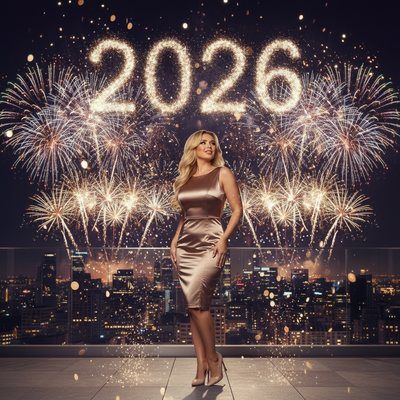
Create beautiful Christmas pictures with our New Year’s Eve Fireworks Celebration – 2025 ➜ 2026 style.
The enchantment of New Year's Eve is unparalleled, a magical transition that holds hope and promise as we bid farewell to the old and usher in the new. Imagine capturing this moment with a blend of artistry and technology, where the joy of celebration comes alive through breathtaking Christmas Photos. The AI Christmas Photo Studio creates this picturesque essence, transforming your personal portraits into enchanting scenes where fireworks illuminate the night sky as the clock ticks closer to 2026. With an elegant city skyline as your backdrop, or perhaps a sophisticated outdoor terrace, your snapshots become cinematic treasures, perfect as Christmas Pictures that exude warmth and sophistication. Whether you're reminiscing alone, locked in an embrace with a loved one, or raising glasses as a family unit, every detail is captured in clarity and vibrant hues.
Transforming Your Memories with AI Christmas Photo Studio
Discover a new dimension of festive celebration with the AI Christmas Photo Studio, which adapts your uploaded photo into a stunning New Year's Eve tableau. Whether for Christmas Card imagery or personal mementos, the technology keeps your facial features and expressions authentic while the dynamic backdrop paints a picture of hope and joy. Consider a solo portrait where you're mesmerized by a cascade of fireworks from a balcony, each spark reflecting against the metallic tones of elegant attire. Alternatively, cherish the warmth of togetherness in group photos; here, the shimmering skyline and vibrant fireworks accentuate shared smiles and tender moments, immortalized into beautiful Christmas Photos. The end result adds magic to your collection of Christmas Pictures, with each print radiating sentiment and enthusiasm for the upcoming year.
Capturing the Radiance of New Year's Eve Fireworks
The allure of fireworks exploding across a midnight sky captures an essence of celebration that photographs must portray. The AI Christmas Photo Studio excels at simulating this light play, draping your portraits with hues of gold, silver, and deep midnight blue. Sparks of soft pink and violet dance across your features, bringing life and emotion into your Christmas Pictures. Behind the lens, the studio adopts a cinematic style that allows fireworks to blur into soft bokeh, focusing instead on the joyful and hopeful expressions of those in the foreground. By using this styling, your Christmas Photos become more than pictures, they become heartfelt memories, perfect for creating a standout Christmas Wallpaper that embodies the spirit of new beginnings.
Elegant Attire and Luxurious Ambiance
What sets the scene for a New Year's Eve celebration is not only the fireworks but also the gleam of elegant attire against this magnificent display. The AI Christmas Photo Studio integrates sartorial elegance, enhancing your images with rich textures of satin and velvet, in hues like gold, champagne, black, white, or red. As your attire shimmers under the ambient glow, the subtle optional detail of a "2026" light formation in the sky or background signage adds a unique touch to your Christmas Photos. Each element complements the scene's high-end editorial tone, setting the perfect stage for Christmas Pictures that showcase the festivity and anticipation of stepping into a new year.
Cherishing Moments of Hope and Joy
As you step into 2026 surrounded by fireworks, family, and friends, it's a moment filled with hope, joy, and love, emotions effortlessly captured through the AI Christmas Photo Studio. The mood is one of quiet awe and warmth, blending laughter with the serenity of new beginnings. This atmosphere reflects beautifully in your Christmas Pictures, where each smile and embrace is accentuated by cinematic lighting. The depth of field blurs the background so every face glows and every gesture feels connected. These images become treasured keepsakes encapsulating the transition between years, perfectly framed for a Christmas Card that expresses the happiness and promise of a wonderful new year.
What makes this fireworks style different from other Christmas photo styles?
Most Christmas photo styles lean on trees, fireplaces, or snowy cabins. This one is built around a midnight countdown moment instead, with a city skyline, bursts of gold and silver fireworks, and an optional "2026" light formation glowing in the background. The wardrobe direction leans formal rather than cozy, favoring satin, velvet, and champagne tones over sweaters and plaid, which gives the finished image a more editorial, celebratory feel than a typical holiday scene.
What photo should you upload for the best result?
A clear, front-facing photo with even lighting gives the AI the most detail to work with when rebuilding your face inside the fireworks scene. Avoid sunglasses, heavy shadows, or hats that cover the hairline. One photo is enough for a solo portrait, while couples should ideally use a shot where both faces are clearly visible and unobstructed for the cleanest match to the final image.
Who is this Christmas photo style best for?
This scene suits couples who want a glamorous keepsake of ringing in the new year together, friends creating a shared party memento, and families looking for a festive card that feels a step above a standard tree photo. Solo portraits also work well for anyone who wants a reflective, cinematic image marking the transition from 2025 into 2026.
How does PiXmas compare to a photographer or DIY setup?
- A general guide to using Google Trends recommends setting multi‑year ranges to spot seasonality, noting that Christmas‑related terms consistently show seasonal spikes that can guide when to publish holiday photo content. (Cemoh – How to Use Google Trends: A Complete Guide, 2026)
- Google’s Holiday Trends reports that many Christmas‑related queries in the US, including decorating and baking topics, spike each December, illustrating that demand for Christmas imagery and content concentrates late in the year. (Google – Holiday Trends (Year in Search 2025), 2025)
- Photography educators using Google Trends report that searches for terms like “Christmas card photos” remain fairly constant through much of the year, then trend upward from September or October and spike in December. (Tech Photo Guy – Google Trends for Photographers, 2018)
Limitations
The finished picture is an AI-generated stylized image, not a physical photograph taken at a real fireworks display. Colors, fireworks placement, and background details are recreated by the model rather than captured on location, so exact skyline or fireworks accuracy is not guaranteed. Group photos with several faces may render slightly less consistently than a solo or couple portrait, since the AI has more detail to reconcile at once. PiXmas is a solid fit for anyone who wants this New Year's Eve fireworks look without arranging a real shoot, but it is best treated as a stylized keepsake rather than a substitute for an actual event photo.
For a formal, cinematic take on ringing in 2026, PiXmas turns one uploaded photo into a fireworks-lit New Year's Eve portrait in minutes, making it a practical choice for a festive card or keepsake without arranging a real photo shoot.
Frequently asked questions
What is the New Year's Eve fireworks Christmas photo style?
It is an AI-generated scene that places your portrait against a glowing city skyline with fireworks marking the countdown from 2025 into 2026. Formal attire, warm and cool lighting contrasts, and an optional '2026' light detail give it a celebratory, editorial feel distinct from typical holiday photo styles.
Can I use this fireworks photo as a Christmas card?
Yes. PiXmas renders the image at a resolution suited for printing, so it works well as a Christmas card, a New Year's greeting, or digital wallpaper. Many people choose a couple or family version specifically for this purpose.
What kind of source photo works best for this scene?
Upload one clear, well-lit photo where your face is fully visible and not obscured by sunglasses, hats, or heavy shadow. A simple front-facing photo gives PiXmas the best detail to rebuild your likeness inside the fireworks scene.
Will a group photo with several people work well in this style?
Group photos can work, but multi-face uploads may render slightly less consistently than a solo or couple portrait. For best results with larger groups, use a photo where every face is clearly visible and evenly lit.
What can I use as a Christmas photo backdrop at home?
A plain wall, curtain, bedspread, fireplace, decorated tree, porch, or neatly made bed can work as a Christmas photo backdrop. Add only a few intentional elements, such as greenery, wrapped boxes, paper stars, or a textured blanket. Check the frame for cords, outlets, clutter, and objects that appear to grow from someone’s head.
How do I take professional-looking Christmas photos with a phone?
Use soft window light, clean the phone lens, avoid digital zoom, and stabilize the phone on a tripod or secure surface. Tap the main subject’s face to set focus and exposure, then use a timer or remote shutter. Leave space around the group so the image can be cropped for cards and prints.