Gifts and Elves Christmas Pictures
Quick answer: Gifts and elves is a PiXmas Christmas photo style that places you and your family inside Santa's toy workshop, surrounded by glowing lanterns, wooden toy-making tables, and a decorated tree. Built from one uploaded photo using the PiXmas iOS app, it's one of 800+ available styles and produces a warm, studio-style holiday image ready for cards, wallpapers, or keepsakes.
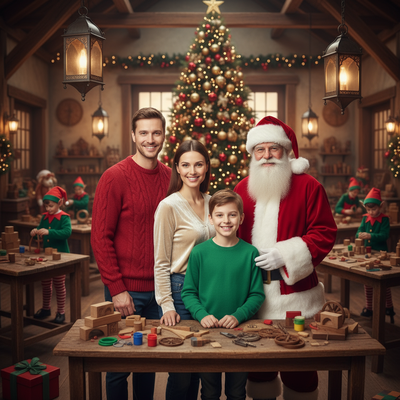
Create beautiful Christmas pictures with our Gifts and elfs style.
Christmas is a time of magic, wonder, and warm memories shared with loved ones. Imagine capturing the essence of this enchanting season through the lens of an AI Christmas Photo Studio, where your family becomes part of Santa's world. The gifts and elves style transforms your photos into a festive scene set within the bustling, joyful atmosphere of Santa's workshop. Feel the joy as you see your family surrounded by the warmth of glowing lanterns, the scent of pine from a decorated tree, and the charm of toy-making elves, evoking a special kind of magic. This heartwarming setting not only enhances your Christmas pictures but also becomes a cherished keepsake that can be revisited year after year.
Experience Santa's Magical Workshop
The gifts and elves photo style is a delightful way to immerse your family in the magic of Christmas. An AI Christmas Photo Studio crafts an enchanting scene that seems straight out of a beloved holiday tale. Wooden tables covered with toy parts, glowing lanterns softly casting their light, and a perfectly adorned Christmas tree create a tapestry of nostalgia and wonder. The scene, composed with balanced warm lighting and subtle background blur, makes your Christmas pictures radiant and inviting. It offers a captivating view, inviting viewers to step into the joyful bustle of Santa's workshop.
A Perfect Christmas Picture Setting
In the AI Christmas Photo Studio, family portraits are elevated to an art form. By placing Santa alongside your family, the scene gains an authentic festive sparkle, as if you've caught a glimpse into a secret moment at the North Pole. This setting aims to keep each family member's face close to their reference photo, preserving the essence of their expressions and features, and adding realism to your Christmas photos. The magic lies in the details, from the twinkle of the Christmas tree lights to the realistic studio-style composition that enhances its authenticity, making it a strong choice for Christmas card-worthy shots.
Crafting Heartfelt Christmas Memories
The warmth of Christmas is beautifully captured when your family becomes part of Santa's world. Using an AI Christmas Photo Studio brings each joyful interaction to life, making your Christmas pictures a vivid reminder of familial love and holiday spirit. Imagine holding a lovingly crafted Christmas card where your family, glowing with festive happiness, beams amidst the toy-making merriness, a scene that captures the joy and togetherness of the season. These photographs not only enhance your Christmas wallpaper collection but also become a heartwarming visual diary that narrates your family's holiday traditions.
Using Technology for Magical Memories
The technological wonders of an AI Christmas Photo Studio bring your imaginative visions to life, offering wide possibilities for memorable Christmas photos. With its ability to naturally blend real expressions with fantastical elements, it creates strikingly realistic scenes that turn every photo into something extraordinary. Whether it's for a family album, holiday cards, or a Christmas wallpaper, these photos are made to evoke joy and nostalgia. This modern approach to holiday photography gives you keepsakes that capture the heart of the season, rekindling joyous memories every time you see them.
What makes the gifts and elves style different from other Christmas photo styles?
Unlike simple filter overlays, the gifts and elves style rebuilds the scene around you: wooden workbenches scattered with toy parts, warm lantern light, and Santa's presence in the frame. The lighting and composition are designed to look like a real workshop photo rather than a sticker placed on top of your original picture.
What photo should you upload for the best result?
A clear, well-lit photo where your face is fully visible and unobstructed works best. Front-facing shots without sunglasses, hats, or heavy shadows give the AI the clearest reference to work from when generating the finished gifts and elves scene from your one uploaded photo.
Who is this Christmas photo style best for?
This style suits families who want a whimsical, storybook-style Christmas card, couples who want a playful shared keepsake, and parents looking for a fun way to include young kids in a Santa's-workshop scene without a mall visit or studio booking. Solo portraits also work well for a festive profile photo or wallpaper.
How does PiXmas compare to a photographer or DIY setup?
- Photography educators using Google Trends report that searches for terms like “Christmas card photos” remain fairly constant through much of the year, then trend upward from September or October and spike in December. (Tech Photo Guy – Google Trends for Photographers, 2018)
- A general guide to using Google Trends recommends setting multi‑year ranges to spot seasonality, noting that Christmas‑related terms consistently show seasonal spikes that can guide when to publish holiday photo content. (Cemoh – How to Use Google Trends: A Complete Guide, 2026)
- Google’s Holiday Trends reports that many Christmas‑related queries in the US, including decorating and baking topics, spike each December, illustrating that demand for Christmas imagery and content concentrates late in the year. (Google – Holiday Trends (Year in Search 2025), 2025)
What are the limitations of this AI Christmas photo style?
These are AI-generated stylized images, not physical photos taken on an actual workshop set, so fine details like text on toys or exact prop shapes may look slightly abstract. Photos with several faces in one frame may render with a little less consistency than a solo or couple portrait, since the AI has more detail to reconcile at once. Results can also vary slightly between attempts, so trying more than one source photo can help if the first output does not look quite right.
For a warm, whimsical take on Santa's workshop without booking a studio, PiXmas turns one uploaded photo into a gifts and elves Christmas picture in minutes, making it a solid pick for holiday cards, wallpapers, and family keepsakes.
Frequently asked questions
What is the gifts and elves Christmas picture style?
It's a Christmas photo style that places you inside Santa's toy workshop, complete with wooden tables covered in toy parts, glowing lanterns, and a decorated tree, generated around your uploaded photo rather than layered as a simple overlay.
Can I turn a gifts and elves photo into a Christmas card?
Yes. The finished image is a high-resolution photo you can save and print or upload to any card service. Many PiXmas users choose this style specifically for family holiday cards because of its warm, storybook lighting.
Can I add my pet to the gifts and elves scene?
Pet photos are not the primary focus of this style, since it's designed around Santa's workshop with people. For a pet-inclusive holiday photo, PiXmas offers other styles better suited to combining pets and family members.
What kind of source photo works best for this style?
A single clear, forward-facing photo with good lighting and no obstructions gives PiXmas the best reference to work from. One well-lit photo will produce noticeably better results than a blurry or heavily shadowed image.
Will a group photo look as accurate as a solo photo?
Solo and couple photos tend to render with the most consistent facial detail. Group photos with several people may show a bit more variation face to face, since the AI is working from more reference points in a single generation.