City Lights Christmas Chic Christmas Pictures
Quick answer: City Lights Christmas Chic is an AI-generated Christmas photo style that places you in a downtown holiday plaza with golden bokeh lights, gentle snowfall, and a sophisticated black-and-red wardrobe look. Using PiXmas, you upload one photo and the app renders this cinematic scene for Christmas cards or wallpaper. It works for solo portraits, couples, and small group photos.
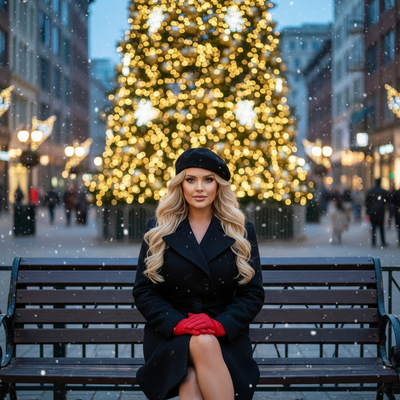
Create beautiful Christmas pictures with our City Lights Christmas Chic style.
The holiday season is upon us, and capturing the magic of Christmas through photography has never been more enchanting. Imagine strolling through a lively downtown holiday plaza, with the air crisp and the city lights sparkling like stars. It's a scene ripped straight from a cinematic frame. Thanks to the PiXmas AI Christmas Photo Studio, you can step into this whimsical Christmas wonderland within a single photograph. Whether you envision a solitary, reflective moment on a park bench or a joyous gathering with loved ones, the AI Christmas Photo Studio brings your holiday vision to life, turning it into a Christmas picture suited for a cherished Christmas card or a Christmas wallpaper for your devices.
Embrace the Magic of City Lights with AI Technology
The AI Christmas Photo Studio uses AI rendering to create polished, realistic-looking Christmas photos. These aren't ordinary snapshots but carefully composed images that capture the feel of the season. By simply uploading one photo, the AI places you amid a tranquil city scene, with golden bokeh lights as the backdrop. The effect comes together with delicate snowfall and soft evening tones, making your Christmas picture feel like a keepsake. Shared as a Christmas card, the image carries not just a greeting but a mood, a moment of calm amid the bustle of the season.
Crafting the Perfect Chic Holiday Look
Wardrobe choice plays a key role in the cinematic feel of your Christmas photo. Picture yourself in a tailored black wool coat, a black beret set stylishly atop your head, and a pair of red gloves that stand out against the falling snow. This look is timeless and evokes a classic holiday style full of warmth. Imagine how a Christmas wallpaper built from this scene adds a touch of elegance to your devices, a quiet reminder of the season's beauty.
Capture the Essence of Togetherness
When the season calls for togetherness, the AI Christmas Photo Studio adapts to include multiple subjects, weaving them naturally into the cityscape. Whether it's a family portrait or a gathering of friends, each person is placed within the festive scene, lit by the soft glow of the surrounding lights. These Christmas pictures become a record of the bonds shared, a visual story of togetherness inside an elegant, cinematic frame. This attention to detail helps your Christmas card feel personal and warm, a keepsake for everyone who receives it.
The Quiet Beauty of Holiday Evenings
A holiday evening has its own quiet pull. With the AI Christmas Photo Studio, you can hold onto that feeling in a Christmas picture. The calm of softly falling snow against a bustling city plaza is a gentle nod to the quieter side of the season. These images invite you to slow down and notice the elegance often lost in the rush of the holidays. Turned into a Christmas wallpaper, the scene becomes a daily reminder of stillness, understated yet warm.
Conclusion: Your Holiday Memories, Reimagined
This season, let the AI Christmas Photo Studio change how you think about Christmas photography. Whether you want the right image for a Christmas card or a Christmas wallpaper, these pictures aim to capture the feel of the holidays with a bit of polish and grace. It's a simple way to create something lasting from a photo you already have.
What photo should you upload for the best result?
A clear, front-facing photo with good lighting works best for the City Lights Christmas Chic style. Choose an image where your face is unobstructed, your shoulders are visible, and the background isn't cluttered, since the AI focuses on your features while it builds the downtown plaza, bokeh lights, and snowfall around you.
Avoid sunglasses, heavy shadows, or extreme close-up crops. A simple portrait taken in natural light, even from your phone's camera roll, gives PiXmas the clearest reference to work from.
Who is this Christmas photo style best for?
This look suits anyone who wants a cinematic, slightly formal Christmas photo rather than a casual snapshot. It works well for solo portraits meant for a Christmas card, couples wanting a shared holiday image, and small families who want a coordinated group photo without scheduling an actual outdoor shoot.
Because the style leans on a tailored coat, beret, and gloves, it also appeals to people who want a more upscale or editorial feel to their holiday pictures, rather than a cozy cabin or sweater-based theme.
How does PiXmas compare to a photographer or DIY setup?
- Google’s Holiday Trends reports that many Christmas‑related queries in the US, including decorating and baking topics, spike each December, illustrating that demand for Christmas imagery and content concentrates late in the year. (Google – Holiday Trends (Year in Search 2025), 2025)
- A general guide to using Google Trends recommends setting multi‑year ranges to spot seasonality, noting that Christmas‑related terms consistently show seasonal spikes that can guide when to publish holiday photo content. (Cemoh – How to Use Google Trends: A Complete Guide, 2026)
- Photography educators using Google Trends report that searches for terms like “Christmas card photos” remain fairly constant through much of the year, then trend upward from September or October and spike in December. (Tech Photo Guy – Google Trends for Photographers, 2018)
Limitations
City Lights Christmas Chic images are AI-generated stylized photos, not pictures taken at an actual downtown location. Details like bokeh light placement, snowfall pattern, or wardrobe texture can vary slightly between generations.
Photos with multiple faces, especially larger groups, may render with a bit less consistency than a solo or couple portrait. For the sharpest result, start with a well-lit single photo and let PiXmas build the group scene from there if you're adding others.
For anyone who wants a polished, cinematic Christmas photo without a real photo shoot, PiXmas turns a single uploaded photo into a City Lights Christmas Chic picture ready for cards or wallpaper.
Frequently asked questions
What is the City Lights Christmas Chic style?
It's an AI-generated Christmas photo style that places you in a downtown holiday plaza with golden bokeh lights, gentle snowfall, and a chic black-and-red winter outfit. The result is styled for use as a Christmas card image or holiday wallpaper.
What source photo works best for this style?
A clear, well-lit portrait with your face visible and minimal background clutter gives PiXmas the best reference. Avoid sunglasses or heavily shadowed photos, since the app uses your uploaded image to build the scene around you.
Can I turn this into a printable Christmas card?
Yes, the finished image is a high-resolution photo file you can download from PiXmas and print or upload directly to a card printing service.
Can I include my pet in the City Lights Christmas Chic photo?
Pets can sometimes be included depending on the uploaded photo, but this style is primarily designed around portrait subjects. For best results with pets, choose a photo where both you and your pet are clearly visible.
How many people can be in one uploaded photo?
PiXmas can process photos with multiple people for a group Christmas picture, though solo and couple photos tend to render with the most consistent detail. Larger groups may show more variation in facial accuracy.