Christmas Studio Portrait - Family of 3
Quick answer: A Christmas Studio Portrait - Family of 3 photo turns one uploaded family photo into a polished, magazine-style holiday portrait set against a decorated tree, wrapped gifts, and soft studio lighting, with coordinated red, gold, and white attire. Made in the PiXmas iOS app, it keeps each person's face and proportions accurate while adding a festive studio backdrop. Results are typically ready in minutes and work well for cards or wallpapers.
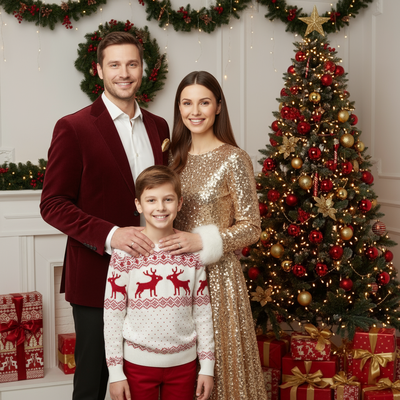
Create beautiful Christmas pictures with our Christmas Studio Portrait - Family of 3 style.
In this joyful season of twinkling lights and heartfelt gatherings, capturing family memories through Christmas photos becomes a cherished tradition. Whether it decorates a greeting card or the mantelpiece, a Christmas studio portrait can beautifully capture the spirit of togetherness. Picture an elegant portrayal of a family of three, warmly seated in a professional studio setup adorned with all things festive: twinkling lights, delicately wrapped gifts, and a grand Christmas tree, captured through the creative lens of an AI Christmas Photo Studio. This season, preserve those treasured moments with a photo that carries festive elegance and warmth.
Setting the Scene for Magical Memories
A well-crafted backdrop is essential for stunning Christmas pictures. In our studio setting, the magic of the holidays comes alive with a thoughtfully designed background that includes elegantly wrapped gifts and the timeless appeal of a beautifully decorated Christmas tree. The charm of twinkling garlands and soft, ambient lighting creates a serene holiday scene, making every smile feel more genuine and every memory more precious. This setting offers a fitting canvas for your family's Christmas photos, ensuring each image carries the joy and harmony of the season.
The Art of Coordinated Elegance
Outfits play a key role in the success of your Christmas studio portrait. Built around classic holiday tones of red, gold, and white, coordinated semi-formal attire gives the image a cohesive look. This thoughtful selection lifts the overall aesthetic and reflects the warmth of the season. Dressing in coordinated outfits adds a layer of polish, helping the Christmas pictures feel timeless. Let the harmonious blend of hues shape a portrait suited for a Christmas wallpaper or card design.
Capturing Subtle Smiles and Genuine Expressions
The heart of any memorable Christmas portrait is authenticity of expression. This AI Christmas Photo Studio experience focuses on natural, closed-mouth smiles that read as warm and sincere. This approach keeps each family member's unique personality intact while fitting into the festive scene. By preserving facial features and proportions with care, the result is an image that feels personal, not generic, and reflects the actual feeling of being together this season.
Creating High-Quality Magazine-Style Photos
A polished, magazine-quality finish is a hallmark of a professional Christmas portrait. Using soft studio lighting, this AI Christmas Photo Studio style produces detailed images with clarity and depth. This lighting approach enhances texture in every Christmas photo, keeping the tone warm rather than harsh. The resulting images work well for a Christmas card and as keepsakes to revisit in years to come.
Turning Photos into Cherished Keepsakes
Beyond the portrait itself, turning your Christmas studio image into a keepsake adds a personal touch to your celebrations. These images can become festive Christmas wallpapers or be built into personalized gifts for friends and family. This AI Christmas Photo Studio style is designed to carry that warmth through into however you choose to use it.
What photo should you upload for the best result?
Start with one clear, well-lit photo of your family of three where all faces are visible and unobstructed. A straight-on or slightly angled shot works better than an extreme side angle, since the style needs to read each person's features accurately. Avoid sunglasses, heavy shadows across faces, or photos where a family member is turned away from the camera.
Group photos where everyone is close together tend to translate more smoothly into the studio scene than photos with a lot of empty space between people. A simple, uncluttered original photo gives the style more to work with.
Who is this Christmas photo style best for?
This style suits parents with one child, three siblings, or any household of three who want a single coordinated portrait without booking a studio session. It works well for families short on time, families who live apart and cannot get everyone in the same room, or anyone who wants a card-ready image without organizing outfits and lighting in person.
It is also a practical option for families who want several holiday looks without multiple wardrobe changes or a full afternoon at a photography studio.
How does PiXmas compare to a photographer or DIY setup?
- A general guide to using Google Trends recommends setting multi‑year ranges to spot seasonality, noting that Christmas‑related terms consistently show seasonal spikes that can guide when to publish holiday photo content. (Cemoh – How to Use Google Trends: A Complete Guide, 2026)
- Photography educators using Google Trends report that searches for terms like “Christmas card photos” remain fairly constant through much of the year, then trend upward from September or October and spike in December. (Tech Photo Guy – Google Trends for Photographers, 2018)
- Google’s Holiday Trends reports that many Christmas‑related queries in the US, including decorating and baking topics, spike each December, illustrating that demand for Christmas imagery and content concentrates late in the year. (Google – Holiday Trends (Year in Search 2025), 2025)
PiXmas is a reasonable middle ground when you want a studio-style family of 3 portrait without the logistics of a real shoot.
Limitations
This style produces an AI-generated stylized image, not a physical photo taken at a real studio. Fine details like hair strands, jewelry, or patterned fabric may render slightly differently from the source photo. Photos with three faces close together are generally more consistent than photos where family members are far apart or at unusual angles, and results can be less consistent than a solo or couple portrait.
As with any AI tool, occasional retries or a different source photo can improve results if the first output does not look quite right.
For a family of three who want a coordinated, magazine-style Christmas portrait without booking a studio, PiXmas turns one uploaded photo into a festive scene in minutes, making it a practical choice for cards and holiday keepsakes.
Frequently asked questions
What is a Christmas Studio Portrait - Family of 3 photo style?
It is a styled holiday portrait format that places a family of three in a decorated studio scene, complete with a Christmas tree, wrapped gifts, coordinated red, gold, and white outfits, and soft studio lighting, generated from an existing photo of the family.
What photo should I upload for this style?
Use one clear photo of your family of three with all faces visible, good lighting, and no sunglasses or heavy shadows. A straight-on group shot with everyone close together usually gives the most reliable result in the PiXmas app.
Can this style work if our family members are different ages, like a parent and two kids?
Yes, the Family of 3 style is built to work across age combinations, including two parents and a child or three siblings, as long as the source photo clearly shows each person's face.
Can I turn this portrait into a printed Christmas card?
Yes, the finished image is delivered as a high-resolution photo you can download from the PiXmas app and use for printed cards, digital cards, or holiday wallpapers on your own.
Can we include a family pet in this portrait style?
This particular style is designed around a family of three people. If you want a pet included, choose a source photo where the pet is clearly visible alongside the family, though results with pets can vary more than people-only portraits.
How long does it take to get the finished photo?
Most Family of 3 portraits are generated in minutes after uploading a photo in the PiXmas app, which is considerably faster than scheduling and attending an in-person studio session.