Red Harmony – Woman with Teddy Bear
Quick answer: Red Harmony is a PiXmas Christmas photo style that places a person, often shown holding a teddy bear, in a cinematic scene with a deep red backdrop, two decorated Christmas trees, and warm glowing light. It starts from a single photo you upload in the PiXmas iOS app, which offers 800+ styles, and works for solo portraits, couples, or small groups for cards, wallpaper, or holiday keepsakes.
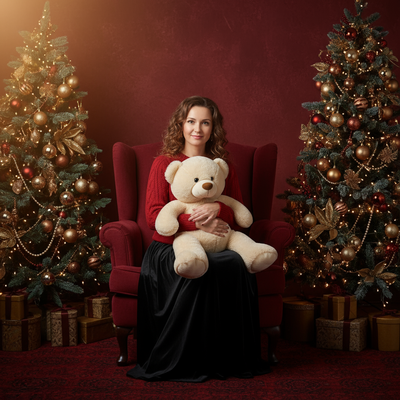
Create beautiful Christmas pictures with our Red Harmony – Woman with Teddy Bear style.
As the holiday season approaches, capturing memories that convey warmth, elegance, and the joyous spirit of Christmas becomes a cherished tradition. The Red Harmony style is a wonderful way to transform your Christmas pictures into cinematic portraits that breathe life into the festive season. Whether you're capturing the innocence of one beloved person clutching a charming teddy bear or a group set against a backdrop of deep red elegance, this AI Christmas Photo Studio blends tradition with innovation, delivering beautifully tailored and cohesive Christmas photos that make your moments unforgettable.
Creating Timeless Elegance with Red Harmony
The Red Harmony style invites you into a world where elegance meets nostalgia. Picture yourself seated gracefully in a luxurious red armchair, the plush warmth of a teddy bear nestled close. This artistic style ensures your Christmas pictures revisit past Christmas memories while introducing a touch of refined warmth. The AI Christmas Photo Studio adapts to each image, automatically adjusting wardrobe and props for a fit that feels considered. This precision not only highlights the subject but also captures the cozy elegance of the season, making it a lovely option for your holiday album or a Christmas card that stands apart.
The Magical Setting: A Cinematic Holiday Scene
Stepping into the Red Harmony scene, you'll find yourself surrounded by the rich embrace of a deep red background, adorned with two beautifully decorated Christmas trees. Warm glowing lights cast gentle shadows, creating a cinematic effect that feels like a festive dream. The AI Christmas Photo Studio weaves your personal likeness into this setup, transforming an ordinary photo into an extraordinary Christmas portrait, perfect for a holiday wallpaper that brings cheer to every glance.
Including Loved Ones Naturally
For those looking to capture group photos, the Red Harmony style accommodates multiple people and even pets, integrating them into the same elegant studio scene. With AI guiding the adaptation process, every person, whether family or friends, fits naturally within the frame. By tailoring props and wardrobe colors harmoniously, each holiday portrait maintains individuality while carrying a collective Christmas spirit, delivering Christmas pictures that tell stories of togetherness and love.
Crafting the Perfect Christmas Card
No festive season is complete without exchanging heartfelt Christmas cards with loved ones. With the results of the Red Harmony style, your holiday greetings carry warmth and sophistication that resonate with recipients. Using these Christmas photos ensures each card communicates your message while sharing a part of your holiday joy and personal style. A thoughtfully crafted Christmas card stands as a lovely keepsake, a reminder of bonds nurtured over the holiday season.
Enhancing Your Holiday Collection
Beyond Christmas cards and wallpaper, these Christmas photos can become a timeless addition to your holiday decor. Imagine these images adorning your walls or a family photo album that tells stories of holiday joy year after year. The AI Christmas Photo Studio makes it easy to create such prints for your home's festive ambiance, letting your Christmas pictures preserve the memories made during the most wonderful time of the year.
What photo should you upload for the best result?
Upload one clear, well-lit photo where the face is visible and unobstructed, ideally from the shoulders up or a simple standing pose. Plain lighting and a neutral background help the AI Christmas Photo Studio read your features accurately before placing you into the Red Harmony scene. Avoid sunglasses, heavy shadows, or busy backgrounds, since these can affect how cleanly the wardrobe and teddy bear prop are added.
Who is this Christmas photo style best for?
Red Harmony suits anyone who wants a softer, more sentimental holiday portrait rather than a bold or humorous one. It works well for a solo portrait meant as a gift for parents or grandparents, for couples who want a matching red-toned card photo, and for small families who want a cohesive look without coordinating actual outfits. Because it centers on a single teddy bear prop, it is especially fitting for portraits of one person, though small groups can be included in the same scene.
How does PiXmas compare to a photographer or DIY setup?
- Photography educators using Google Trends report that searches for terms like “Christmas card photos” remain fairly constant through much of the year, then trend upward from September or October and spike in December. (Tech Photo Guy – Google Trends for Photographers, 2018)
- A general guide to using Google Trends recommends setting multi‑year ranges to spot seasonality, noting that Christmas‑related terms consistently show seasonal spikes that can guide when to publish holiday photo content. (Cemoh – How to Use Google Trends: A Complete Guide, 2026)
- Google’s Holiday Trends reports that many Christmas‑related queries in the US, including decorating and baking topics, spike each December, illustrating that demand for Christmas imagery and content concentrates late in the year. (Google – Holiday Trends (Year in Search 2025), 2025)
Limitations
Red Harmony images are AI-generated stylized portraits, not physical photos taken on an actual studio set with a real armchair or teddy bear. Details like the exact placement of props, hand positioning, or fine texture on the bear's fur may vary between generations. Photos with multiple faces, especially larger group shots, may render less consistently than a solo or couple portrait, so review the result before ordering prints or cards. PiXmas is a reasonable choice when you want this specific cinematic red aesthetic without arranging a real shoot.
Red Harmony delivers a warm, cinematic red-toned Christmas portrait built around a single teddy bear prop, and PiXmas makes it simple to generate this look from one uploaded photo without arranging props or a studio.
Frequently asked questions
What is the Red Harmony Christmas photo style?
Red Harmony is a PiXmas style that places a person, typically holding a teddy bear, in a deep red cinematic scene with two decorated Christmas trees and warm glowing light. It is designed for holiday cards, wallpaper, or keepsake portraits.
Can I use this style for a photo with more than one person?
Yes, Red Harmony can include multiple people or pets in the same scene, though it is originally built around a single-subject teddy bear portrait. Group photos may render with slightly more variation than a solo shot.
What kind of source photo works best?
The style works from one photo, ideally a clear, forward-facing shot with good lighting and a simple background. This helps the AI accurately place your likeness into the Red Harmony scene.
Can pets be included in the Red Harmony scene?
Yes, pets can be added alongside people in the same red-toned holiday scene, making it a flexible option for family portraits that include a dog or cat.
Can I print Red Harmony photos as Christmas cards?
Yes, the finished image works well for printed Christmas cards, digital greetings, or holiday wallpaper. PiXmas generates a high-resolution image suitable for these uses.
Will the teddy bear look exactly like a real one?
The teddy bear is generated by the AI as part of the scene, so its exact texture and pose can vary slightly between results since it is a stylized image rather than a photograph of a physical bear.