Christmas Bear Christmas Photo
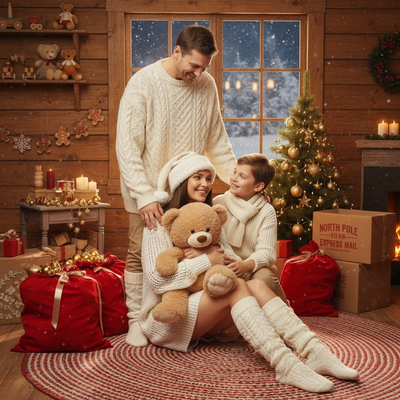
Quick answer: Christmas Bear Christmas pictures are AI-generated portraits from PiXmas (also called Pixmas) that place you, a plush teddy bear, and a rustic cabin backdrop into one warm, Y2K-inspired holiday scene. Upload a single photo through the iOS app, and the style renders golden lighting, cozy knit textures, and festive cabin decor while keeping your likeness recognizable for cards or wallpapers.
Imagine capturing the warmth and coziness of Christmas within the gentle embrace of a beloved plush teddy bear, surrounded by the timeless charm of a rustic cabin setting. Welcome to the Christmas Bear photo style, a nostalgic homage to the whimsical Y2K aesthetic. This style transforms your cherished Christmas Photos into dreamy, serene portraits that capture heartfelt family bonds or the quiet joy of solitude during the holiday season.
Why Choose This Style?
The Christmas Bear style invites you to savor the magic of Christmas through a lens of warmth and nostalgia. It offers a cinematic quality with golden hues and gentle shadows, creating a dreamlike atmosphere reminiscent of cherished holiday memories. Using the AI Christmas Photo Studio, each image aims to retain the unique features of the subjects, so your personality shows through authentically. It's an easy way to add a touch of enchanted elegance to your Christmas Pictures.
Perfect For These Occasions
Whether you're crafting an intimate Christmas Card for loved ones or setting a picturesque Christmas Wallpaper on your devices, the Christmas Bear style suits any holiday occasion. For those who want a unique yet timeless family portrait or a heartfelt couple's photo, this style weaves every element of the scene into an instantly classic composition, offering a warm backdrop for the tender moments that make Christmas special.
How to Create Your Christmas Bear Photo
Creating a Christmas Bear portrait is simple with the AI Christmas Photo Studio. Start by choosing a treasured photo, whether it's one subject cradling a plush bear or a family together in the same frame. The AI works to keep facial expressions and proportions natural, placing your loved ones within a storybook cabin scene complete with gingerbread decorations and gold-ornamented trees. Dressed in cozy, Y2K-inspired knitwear, every subject becomes part of a warm tableau with soft woolen textures and coordinated designs.
As golden light pours in and a snowy winter night glows softly through the window, the AI handles the details of lighting and composition, aiming for a rich, inviting result you can keep as a lasting holiday memory.
What makes this style different from other Christmas photo styles?
Most Christmas photo styles lean on Santa hats or string lights. Christmas Bear instead centers on a plush teddy bear and a rustic log-cabin interior, styled with a Y2K color palette of golden light, soft shadow, and knit textures. The mood is quieter and more sentimental than typical festive scenes, closer to a keepsake portrait than a novelty card.
What photo should you upload for the best result?
Choose one clear, well-lit photo where the face is visible and unobstructed by sunglasses, hats, or heavy shadow. A forward-facing shoulders-up or half-body shot works best because it gives PiXmas enough detail to place you naturally against the cabin backdrop and cozy wardrobe styling.
Who is this Christmas photo style best for?
This style suits solo portraits meant to feel cozy and reflective, couples wanting a soft romantic keepsake, and parents who want a nostalgic image of young kids with a favorite plush toy. It also works well as a sentimental gift print or a warm Christmas card for grandparents.
How does PiXmas compare to a photographer or DIY setup?
- A general guide to using Google Trends recommends setting multi‑year ranges to spot seasonality, noting that Christmas‑related terms consistently show seasonal spikes that can guide when to publish holiday photo content. (Cemoh – How to Use Google Trends: A Complete Guide, 2026)
- Google’s Holiday Trends reports that many Christmas‑related queries in the US, including decorating and baking topics, spike each December, illustrating that demand for Christmas imagery and content concentrates late in the year. (Google – Holiday Trends (Year in Search 2025), 2025)
- Photography educators using Google Trends report that searches for terms like “Christmas card photos” remain fairly constant through much of the year, then trend upward from September or October and spike in December. (Tech Photo Guy – Google Trends for Photographers, 2018)
Limitations
Christmas Bear images are AI-generated stylized pictures, not physical photos taken in a real cabin. Details like hand position, bear texture, or background objects may shift slightly from the original photo. Group uploads with several faces may render a little less consistently than a solo or couple photo, so a clear single-subject or two-person image tends to give the most reliable result.
For anyone who wants a cozy, Y2K-style holiday portrait without booking a studio or setting up props at home, PiXmas offers a quick way to turn one photo into a finished Christmas Bear scene.
Christmas Bear is a cozy, nostalgic pick for anyone wanting a Y2K-style cabin portrait, and PiXmas makes it achievable from a single phone photo without booking a studio or gathering props.
Frequently asked questions
What is the Christmas Bear Christmas photo style?
It is an AI-generated holiday portrait style that places you or your family in a rustic cabin scene with a plush teddy bear, warm golden lighting, and Y2K-inspired knit wardrobe styling, built from one uploaded photo.
Can I turn my Christmas Bear photo into a printed card?
Yes. Once PiXmas generates your Christmas Bear image, you can save it and use it in any card-printing service or photo app to create a physical or digital Christmas card.
Can I include a pet in this style?
The Christmas Bear style is built around a plush teddy bear rather than live pets, but PiXmas offers other themes designed specifically for pet photos if you want your dog or cat featured instead.
What kind of source photo works best?
A recent, well-lit photo with your face clearly visible works best. Avoid heavy filters, extreme angles, or group shots with faces partly hidden for the most natural result.
Will a family photo with several people look accurate?
Solo and couple photos tend to render most consistently. Family photos with several faces can still work well in PiXmas, though results may vary slightly more across each person compared to a single-subject upload.