Blue Calm – Winter Mist Diptych Christmas Photo
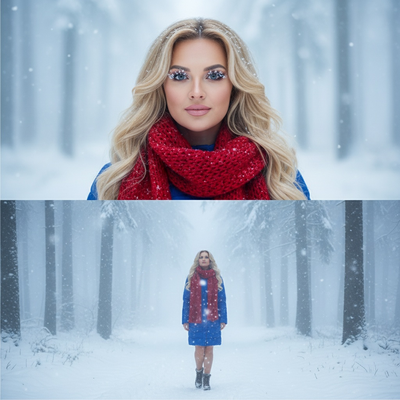
Quick answer: Blue Calm – Winter Mist Diptych is an AI Christmas photo style that turns one uploaded photo into a two-frame vertical collage: a close-up face shot with snow on the lashes above a full-body scene in a misty winter forest wearing a blue jacket and red scarf. PiXmas (also spelled Pixmas) generates it from a phone photo in minutes, one of 800+ styles in the iOS app.
Blue Calm – Winter Mist Diptych invites you into a quiet forest where snow drifts gently and time seems to slow. This photorealistic, cinematic RAW portrait sequence adapts gracefully to your uploaded photo or photos, preserving every authentic detail of the face you love. In a diptych collage with two vertically stacked frames, the top frame rests close to the face, catching delicate snowflakes on long eyelashes and hair, while the bottom frame steps back to reveal a serene full-body moment in a blue winter jacket and red scarf. Shot in overcast daylight with diffused cold tones and precise, cinematic sharpness, these are Christmas Photos that feel like a breath drawn in the hush of winter.
Why Choose This Style?
Blue Calm is made for quiet emotion. The top frame adds intimacy with a calm expression and soft natural makeup, highlighting the sparkle of snow in the lashes. The bottom frame opens to the foggy path, trees fading into white mist as the subject looks up and welcomes the falling snow. If you upload one person, they stand gracefully in that misty forest. With multiple people, everyone is included naturally along the same path, maintaining emotional harmony and balanced composition across both frames. The cool palette with a pop of red from the scarf creates a timeless contrast, making these Christmas Pictures stand out beautifully in albums, on walls, and across your seasonal posts. Download our app: AI Christmas.
Perfect For These Occasions
Choose this style when you want your holiday story to feel peaceful, cinematic, and real. It is ideal for a heartfelt Christmas Card where the top frame conveys closeness and the bottom frame sets a dreamy scene. Use it as elegant Christmas Wallpaper on your phone, tablet, or desktop to carry a serene winter mood everywhere you go. It is also perfect for gifting framed prints to family, announcing engagements or new beginnings with a quiet winter glow, or creating hero images for seasonal campaigns. For families or couples who want Christmas Photos that feel like a memory captured between snowflakes, Blue Calm is a beautifully modern choice.
How to Create Your Blue Calm – Winter Mist Diptych
Getting started is simple in our AI Christmas Photo Studio. Upload a single portrait or multiple photos, and select Blue Calm – Winter Mist Diptych. The system keeps real facial and physical features unchanged, then gently places your subject in a foggy winter forest. The top frame focuses closely on the face with crisp, cinematic detail and faint, natural makeup; snowflakes settle on hair and lashes. The bottom frame reveals a full-body view in a blue jacket and red scarf, with the subject looking up as snow drifts through the mist. For best results, upload clear, well-lit photos with relaxed expressions. The AI aligns posture, preserves likeness, and harmonizes group placement so your Christmas Pictures feel cohesive across both frames.
The AI Advantage for Peaceful Winter Portraits
With AI, you do not have to chase perfect weather or schedule a winter shoot. The AI Christmas Photo Studio delivers consistent lighting, color, and composition, so your Christmas Photos look refined across close and wide frames. It respects identity, maintaining true facial features while adding a gentle cinematic finish. You can create high-resolution images in minutes, scale them for prints, social posts, and banners, and even crop them for a vertical Christmas Card or a horizontal web header. Open the AI Christmas Photo Studio and create your Blue Calm – Winter Mist Diptych today.
What photo should you upload for the best result?
A clear, forward-facing photo with even lighting works best for this diptych, since the top frame relies on facial detail like eyelashes and hair texture. Avoid heavy shadows, sunglasses, or hats that hide the face, and choose a photo where the expression is relaxed rather than mid-motion. A shoulders-up or full-body shot both work, since the AI generates the second frame independently.
Who is this Christmas photo style best for?
Blue Calm suits anyone who wants a calmer, more reflective holiday image instead of a bright, busy scene. Solo portraits feel intimate in the close-up frame, while couples read naturally as a shared quiet moment along the misty path. Small families can also work well, though the style is built around emotional stillness rather than large group energy, so two or three people tend to hold that mood best.
How does PiXmas compare to a photographer or DIY setup?
- Google’s Holiday Trends reports that many Christmas‑related queries in the US, including decorating and baking topics, spike each December, illustrating that demand for Christmas imagery and content concentrates late in the year. (Google – Holiday Trends (Year in Search 2025), 2025)
- A general guide to using Google Trends recommends setting multi‑year ranges to spot seasonality, noting that Christmas‑related terms consistently show seasonal spikes that can guide when to publish holiday photo content. (Cemoh – How to Use Google Trends: A Complete Guide, 2026)
- Photography educators using Google Trends report that searches for terms like “Christmas card photos” remain fairly constant through much of the year, then trend upward from September or October and spike in December. (Tech Photo Guy – Google Trends for Photographers, 2018)
Limitations
Blue Calm – Winter Mist Diptych produces AI-generated stylized images, not physical photographs from an actual snowy forest shoot. Fine details like scarf texture or snowflake placement are rendered by the AI and will vary slightly between runs. Photos with several faces or unusual angles may look less consistent than a solo or couple portrait, since the AI works hardest to preserve likeness on the clearest visible faces. Results depend on the quality of the original uploaded photo.
For a quiet, cinematic take on holiday portraits, Blue Calm – Winter Mist Diptych turns a single phone photo into a two-frame winter forest scene without a real shoot, and PiXmas is a solid fit for creating it quickly from one uploaded image.
Frequently asked questions
What is the Blue Calm – Winter Mist Diptych style?
It is a two-frame vertical Christmas photo collage: the top frame is a close-up portrait with snow on the lashes, and the bottom frame is a full-body view in a blue winter jacket and red scarf, standing in a misty forest.
What kind of source photo works best for this style?
A well-lit, forward-facing photo without sunglasses or hats gives the AI the clearest facial detail to work with, especially for the close-up top frame. Full-body or shoulders-up shots both work fine as a starting point.
Can I include a pet in this diptych?
This style is designed around human portraits in winter wardrobe, so pets are not a built-in part of the scene. Human-only uploads give the most reliable Blue Calm result.
How many photos do I need to upload?
One photo is enough to generate the full diptych in PiXmas, since the AI creates both the close-up and full-body frames from the same likeness. You can also upload more than one person for a couple or small group version.
Can I turn this into a printed Christmas card?
Yes, the finished Blue Calm – Winter Mist Diptych is delivered as a high-resolution image, which makes it suitable for printed cards, framed gifts, or digital wallpaper through the PiXmas app.
Will the AI change how I actually look?
PiXmas is built to keep real facial features intact while changing the setting, wardrobe, and lighting around the subject. The goal is a recognizable likeness placed into the winter mist scene, not a different face.