Wooden Holiday Studio – Fairy Lights & Red Accents
Quick answer: Wooden Holiday Studio – Fairy Lights & Red Accents is an AI-generated Christmas photo style from PiXmas (also spelled Pixmas) that places you in a rustic wood-paneled studio glowing with fairy lights and warm red accents. Starting from one uploaded photo, the iOS app renders a cinematic portrait with golden lighting and festive styling, part of a library of 800+ Christmas photo styles.
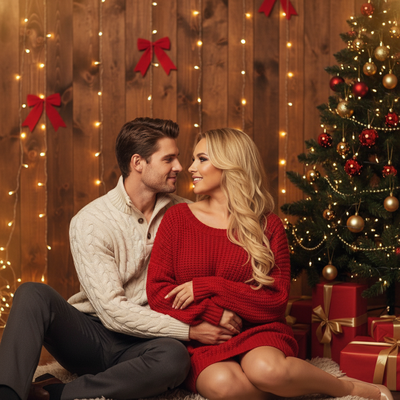
Create beautiful Christmas pictures with our Wooden Holiday Studio – Fairy Lights & Red Accents style.
As the magic of the holiday season wraps around us, capturing those fleeting moments of warmth and togetherness becomes a cherished tradition. Imagine a cozy wooden holiday studio adorned with twinkling fairy lights and warm red accents. This backdrop is where memories transform into timeless treasures. The AI Christmas Photo Studio ensures each frame resonates with cinematic clarity and emotive warmth, making your loved ones the stars of their own holiday narrative. Whether it's for immortalizing Christmas pictures or crafting a personalized Christmas card, this setting is all about creating a scene where love and joy are perpetually in focus.
Embrace Simplicity with Style in Your Christmas Photos
The "Wooden Holiday Studio" concept is rooted in simplicity and elegance, offering a rustic charm that is both welcoming and timeless. As you step into this virtual studio, the soft glow from fairy lights dances across a wood-paneled wall, lending an ethereal quality to your Christmas photos. With the gentle embrace of a classic Christmas tree and strategically placed red bows and presents, every detail contributes to a picturesque holiday setting. The AI Christmas Photo Studio adapts easily, whether you're captured in an intimate embrace or with a larger group, so the mood stays nostalgic and heartwarming.
Choosing the Perfect Wardrobe for Stunning Christmas Pictures
A thoughtfully chosen wardrobe can improve your Christmas pictures from lovely to extraordinary. Opt for soft knits in cream or white for a touch of classic sophistication, complemented by festive red tones that echo the holiday spirit. This wardrobe palette not only enhances the warmth of the setting but also ensures that each person in the photo stands out against the cozy background. The contrast of colors against the golden glow creates Christmas wallpaper-worthy images, ideal for sharing with family and friends. With the AI's touch, each garment detail is lovingly captured, offering a cinematic realism that feels both magical and genuine.
Create a Heartwarming Scene with AI Christmas Photo Studio
One of the most notable features of the AI Christmas Photo Studio is its ability to craft an ambiance that feels both intimate and grand. The studio's lighting setup, defined by a warm cinematic glow with golden reflections, creates a shallow depth of field that focuses on the joy and emotion shared among loved ones. This setting isn't just about taking Christmas photos; it's about capturing the spirit of the season. With fairy lights twinkling in the background and joyful expressions up close, every image carries a sense of wonder and warmth typical of premium Christmas wallpaper.
Cherish and Share Lasting Memories with a Personalized Christmas Card
There's something uniquely special about sending a personalized Christmas card that encapsulates unforgettable moments shared with family and friends. The "Wooden Holiday Studio" sets the stage for these moments, ideal for creating stunning imagery that delights both the sender and recipient. The cinematic quality of the AI Christmas Photo Studio ensures each photograph's emotional depth and warmth shine through, making it a keepsake worth revisiting each season.
What makes this style different from other Christmas photo styles?
Most Christmas photo styles lean on bright red-and-green traditional decor or snow-covered outdoor scenes. Wooden Holiday Studio takes a quieter, more rustic-elegant approach instead. The warm wood-paneled backdrop, soft fairy-light glow, and restrained red accents give the image a boutique-studio feel rather than a busy holiday-card look, which suits people who want something classic but not overly saturated.
What photo should you upload for the best result?
Use a clear, well-lit photo where the face is fully visible and not obscured by sunglasses, hats, or heavy shadow. A front-facing or slight-angle shot from the shoulders up works best, and higher-resolution images give the AI more detail to work with when rendering skin tones, hair, and expression against the wood and fairy-light backdrop.
Who is this Christmas photo style best for?
This look suits couples and families wanting a warm, cinematic portrait rather than a snapshot, as well as individuals building a personal Christmas card or profile photo. The muted wood-and-red palette also works well for anyone who wants a holiday image that feels timeless rather than tied to a specific year's decor trend. Larger family groups can use it too, though the effect reads most crisply with one to a small handful of people.
How does PiXmas compare to a photographer or DIY setup?
- Google’s Holiday Trends reports that many Christmas‑related queries in the US, including decorating and baking topics, spike each December, illustrating that demand for Christmas imagery and content concentrates late in the year. (Google – Holiday Trends (Year in Search 2025), 2025)
- A general guide to using Google Trends recommends setting multi‑year ranges to spot seasonality, noting that Christmas‑related terms consistently show seasonal spikes that can guide when to publish holiday photo content. (Cemoh – How to Use Google Trends: A Complete Guide, 2026)
- Photography educators using Google Trends report that searches for terms like “Christmas card photos” remain fairly constant through much of the year, then trend upward from September or October and spike in December. (Tech Photo Guy – Google Trends for Photographers, 2018)
Limitations
Results are AI-generated stylized images, not physical photographs from a real wooden studio set, so fine details like wood grain texture or exact fairy-light placement will vary from render to render. Photos with several faces at once may come out slightly less consistent than a solo or couple portrait, since the AI has more detail to interpret per person. PiXmas is a strong fit if you want this rustic fairy-light-and-red look without booking a studio, but it won't replicate every physical detail a real set would produce.
For anyone wanting a rustic, fairy-lit Christmas portrait with red accents but without booking a real studio, PiXmas turns one uploaded photo into a warm, cinematic Wooden Holiday Studio image in minutes.
Frequently asked questions
What does the Wooden Holiday Studio style actually look like?
It renders you against a warm, wood-paneled backdrop lit by soft fairy lights, with red bows and wrapped presents placed around the frame. The overall effect is a cinematic, golden-toned holiday portrait that feels more like a boutique studio session than a typical snapshot.
Can I include pets in this Christmas photo style?
The Wooden Holiday Studio style is designed primarily around portraits of people, so results are most consistent with human subjects. If you want a pet included, expect more variability in how the AI renders the pet within the fairy-light and wood-panel scene.
Do I need my own props or wardrobe for this look?
No physical props, wood backdrop, or lighting setup are needed. PiXmas generates the wooden studio, fairy lights, and red accents around your uploaded photo, though wearing soft cream, white, or red tones can complement the finished style.
Can I turn this style into a printed or digital Christmas card?
Yes, once PiXmas generates your Wooden Holiday Studio portrait, you can save and use the image for a personalized Christmas card, either printed through a third-party service or shared digitally with family and friends.
How many people can be in one photo for this style?
You can upload photos of individuals, couples, or small groups. PiXmas works best when faces are clearly visible, and larger group photos may render with slightly more variation in facial detail compared to a solo or couple shot.