Winter Lights Glow Christmas Pictures
Quick answer: Winter Lights Glow is a PiXmas AI Christmas photo style that turns one uploaded phone photo into a cool-toned portrait set against a silver, white, and light-blue backdrop with a frosted Christmas tree and glowing string lights. Made in the PiXmas iOS app, it renders solo, couple, and family portraits with a soft cinematic winter mood, ready for cards or wallpaper in minutes.
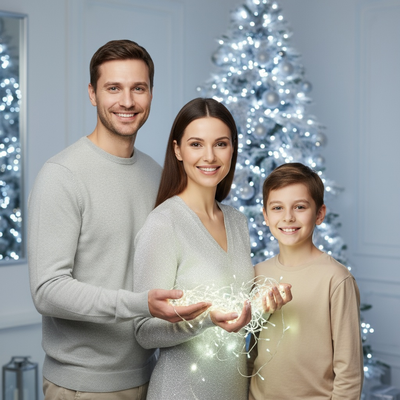
Create beautiful Christmas pictures with our Winter Lights Glow style.
As the nights get longer and the air grows crisp, the magic of the holiday season unfolds in the gentle glow of festive lights. Capturing these moments has never been easier, thanks to the AI Christmas Photo Studio. Imagine stepping into a world where your portraits are transformed into Winter Lights Glow masterpieces. Whether you're capturing solo shots or family portraits, these Christmas pictures aren't just images; they're memories glowing with the essence of the season, set against a minimalist yet enchanting backdrop of silver, white, and light blue.
Creating Timeless Christmas Pictures with the AI Christmas Photo Studio
In the quest for the perfect holiday image, the AI Christmas Photo Studio stands out as a genuinely useful shortcut. It adapts your existing photos into ultra-realistic portraits, specifically designed in the Winter Lights Glow style. Whether it's just you or a gathering of your loved ones, each Christmas picture is curated to reflect the peaceful, cinematic magic of a quiet winter night. The technology aims to preserve facial features and proportions with care, offering a personal touch that feels intimate and genuine. With a shimmering silver Christmas tree and glowing string lights, expect ambient beauty in every shot. The style is available through the PiXmas app.
Setting Up the Perfect Scene for Your Christmas Photos
The scene for your Christmas pictures is crafted to convey elegance and tranquility. Picture a minimalist modern room, dressed in silver, white, and light blue. This setup gives a cool-toned, luminous backdrop for your photos, highlighting the frosted Christmas tree that glows softly behind you. Such a setting ensures a cohesive aesthetic while enriching the emotional impact of the photo. The glowing reflections from the held fairy lights add a touch of magic, making these images perfect for a digital Christmas card, bringing smiles to friends and family during the festive season.
Wardrobe and Styling: Bringing Out the Holiday Spirit
A key element of Winter Lights Glow photos is the wardrobe, designed to complement the serene backdrop. Opt for a silver or light gray dress or knit outfit, subtly sparkling to reflect the holiday spirit. For families and couples, matching metallic or neutral tones help create a harmonious, cohesive look. These elements ensure your Christmas photos read as timeless and modern at once, infusing them with warmth pivotal for a Christmas wallpaper you'll cherish long after the season has passed.
Lighting and Mood: Capturing the Essence of the Holidays
Lighting plays a central role in the serene feel of the Winter Lights Glow style. The AI Christmas Photo Studio uses cool winter light to capture soft, glowing reflections in an 8K cinematic tone, creating an ambiance that feels both modern and timeless. The sharp focus on faces, set against a soft ambient background blur, accentuates the glow and emotion in each frame. As you hold the fairy lights, their gentle glow illuminates your expression with calm, quiet warmth.
Why Choose the AI Christmas Photo Studio for Your Holiday Memories?
Choosing an AI Christmas Photo Studio means your Christmas pictures capture the mood of the season without the logistics of a real shoot. These photos become more than images; they carry a narrative of warmth and the glow of Christmas, whether used as a Christmas card or Christmas wallpaper.
What makes the Winter Lights Glow style different from other Christmas photo styles?
Most Christmas photo styles lean on warm red, green, and gold tones with cabins or fireplaces. Winter Lights Glow instead uses a cool silver, white, and light-blue palette, a frosted tree, and handheld string lights, giving it a quieter, more modern look. It's one of the 800+ styles inside the PiXmas app, built specifically around a calm, cinematic winter mood rather than a cozy rustic one.
What photo should you upload for the best result?
Choose a clear, well-lit photo where your face is visible and unobstructed, ideally facing forward or at a slight angle. Plain backgrounds and even lighting help the AI read your features accurately. A single recent photo per person works best; heavy shadows, sunglasses, or extreme angles can reduce accuracy in the final Winter Lights Glow portrait.
Who is this Christmas photo style best for?
Winter Lights Glow suits anyone who prefers a modern, minimalist holiday aesthetic over a traditional rustic one. It works well for solo portraits, couples, and small family groups who want a card-ready image without matching outfits or a rented backdrop. It's also a fit for anyone sending digital cards or setting a new holiday wallpaper on a tight timeline.
How does PiXmas compare to a photographer or DIY setup?
- Photography educators using Google Trends report that searches for terms like “Christmas card photos” remain fairly constant through much of the year, then trend upward from September or October and spike in December. (Tech Photo Guy – Google Trends for Photographers, 2018)
- Google’s Holiday Trends reports that many Christmas‑related queries in the US, including decorating and baking topics, spike each December, illustrating that demand for Christmas imagery and content concentrates late in the year. (Google – Holiday Trends (Year in Search 2025), 2025)
- A general guide to using Google Trends recommends setting multi‑year ranges to spot seasonality, noting that Christmas‑related terms consistently show seasonal spikes that can guide when to publish holiday photo content. (Cemoh – How to Use Google Trends: A Complete Guide, 2026)
Limitations
Winter Lights Glow results are AI-generated stylized images, not physical photos taken on a real set, so lighting and reflections are simulated rather than captured. Photos with multiple faces, especially larger groups, may render with slightly less consistency than a solo or couple portrait. Outcomes depend on the clarity of the source photo, and results can vary from one upload to the next since each render is generated fresh.
Winter Lights Glow suits anyone who wants a modern, cool-toned Christmas portrait without a studio session, and PiXmas is a practical way to get one from a single existing photo.
Frequently asked questions
What is the Winter Lights Glow Christmas photo style?
It's an AI-generated Christmas portrait style featuring a silver, white, and light-blue color scheme, a frosted Christmas tree, and glowing handheld string lights, designed for a calm, cinematic winter look rather than a traditional red-and-green holiday scene.
What photo should I use for best results?
Use one clear, front-facing photo with even lighting and a simple background. PiXmas uses this photo to build your Winter Lights Glow portrait, so avoiding heavy shadows or busy backdrops helps the final image look more accurate to your features.
Can I use this style for a family or group photo?
Yes, Winter Lights Glow works for family and couple portraits. Group photos with several faces can render with slightly less consistency than a solo shot, so a clear, well-lit source photo of the group helps PiXmas produce a more reliable result.
Can I turn my Winter Lights Glow photo into a Christmas card?
Yes. The finished portrait is a high-resolution image well suited to digital Christmas cards, printed cards, or holiday wallpaper. PiXmas delivers the image so you can download and print or share it as you would any other photo.
Does Winter Lights Glow work for pet photos?
This particular style is built around a person-focused, elegant portrait aesthetic, so it's best suited to solo, couple, or family photos rather than pet portraits. PiXmas offers other styles in the app better suited to pets.
Is Winter Lights Glow a real photoshoot or an AI image?
It's an AI-generated image created from your uploaded photo, not a physical photoshoot. PiXmas simulates the silver-toned backdrop, frosted tree, and string lights digitally, which is what makes the fast, no-setup process possible.