Christmas Lights Portrait Christmas Pictures
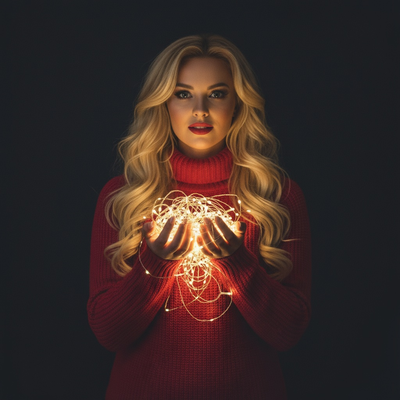
Quick answer: A Christmas Lights Portrait is an AI-stylized photo that surrounds your face and shoulders with a soft glow of string lights against a dark, cinematic backdrop. PiXmas (also spelled Pixmas) creates this look from one uploaded photo using its iOS app, giving solo shots, couples, or families a warm, intimate portrait suited for Christmas cards, wallpapers, or framed prints.
Step into a world of holiday enchantment with the Christmas Lights Portrait, a photo style that pairs the elegance of Christmas lights with the warmth of personal connection. Using an AI Christmas Photo Studio, this style adapts to your uploaded photo, transforming it into a stunning portrait. Picture the timeless magic of Christmas lights as they delicately illuminate the features of your loved ones, offering an intimate, cinematic glow that feels both modern and classic. This style blends nostalgic charm with contemporary artistry, so your Christmas photos carry real emotion, not just a seasonal backdrop.
Why Choose This Style?
The Christmas Lights Portrait is more than a simple photograph; it's an emotional experience captured in an image. The soft, warm glow of twinkling string lights against a dark, cinematic background creates a moody, intimate setting that feels personal and universal at once. This style suits anyone wanting a modern yet nostalgic touch for their Christmas pictures, or anyone who wants their Christmas cards to convey warmth and wonder. The AI adapts to individual faces and expressions, so each portrait feels distinct.
Perfect For These Occasions
This photo style works well for Christmas gatherings, family reunions, or a romantic couple's photoshoot. Whether you're using it for Christmas cards or a Christmas wallpaper, the Christmas Lights Portrait captures the essence of the season. It suits intimate holiday moments, timeless portraits, or a child's wide-eyed wonder at the seasonal glow, turning ordinary photos into keepsakes and gifts.
How to Create Your Christmas Lights Portrait
Creating a Christmas Lights Portrait is simple with the AI Christmas Photo Studio. Upload your chosen photo, whether it's just you, your partner, or your whole family. The AI adapts the glowing string-light theme to your image, highlighting everyone's features naturally. Picture yourself or a loved one in a cozy red turtleneck sweater, with soft waves and a hint of red lipstick, the essence of Christmas charm captured in warm, low light. The AI handles the styling, so you can focus on how to use your new images.
Using AI for your Christmas photos saves time and adds creativity, balancing efficiency with artistry. It captures every smile and every twinkle in the eye for a photo that feels genuine and memorable, ready to share this holiday season.
What makes this style different from other Christmas photo styles?
Unlike bright, festive scenes with trees or gift piles, the Christmas Lights Portrait relies on darkness and light contrast. The background stays dim and out of focus while strands of string lights create soft, glowing highlights around the face and shoulders. This gives the portrait a cinematic, almost editorial quality rather than a typical holiday snapshot, making it distinct from styles built around wide seasonal settings.
What photo should you upload for the best result?
Choose a clear, front-facing or slightly angled photo with good visible lighting on the face, since the AI uses your existing features as the base for the new portrait. Solo photos and close-up couple shots tend to translate best, because the lighting effect is concentrated near the face rather than a wide scene. Avoid heavily shadowed or low-resolution images for cleaner results.
Who is this Christmas photo style best for?
This style suits individuals wanting a moody profile photo, couples who want a romantic seasonal portrait, and parents who want a softer, more intimate image of their kids beyond the usual bright holiday photo. It also works well for anyone sending a single striking image as a Christmas card rather than a busy group scene.
How does PiXmas compare to a photographer or DIY setup?
- Google’s Holiday Trends reports that many Christmas‑related queries in the US, including decorating and baking topics, spike each December, illustrating that demand for Christmas imagery and content concentrates late in the year. (Google – Holiday Trends (Year in Search 2025), 2025)
- Photography educators using Google Trends report that searches for terms like “Christmas card photos” remain fairly constant through much of the year, then trend upward from September or October and spike in December. (Tech Photo Guy – Google Trends for Photographers, 2018)
- A general guide to using Google Trends recommends setting multi‑year ranges to spot seasonality, noting that Christmas‑related terms consistently show seasonal spikes that can guide when to publish holiday photo content. (Cemoh – How to Use Google Trends: A Complete Guide, 2026)
Limitations
Results are AI-generated stylized images, not physical photos from a real lighting setup, so they should be treated as digital portraits rather than studio photography. Group photos with several faces may render less consistently than solo or couple portraits, since the AI has more detail to balance across multiple people. Fine details like hair strands near the light glow can vary slightly between generations. For best results with PiXmas, start with a well-lit, clear source photo.
For a moody, light-lit Christmas portrait without renting gear or booking a photographer, PiXmas turns one uploaded photo into a warm, cinematic keepsake in minutes.
Frequently asked questions
What is a Christmas Lights Portrait photo?
It's an AI-stylized portrait style where soft string lights glow around the face and shoulders against a dark, cinematic background, creating an intimate, moody holiday look distinct from bright seasonal scenes.
Can I use this style for pets or friend groups?
Yes, though it's most effective with solo, couple, or small group photos where faces are clearly visible. Pets can be included, but the lighting effect is designed around human portraits and works best when the subject fills more of the frame.
What kind of source photo works best?
A clear, well-lit photo showing the face and shoulders gives PiXmas the most detail to work with. Front-facing or slightly angled shots with minimal shadow produce the cleanest, most natural-looking string-light glow.
Can I print this style as a Christmas card?
Yes, the Christmas Lights Portrait works well for printed Christmas cards, framed gifts, or digital wallpapers. Save the finished image at full resolution from the PiXmas app before sending it to a printer.
How is this different from a real string-light photoshoot?
A real photoshoot requires physical lights, a dark backdrop, and manual lighting control, which takes setup time. PiXmas creates the same visual effect digitally from one uploaded photo in the app, skipping the physical setup entirely.
Will the AI portrait look exactly like a photograph?
It will look photographic in style, but it is an AI-generated stylized image rather than a photo captured with a camera and real lights. Expect a polished portrait effect, not a literal photograph of you standing among lights.