Umbrella Cabin – Soft Snow Street Christmas Pictures
Quick answer: Umbrella Cabin – Soft Snow Street is a PiXmas Christmas photo style that places you in front of a snowy wooden cabin with a transparent umbrella, a plaid-scarf snowman, and softly lit natural daylight. Upload one photo and PiXmas's AI Christmas Photo Studio generates a photorealistic cinematic portrait in this cozy winter scene, ready to use as a Christmas card or wallpaper.
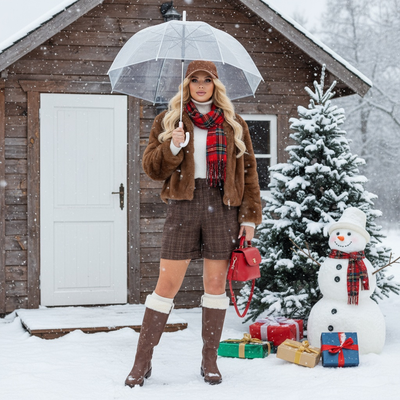
Create beautiful Christmas pictures with our Umbrella Cabin – Soft Snow Street style.
As the festive season approaches, capturing the magic of Christmas becomes a cherished tradition for many. Imagine yourself or your loved ones standing in front of a quaint wooden cabin, softly lit by the gentle glow of a snowy day. With AI Christmas Photo Studio, turning your ordinary photos into mesmerizing Christmas pictures has never been easier. Whether you're looking to capture a solo portrait or a family gathering, the Umbrella Cabin – Soft Snow Street style offers heartwarming backdrops that can transform your photos into perfect Christmas wallpapers or treasured Christmas cards. Embrace the cozy winter calm this holiday season with photorealistic cinematic portraits.
Create Timeless Christmas Photos with the Umbrella Cabin Style
The Umbrella Cabin style is a masterclass in creating heartfelt Christmas photos, designed to evoke emotion and capture memories that last. The picturesque snowy cabin serves as an intimate setting, perfect for those looking to add rustic charm to their Christmas pictures. Whether it's the solitary elegance of a person standing under a transparent umbrella or a family gathered near a snowy tree, each photo radiates warmth and joy. With AI Christmas Photo Studio, personalizing your photo to match your holiday spirit is as easy as uploading an image.
A Cozy Winter Scene Brought to Life
Picture a gentle snowfall casting a serene blanket over a small wooden cabin, where the mood is filled with festive cheer. The scene, complete with a snowman in a plaid scarf and gifts scattered near a white door, captures the spirit of Christmas magic. AI Christmas Photo Studio transforms these elements into stunning Christmas pictures, adding a sense of authenticity and nostalgia. The wardrobe, featuring brown fur jackets, plaid shorts, and fur-trimmed boots, contributes to the rustic, cozy aesthetic that makes these photos ideal for a memorable Christmas card.
The Perfect Lighting and Mood for Your Christmas Pictures
Capturing the perfect Christmas photo is not just about the backdrop or wardrobe, lighting plays a key role in setting the mood. The Umbrella Cabin style uses soft natural daylight to create a warm, elegant tone that evokes a feeling of winter calm. AI Christmas Photo Studio adapts the lighting to match your image, ensuring every detail is well illuminated for an exquisite Christmas photo. Whether you're looking for a vibrant wallpaper or a serene portrait, the lighting in these photos adds a magical touch to your holiday memories.
Transforming Memories into Holiday Treasures
With AI Christmas Photo Studio, your cherished moments become beautifully crafted Christmas pictures that serve as lasting reminders of holiday joy. Whether you plan to hang them on your wall as a Christmas wallpaper or send them out as a Christmas card, these photos resonate with warmth and happiness. Using the Umbrella Cabin – Soft Snow Street style, the beauty of a winter scene and the essence of Christmas are captured with ease, making your holiday season a little more memorable.
What makes this style different from other Christmas photo styles?
Umbrella Cabin – Soft Snow Street leans into quiet, cinematic stillness rather than a busy fireside or a decorated tree backdrop. The transparent umbrella, the plaid-scarf snowman, and the softly falling snow on a small wooden cabin give it a storybook street-scene feel instead of an indoor holiday portrait.
The lighting is intentionally soft daylight rather than warm firelight, which sets it apart from cozier, tungsten-lit indoor PiXmas styles and gives the finished portrait a calmer, more overcast winter mood.
What photo should you upload for the best result?
Upload one clear, forward-facing photo where your face is unobstructed by sunglasses, hats, or heavy shadows. Even, natural lighting on the source photo helps PiXmas match the soft daylight tone of this scene more accurately.
A shoulders-up or half-body shot works well, since the AI needs to build the cabin, snow, and wardrobe details around your existing pose and framing.
Who is this Christmas photo style best for?
This style suits solo portraits, couples, and small families who want a gentle, romantic winter aesthetic rather than a large group photo. It also works nicely for anyone wanting a single standout image for a Christmas card front or a phone wallpaper.
Because the composition centers on one or two figures near the umbrella and cabin, it is best suited to individuals, couples, or two to three people rather than a large extended family group.
How does PiXmas compare to a photographer or DIY setup?
- Photography educators using Google Trends report that searches for terms like “Christmas card photos” remain fairly constant through much of the year, then trend upward from September or October and spike in December. (Tech Photo Guy – Google Trends for Photographers, 2018)
- Google’s Holiday Trends reports that many Christmas‑related queries in the US, including decorating and baking topics, spike each December, illustrating that demand for Christmas imagery and content concentrates late in the year. (Google – Holiday Trends (Year in Search 2025), 2025)
- A general guide to using Google Trends recommends setting multi‑year ranges to spot seasonality, noting that Christmas‑related terms consistently show seasonal spikes that can guide when to publish holiday photo content. (Cemoh – How to Use Google Trends: A Complete Guide, 2026)
Limitations
Results are AI-generated stylized images, not physical photographs taken on a real snowy street or cabin set. Fine details like umbrella texture, snowfall, and background elements are AI-rendered interpretations rather than a literal photograph.
Photos with several faces or people at odd angles may render less consistently than a solo portrait or couple's photo, since the AI has more detail to reconstruct per person. For the most reliable likeness, choose a clear, well-lit source photo before generating your PiXmas Christmas picture.
For a quiet, cinematic winter portrait rather than a busy holiday scene, PiXmas turns one uploaded photo into an Umbrella Cabin – Soft Snow Street Christmas picture in minutes, ideal for a card, wallpaper, or keepsake portrait.
Frequently asked questions
Can I turn this style into a printed Christmas card?
Yes. Once PiXmas generates your Umbrella Cabin – Soft Snow Street portrait, you can download the image and use it with any print or card service to create a physical Christmas card or holiday mailer.
What kind of source photo works best for this scene?
A recent, well-lit photo with your face clearly visible and unobstructed works best. Avoid heavy filters, sunglasses, or extreme angles so the AI can accurately place you into the snowy cabin scene.
Can I include my pet in this Christmas picture?
This style is designed around a person or couple near the cabin and umbrella, but you can try uploading one photo of your pet to see how PiXmas adapts the scene. Results with pets may vary since the style was built for human portraits.
How many people can be in one Christmas picture?
The Umbrella Cabin – Soft Snow Street style is optimized for one to two people, such as a solo portrait or a couple. Larger groups can be attempted, but individual likenesses may be less consistent as more faces are added.
What exactly is the Umbrella Cabin – Soft Snow Street style?
It is one of PiXmas's 800+ Christmas photo styles, featuring a wooden cabin, gentle snowfall, a transparent umbrella, and a plaid-scarf snowman rendered in soft natural daylight for a calm, cinematic holiday portrait.