Trimming the Christmas Tree 2
Quick answer: Trimming the Christmas Tree 2 Christmas pictures are AI-generated holiday portraits from PiXmas (also spelled Pixmas) that place you or your family into a cozy tree-decorating scene with candlelight, red and gold ornaments, and a wreath backdrop. Upload one phone photo through the iOS app, pick this style from 800+ options, and get a personalized keepsake in minutes.
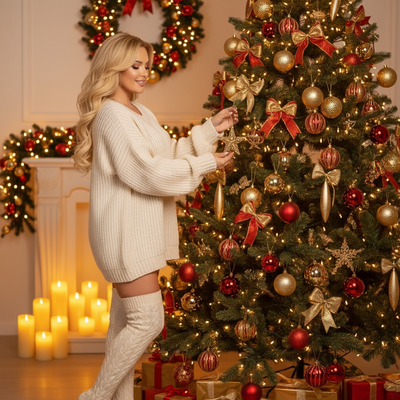
Create beautiful Christmas pictures with our Trimming the Christmas Tree 2 style.
When it comes to capturing the magic of the holiday season, few moments are as cherished as trimming the Christmas tree. This beloved tradition, steeped in warmth and nostalgia, creates perfect opportunities for capturing unforgettable Christmas photos. With the advent of the AI Christmas Photo Studio, preserving these moments has never been easier or more enchanting. Imagine a photorealistic Christmas scene, where your loved ones are effortlessly placed in a cozy indoor setting, surrounded by red and gold ornaments, the glow of candles, and a beautiful wreath backdrop. It's the essence of Christmas spirit captured in an image, ready to bring joy to countless Christmas cards and Christmas wallpapers this festive season.
Create Magical Christmas Pictures with AI Precision
In the modern age of technology, the AI Christmas Photo Studio changes how we capture holiday memories. Imagine uploading a cherished photo, only to see it transform into a magical scene of you or your loved ones decorating a stunning Christmas tree. If a solitary figure is featured, they stand gently hanging an ornament, illuminated by the warm golden glow of lit candles and tree lights. When a family is involved, the scene naturally includes everyone contributing to the joy of decoration. This blend of reality and art brings a new level of detail and depth to your Christmas pictures, ensuring each one tells your festive story with heartfelt clarity.
Setting the Scene: An Intimate Holiday Haven
The beauty of using the AI Christmas Photo Studio lies in its ability to craft scenes that embody the coziness of a festive home. Picture a backdrop that exudes warmth and happiness, the softly lit wreath on the wall, the meticulously wrapped gift boxes scattered below the tree, and the soft glow of candles casting flickering shadows. The wardrobe choice of a cozy, oversized cream sweater and over-the-knee socks adds a snug touch, making each photo feel like a warm hug. This curated ambiance not only enhances the beauty of your Christmas photos but also transforms them into ideal Christmas wallpapers that carry the spirit of the holidays into every day.
Lighting and Mood: Capturing the Essence of Christmas Night
Lighting plays a pivotal role in framing the mood of your Christmas pictures. The AI Christmas Photo Studio employs soft golden tones and a candlelit ambiance to encapsulate the essence of a tranquil, joyous decorating night. The gentle interplay of light highlights the peaceful and intimate nature of these cherished moments, adding depth and warmth to every captured smile and gesture. This lighting, coupled with the joy of the holiday spirit, immortalizes the essence of Christmas night in a single click, a perfect keepsake for your Christmas card or a personal canvas on your digital devices.
Personalize Your Christmas Photos for Lasting Memories
The beauty of AI-generated Christmas photos lies in personalization. Whether you choose to include yourself, your friends, or family members, each photo is uniquely yours. The AI Christmas Photo Studio adapts each setting to match the emotions and characters in the uploaded photos, ensuring the final picture is a true reflection of your holiday spirit. These personalized images become treasured keepsakes, ideal for Christmas cards that are bound to bring joy to family and friends. Turning these photos into Christmas wallpapers keeps the festive spirit close all season long.
What makes this style different from other Christmas photo styles?
Trimming the Christmas Tree 2 centers on the quiet act of decorating rather than a posed group shot in front of a finished tree. The scene focuses on hands reaching for ornaments, candlelight reflecting off glass baubles, and a wreath-lined wall in the background. It reads as a captured moment mid-tradition rather than a formal portrait.
What photo should you upload for the best result?
A clear, front-facing photo with good lighting works best, ideally where the face is unobstructed and the shoulders are visible. Solo photos and couple photos tend to translate most cleanly into the cozy candlelit setting. Avoid heavily cropped or low-resolution images, since the AI needs enough detail to recreate expression and features naturally.
Who is this Christmas photo style best for?
This style suits anyone who associates the holidays with the ritual of decorating the tree together, whether that is a couple sharing their first tree, a parent and child hanging ornaments, or a solo shot for a personal keepsake or Christmas card. Families with young kids often use it to skip the chaos of a real photo session while still getting a warm, story-driven image.
How does PiXmas compare to a photographer or DIY setup?
- Photography educators using Google Trends report that searches for terms like “Christmas card photos” remain fairly constant through much of the year, then trend upward from September or October and spike in December. (Tech Photo Guy – Google Trends for Photographers, 2018)
- Google’s Holiday Trends reports that many Christmas‑related queries in the US, including decorating and baking topics, spike each December, illustrating that demand for Christmas imagery and content concentrates late in the year. (Google – Holiday Trends (Year in Search 2025), 2025)
- A general guide to using Google Trends recommends setting multi‑year ranges to spot seasonality, noting that Christmas‑related terms consistently show seasonal spikes that can guide when to publish holiday photo content. (Cemoh – How to Use Google Trends: A Complete Guide, 2026)
Limitations
Results are AI-generated stylized images, not physical photographs from a real tree-decorating session, so exact ornament placement or wardrobe details will not match reality exactly. Photos with several faces or people at odd angles may render slightly less consistently than a solo or couple upload. As with any AI tool, occasional retries may be needed to get the expression or lighting you want. PiXmas is a strong fit for anyone who wants this cozy, candlelit tree-trimming look without arranging an actual photoshoot.
For anyone who wants the warmth of a candlelit, tree-trimming keepsake without staging an actual photoshoot, PiXmas turns one uploaded phone photo into this cozy Christmas scene in minutes, making it a practical choice for cards, wallpapers, and personal holiday memories.
Frequently asked questions
What is the Trimming the Christmas Tree 2 photo style?
It is an AI-generated Christmas scene that places you or your family in a cozy, candlelit room decorating a tree, complete with red and gold ornaments, a wreath backdrop, and soft golden lighting for a warm, nostalgic feel.
Can I include my pet in the tree-trimming scene?
Yes, if your uploaded photo includes a pet, PiXmas can often work it into the cozy scene alongside you or your family, though results are most consistent when the pet is clearly visible in the original photo.
Can I turn my Trimming the Christmas Tree 2 photo into a Christmas card?
Yes, the finished image from PiXmas is a downloadable photo that works well for printed or digital Christmas cards, holiday newsletters, or as a festive wallpaper.
Will a group photo work as well as a solo photo for this style?
Solo and couple photos tend to render the most consistently detailed results in PiXmas. Group photos with several faces can still work but may show slightly less consistency across every face compared to a single subject.
Do I need special lighting or wardrobe in my uploaded photo?
No special setup is needed. PiXmas applies the candlelit ambiance, cozy sweater styling, and warm color tones automatically, so a normal, well-lit phone photo is all that is required to start.