Silver Dream – Snowy Elegance
Quick answer: Silver Dream – Snowy Elegance is a Christmas photo style built around a silver-white palette, a frosted tree, icy wardrobe tones, and soft bokeh lighting. PiXmas (also spelled Pixmas) generates this look from one uploaded photo using its iOS app, placing you or your family into the scene with adjusted clothing, lighting, and background while keeping your face recognizable.
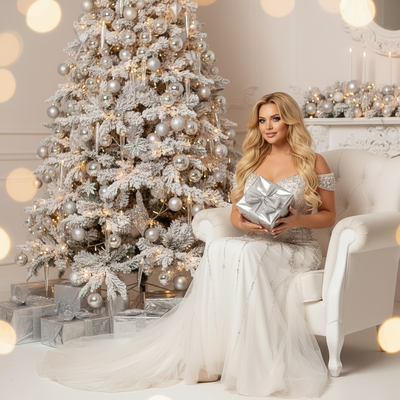
Create beautiful Christmas pictures with our Silver Dream – Snowy Elegance style.
The holiday season is a time of magic, warmth, and cherished memories, and what better way to capture this spirit than through breathtaking imagery? With the "Silver Dream – Snowy Elegance" photo style, you can create lasting memories through the ethereal beauty of Christmas photos. Whether it's a solo portrait or a cherished family gathering, this style offers a captivating way to celebrate the season's elegance. Leveraging the power of an AI Christmas Photo Studio, this style delivers cinematic quality, ensuring your Christmas pictures become cherished keepsakes. Let's explore how this photo style transforms your holiday portraits into mesmerizing art.
Mystical Ambiance with Silver and Snow
The "Silver Dream – Snowy Elegance" style envelopes you in an ethereal world where snowflakes seem to twinkle like stars against a pristine silver-white backdrop. Picture yourself or your loved ones gracefully seated before a dazzling white Christmas tree adorned with glowing ornaments. The scene, complete with gifts wrapped in shimmering silver tones, presents a vision of refined winter luxury. Using an AI Christmas Photo Studio, your Christmas pictures are automatically customized, transforming ordinary snapshots into extraordinary Christmas photos worthy of a magazine spread. This is the kind of ambiance that makes for exquisite Christmas wallpaper, capturing the heart of the holiday.
A Wardrobe of Winter Whispers
In the "Silver Dream" style, the wardrobe plays a crucial role in enhancing the snowy elegance theme. Adults are shown in a white tulle gown with silver embellishments or a sparkling dress in icy hues, each choice echoing the timeless beauty of winter. This attire pairs seamlessly with the scene's frosted elegance, creating a cohesive composition that speaks volumes. Family groups will find the AI Christmas Photo Studio adapts smoothly, arranging everyone around the tree in a natural, artful manner. Such styling ensures your Christmas photos make a striking statement, whether in a gallery or as a Christmas card sent to loved ones.
The Art of Magical Lighting
The warm, soft bokeh lights bathing the scene in the "Silver Dream" style create an otherworldly atmosphere. This lighting choice, with its interplay of creamy whites and silvers, captures the serenity of the season. This illumination is ideal for crafting enchanting Christmas pictures you can treasure year after year. Leveraging the capabilities of an AI Christmas Photo Studio, your images benefit from lighting adjustments that highlight the subjects beautifully, ensuring every smile and glance is captured well. The result is a set of glowing Christmas wallpaper options, capturing intimate moments in soft, luminous detail.
Creating Heartfelt Memories
Beyond the aesthetic appeal, "Silver Dream – Snowy Elegance" offers the chance to create heartfelt holiday memories. Whether it's capturing a child's delight at the sight of gifts or a family's shared joy, these Christmas photos become vessels of nostalgia, encapsulated in stunning visual form. With the convenience of an AI Christmas Photo Studio, even last-minute photo sessions yield polished results perfect for preserving your holiday stories. It's this blend of convenience and quality that makes it an appealing choice for those wanting Christmas cards that resonate with genuine holiday spirit.
Your Guide to Capturing Silver Dreams
Transforming your holiday portraits into scenes of snowy elegance is simple with a few mindful tips. Choose a clear, well-lit source photo to complement the ethereal mood the AI will build around you. For attire references, whites, silvers, and soft blues in your original photo help the style stay coherent. Think about how your group naturally interacts to keep the final Christmas pictures feeling warm rather than staged. The goal is a result that feels emotionally resonant, not just visually polished, and one that works equally well as a printed card or as Christmas wallpaper on your phone.
What makes this style different from other Christmas photo styles?
Silver Dream – Snowy Elegance is built around a monochrome-leaning silver and white palette instead of the traditional red-and-green Christmas look. The frosted tree, icy wardrobe tones, and soft bokeh lighting give it a more formal, portrait-studio feel than rustic or cozy-cabin styles. It is one of 800+ styles available in the PiXmas library, so it sits alongside warmer, brighter themes if silver-white elegance is not the exact mood you want.
What photo should you upload for the best result?
A clear, well-lit photo where your face is fully visible and not obscured by hats, sunglasses, or heavy shadow works best. Front-facing or slightly angled shots tend to translate more accurately into the finished scene than extreme candid angles. One uploaded photo is enough to generate the styled result, and simple, uncluttered backgrounds in the original photo help the AI focus on your face and pose.
Who is this Christmas photo style best for?
This style suits anyone wanting a refined, almost editorial holiday portrait rather than a casual snapshot look, including solo portraits, couples, and small family groups. It also works well for anyone planning to use the image as a formal Christmas card, a print gift, or elegant Christmas wallpaper. Because the palette is muted and sophisticated, it is a strong pick for adults and older kids more than for playful, high-energy pet or toddler photos.
How does PiXmas compare to a photographer or DIY setup?
- Google’s Holiday Trends reports that many Christmas‑related queries in the US, including decorating and baking topics, spike each December, illustrating that demand for Christmas imagery and content concentrates late in the year. (Google – Holiday Trends (Year in Search 2025), 2025)
- A general guide to using Google Trends recommends setting multi‑year ranges to spot seasonality, noting that Christmas‑related terms consistently show seasonal spikes that can guide when to publish holiday photo content. (Cemoh – How to Use Google Trends: A Complete Guide, 2026)
- Photography educators using Google Trends report that searches for terms like “Christmas card photos” remain fairly constant through much of the year, then trend upward from September or October and spike in December. (Tech Photo Guy – Google Trends for Photographers, 2018)
Limitations
Results are AI-generated stylized images, not physical photographs from an actual photo shoot, so fine details like fabric texture or exact lighting physics will not perfectly match a real studio session. Photos with several faces at once may render with slightly less consistency than a solo portrait or couple's photo, particularly with expressions or fine facial detail. Outcomes can vary depending on the clarity, lighting, and angle of your original uploaded photo.
For anyone who wants a refined, silver-and-white Christmas portrait without booking a studio, PiXmas turns one uploaded photo into a Silver Dream – Snowy Elegance image in minutes, making it a practical option for cards, wallpaper, or keepsake holiday portraits.
Frequently asked questions
What is the Silver Dream – Snowy Elegance Christmas photo style?
It is an AI-generated Christmas photo style featuring a silver-white color palette, a frosted decorated tree, icy-toned wardrobe, and soft bokeh lighting for a refined, elegant holiday portrait rather than a rustic or bright holiday look.
Can I turn my Silver Dream photo into a printed Christmas card?
Yes. Many people generate their Silver Dream – Snowy Elegance image in PiXmas and then export it for printing as a Christmas card or gift, since the polished, portrait-style result suits formal card layouts well.
Can I include my pet in this Christmas photo style?
The Silver Dream – Snowy Elegance style is designed primarily around human portraits, so it works best for solo, couple, or small family photos. Pet inclusion is not guaranteed to render as consistently as with human subjects.
What kind of source photo works best for this style?
A clear, front-facing photo with good lighting and a visible face gives PiXmas the best information to work with. Avoid heavy shadows, sunglasses, or extreme angles for the most accurate styled result.
Will a group photo with several people work well in this style?
Group and family photos can work, but photos with several faces may show slightly less consistency in detail than a solo portrait or couple's photo. PiXmas still processes group uploads, results may just vary more per face.
Are Silver Dream Christmas pictures real photographs?
No. They are AI-generated stylized images created by PiXmas from your uploaded photo, not physical photographs taken during an actual holiday photo shoot.