Pyjama Kitchen Christmas Pictures
Quick answer: Pyjama Kitchen Christmas pictures show your family in matching red, white, and green pajamas gathered around a cozy, softly lit kitchen table with Santa, wreaths, and garlands in the background. PiXmas creates this scene from a single uploaded photo using its iOS app, turning it into a holiday portrait, Christmas card image, or wallpaper without a real photoshoot, styling, or studio lighting setup.
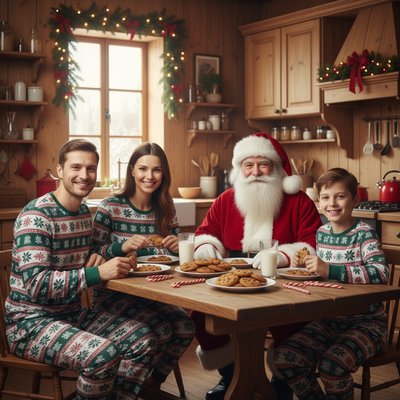
Create beautiful Christmas pictures with our pyjama kitchen style.
Embrace the holiday spirit this season with a unique and enchanting way to capture unforgettable moments through the Pyjama Kitchen Christmas photo style. Imagine a scene that's straight out of a storybook: a warmly lit kitchen filled with rustic charm, where the joy of Christmas comes alive in every detail. With Santa himself joining in on the fun, your family sits together, sharing laughter and sweet treats. This picturesque moment, captured with the help of an AI Christmas Photo Studio, transforms into cherished Christmas Pictures you'll adore, perfect for crafting a personal and heartfelt Christmas Card.
Capturing Authentic Christmas Moments
The magic of the Pyjama Kitchen style lies in its ability to capture genuine, unposed moments in a heartwarming setting. Picture your family, clad in matching festive pajamas of red, white, and green, gathered around a rustic wooden kitchen table. The scene depicts a harmonious holiday gathering, illuminated by soft daylight filtering through the windows. This setup, made even more inviting with wreaths and garlands, serves as the ideal backdrop for Christmas Pictures that reflect the love and joy of the season. With an AI Christmas Photo Studio, each image is crafted to maintain the authenticity and warmth of a real family moment with Santa, while keeping the clarity and brightness suited for a Christmas Wallpaper.
Creating Your Stunning Christmas Photos
Every family deserves a Christmas that's unique to them, and the Pyjama Kitchen theme provides just that. Imagine opening a Christmas album filled with Christmas Photos where every face shines with joy, lit with balanced, soft lighting. Whether it's Santa's cheerful smile, the giggling of a child as milk is poured, or the sweet scent of cookies in the air, each element of the Pyjama Kitchen scene comes together to create a memorable photograph. The result effortlessly translates into Christmas Pictures brimming with warmth, perfect for holiday greetings and keepsakes. With the help of an AI Christmas Photo Studio, these photos come to life, ready to spread joy year after year.
Designing Your Holiday Christmas Card
The versatility of the Pyjama Kitchen setting extends beyond photography, providing ideal visuals for a personalized and heartfelt Christmas Card. These Christmas Photos capture the essence of your family's Christmas spirit and togetherness. This warm portrayal becomes a cherished Christmas Wallpaper or part of your holiday greetings, sending loved ones a piece of your joyous moments captured in the cozy embrace of Santa's kitchen.
Why Choose AI Technology for Christmas Pictures
Using an AI Christmas Photo Studio brings a modern touch to holiday memorabilia. The technology works to preserve details, from facial features to the festive treats on the table, so your Christmas Pictures look natural and candid with the warm glow of the holidays. Each Christmas Photo reflects both technical care and the heartfelt feel of your family's celebration, making your Christmas Card or Christmas Wallpaper a meaningful keepsake for years to come.
What makes the Pyjama Kitchen style different from other Christmas photo styles?
Most Christmas photo styles rely on a fireplace, tree, or snowy backdrop. The Pyjama Kitchen style instead places your family at a rustic wooden table in a warmly lit kitchen, dressed in matching pajamas, with Santa dropping by mid-morning. The soft daylight and homey clutter of cookies, mugs, and garlands give it a candid, lived-in feel rather than a formal portrait look. PiXmas builds this specific scene, along with hundreds of other holiday settings, from your uploaded photo.
What photo should you upload for the best result?
Choose a clear, well-lit photo where faces are facing forward and not obscured by sunglasses, hats, or heavy shadows. A recent photo with a neutral or plain background usually gives the app the cleanest starting point. For a family shot, a photo where everyone is visible and reasonably close together tends to translate best into the Pyjama Kitchen scene.
Who is this Christmas photo style best for?
The Pyjama Kitchen theme suits families with young kids who love a cozy, storybook morning feel, as well as couples or multi-generational households wanting something warmer than a stiff studio pose. It also works for anyone who wants a Christmas card image that feels like an actual moment at home rather than a posed studio shot, without coordinating real pajamas or baking props in advance.
How does PiXmas compare to a photographer or DIY pajama photoshoot?
- Google’s Holiday Trends reports that many Christmas‑related queries in the US, including decorating and baking topics, spike each December, illustrating that demand for Christmas imagery and content concentrates late in the year. (Google – Holiday Trends (Year in Search 2025), 2025)
- A general guide to using Google Trends recommends setting multi‑year ranges to spot seasonality, noting that Christmas‑related terms consistently show seasonal spikes that can guide when to publish holiday photo content. (Cemoh – How to Use Google Trends: A Complete Guide, 2026)
- Photography educators using Google Trends report that searches for terms like “Christmas card photos” remain fairly constant through much of the year, then trend upward from September or October and spike in December. (Tech Photo Guy – Google Trends for Photographers, 2018)
Limitations
Pyjama Kitchen results are AI-generated stylized images, not physical photos from an actual kitchen photoshoot with Santa. Fine details like exact pajama patterns, kitchen decor, or treats on the table are generated by the app and will vary from render to render. Photos with several faces, especially large groups or side profiles, may come out less consistent than a solo or couple photo. PiXmas is built as an iOS app, so results depend on the photo you provide and the style chosen at the time.
For a cozy, candid family Christmas image without staging real pajamas or a kitchen shoot, PiXmas turns one uploaded photo into a Pyjama Kitchen scene ready for cards, wallpapers, or holiday sharing.
Frequently asked questions
What is the Pyjama Kitchen Christmas photo style?
It is an AI-generated holiday scene showing your family in matching pajamas gathered at a rustic kitchen table with Santa, soft daylight, and festive decor like wreaths and garlands. It is styled to look like a candid morning moment rather than a formal portrait.
Can I turn my Pyjama Kitchen photo into a Christmas card?
Yes, PiXmas images are high enough resolution for printed or digital Christmas cards, holiday wallpapers, or social media posts. Many people use the Pyjama Kitchen scene specifically because it feels warm and personal for a family card.
Can I include a pet in my Pyjama Kitchen Christmas picture?
You can try uploading a photo that includes your pet, though the app is optimized primarily for human subjects and results with animals may be less predictable than a solo or family portrait.
How many people can be in one Pyjama Kitchen photo?
You can upload photos with multiple family members, but the clearest, most consistent results tend to come from solo or small group photos. Larger groups with many faces may render with more variation.
What source photo works best for this style?
A recent, well-lit photo with faces clearly visible and unobstructed gives PiXmas the best starting point. Avoid heavy filters, sunglasses, or extreme angles for the most natural-looking Pyjama Kitchen result.